
SlashSnips — Snippets & AI Prompts
Save reusable text, email templates & AI prompts. Insert anywhere by typing /shortcut, or copy with one click. Works everywhere.
As of July 2026, SlashSnips — Snippets & AI Prompts has — users in the Productivity category.
Usersno change0%
—
—
Ratingno change0%
—
— reviews
Reviewsno change0%
—
Version
1.0.0
Manifest V3
History
1 snapshotsTracking since Jul 21, 2026.
Not enough history yet for this metric — the chart fills in as we collect more snapshots.
View as table
| Date | Users | Rating | Reviews | Version |
|---|---|---|---|---|
| Jul 21, 2026 | — | — | — | 1.0.0 |
| Now | — | — | — | 1.0.0 |
Permissions & access
- Permissions
- storageclipboardWrite
- Host access
- https://extensionpay.com/
Screenshots

About
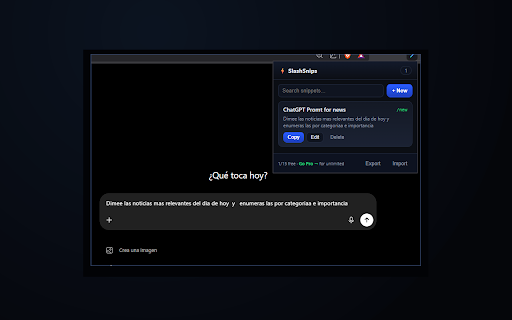
Stop retyping the same text. SlashSnips saves your email templates, canned replies, and AI prompts — and inserts them into ANY text box by typing a short /shortcut, or with one click.

⚡ HOW IT WORKS
1. Save a snippet and give it a shortcut (e.g. "cold").
2. In Gmail, ChatGPT, LinkedIn, any form — type /cold then press Tab.
3. It expands instantly. Or open the popup and click Copy.

✅ PERFECT FOR
• Sales & support teams — canned replies in seconds
• Recruiters — outreach templates
• ChatGPT / Claude / Gemini users — save and reuse your best prompts
• Anyone who types the same things every day

🔒 100% PRIVATE
Everything is stored locally in your browser. No account, no cloud, nothing leaves your device. Ever.

✨ FEATURES
• Type /shortcut + Tab to expand in any field
• One-click copy
• Instant search
• Import / export your snippets (backup)
• Clean, fast, distraction-free

Free plan: up to 15 snippets. Go Pro for unlimited — one-time payment, no subscription traps.

Save hours every week. Install SlashSnips and never retype again.
Technical
- Version
- 1.0.0
- Manifest
- V3
- Size
- 21.55KiB
- Min Chrome
- 88
- Languages
- 1
- Featured
- No
Metadata
- ID
- eddmaofibelhidgenancndomdhepjbkb
- Developer ID
- ub2c5c9822a76061330a3ff8065ce70d9
- Developer Email
- [email protected]
- Created
- Jul 20, 2026
- Last Updated (Store)
- Jul 20, 2026
- Last Scraped
- Jul 21, 2026
- Website
- —
- Support URL
- —
- Privacy Policy
- https://radiant-douhua-1a14e7.netlify.app/slashsnips
Data sourced from the Chrome Web Store · last verified Jul 21, 2026.