
Freezetab
Freezetab is a tool for saving content from the web.
As of June 2026, Freezetab has 5,000 users and a 3.55/5 rating from 56 reviews in the Workflow & Planning category.
Usersno change0%
5.0K
5,000
Ratingno change0%
3.55
56 reviews
Reviewsno change0%
56
Version
2.0.4
Manifest V3
History
1 snapshotsTracking since Apr 22, 2026.
View as table
| Date | Users | Rating | Reviews | Version |
|---|---|---|---|---|
| Apr 22, 2026 | 5.0K | 3.55 | 56 | 2.0.4 |
| Now | 5.0K | 3.55 | 56 | 2.0.4 |
Permissions & access
- Permissions
- activeTabstorageunlimitedStoragescriptingcontextMenusalarms
- Host access
- None declared
Screenshots



About
Freezetab is a browser extension designed to help you save content from the web. You can use the extension to save links from your tabs and tab groups, articles, quotes from websites, and even RSS and Atom feeds.

★ Privacy

This extension has a detailed privacy policy which you can read on our website, but the gist of it is that your private data won't be sent to our servers unless you log in to our website. You can absolutely use this extension 100% locally, and even without an internet connection.

★ Save tabs and tab groups

Saving tabs and tab groups is the primary feature of this extension. The extension can save and reopen any of your tabs and tab groups. You can also choose to close the tabs after saving. The extension will remember the names and colors of your tab groups as well as the links they contain, and restore them appropriately.

While choosing which tabs to save, you can select the current tab, everything except the current tab, everything to the left or right of the current tab, tabs you've highlighted, or just specific tabs you've selected within the extension. The extension allows you to choose tabs from specific windows as well.

★ Save articles

This extension empowers you to save articles from the web. The extension contains a polished article reader which not only allows you to read content from the web, but to edit that content. The article editor is a full rich text editor with the ability to add notes, highlight text, and apply complex text styling. You can apply all of the traditional text styles like bold, italic, underline, and strikethrough, as well as more complex styling constructs like lists, block quotes, links, and headers. If you've saved an article which contains source code, the article reader will even apply syntax highlighting with support for most popular programming languages!

★ Save quotes

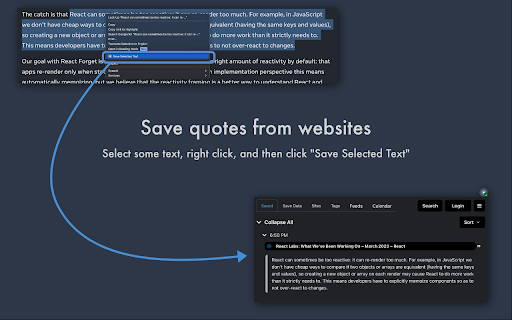
The extension can save quotes from websites. Just select a passage of text on a website, right click, and then click 'Save Selected Text'. The extension will save the selected text, as well as a text fragment link. When you click the link in a browser that supports text fragments, it'll take you to the original website and visually highlight the text you saved.

★ Feeds

The extension can notify you if it finds an RSS or Atom feed on the current page (by updating the extension's icon with the number of feeds found). If you save a feed, the extension will fetch new links from the feed in the background, and you can choose to save or delete any of the fetched links.

★ Sort by site, tag, or time period

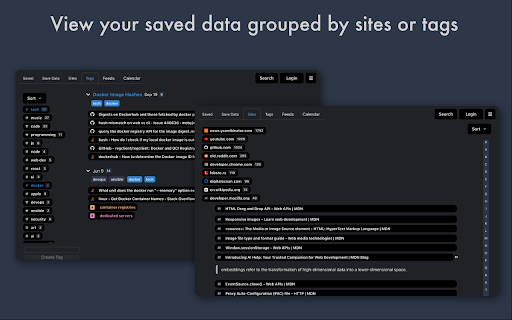
Want to find all of your saved data from a specific site, or annotated with a specific tag? This extension allows you to filter your data based on specific sites and tags, as well as view your data chronologically in a calendar view.

★ Search

The extension supports fast full-text search, which you can access quickly from within the extension popup with a keyboard shortcut.

★ Keyboard Shortcuts

You can open the extension by holding Command + Shift + O on a Mac or Ctrl + Shift + O in any other operating system. Once the extension popup is open, you can use shortcuts to:

- Save All Tabs
- Save the Current Tab
- Save Everything Except the Current Tab
- Save an Article
- Search
- Open the extension popup in a new tab
- Toggle Privacy Mode

★ Sharing

Securely and privately share your data with friends! Click the settings icon next to any collection of saved data to share that collection with others. The extension will generate a shareable url which compresses the data and appends it to the hash portion of the url. When you (or someone else) open the link in your browser, the page's code will decompress the data and present it to you. Data stored in the hash portion of a url is never sent to external servers by web browsers, which means only the people you share the link with will ever have access to that data.
Technical
- Version
- 2.0.4
- Manifest
- V3
- Size
- 1.13MiB
- Min Chrome
- 88
- Languages
- 1
- Featured
- Yes
Metadata
- ID
- ecpipjjckcegdmapdifgigmempnikcjg
- Developer ID
- u1cd98d1a251f9ff9a4628b596c691451
- Developer Email
- [email protected]
- Created
- Aug 22, 2017
- Last Updated (Store)
- Oct 30, 2023
- Last Scraped
- Jun 7, 2026
- Website
- https://www.freezetab.com/
- Support URL
- —
- Privacy Policy
- https://www.freezetab.com/privacy.html
Similar extensions
Alternatives to Freezetab, ranked by description similarity.

Tabber - Tab Organizer
Simplify your browsing by grouping unused tabs into organized groups
2.0K
★ 4.7

LinkCollect - Save & Share Bookmarks
linkcollect is the simplest way to save & share web links, bookmarks or tabs from anywhere to anyone
1.0K
★ 4.1

Browser Extension
Siimpl Browser Extension
215
★ 5.0

Raindrop.io
All-in-one bookmark manager
400.0K
★ 4.1

Locker – Hide & Lock Tabs, Private Bookmarks
Protect your tabs and bookmarks. Hide everything in one click — even in incognito.
1.0K
★ 4.3

Tab Saver
Tab Saver: Organize and Save Tabs, export bookmarks chrome. Tab manager to backup and organize sessions, save chrome tabs for later
137
★ 5.0

TabVault
Save and organize all your tabs into named collections. Restore anytime. Private, clutter-free, and built to keep you in flow.
2

SavedTabs - A better new tab and start page
Save your open tabs with one click and continue browsing later
865
★ 4.8
Data sourced from the Chrome Web Store · last verified Jun 7, 2026.