
Reader View
Removes clutter like buttons, backgrounds, adjusts text size, contrast, and layout for better readability
As of June 2026, Reader View has 300,000 users and a 4.69/5 rating from 1,101 reviews in the Accessibility category.
Usersno change0%
300.0K
300,000
Ratingno change0%
4.69
1.1K reviews
Reviewsup 0.5 percent+0.5%
1.1K
Version
0.8.4
Manifest V3
90-day change · In the last 90 days this extension 1 version update.
History
6 snapshotsTracking since Apr 18, 2026.
View as table
| Date | Users | Rating | Reviews | Version |
|---|---|---|---|---|
| Apr 18, 2026 | 300.0K | 4.69 | 1.1K | 0.8.3 |
| Apr 27, 2026 | 300.0K | 4.69 | 1.1K | 0.8.3 |
| May 22, 2026 | 300.0K | 4.69 | 1.1K | 0.8.3 |
| May 24, 2026 | 300.0K | 4.69 | 1.1K | 0.8.4 |
| May 30, 2026 | 300.0K | 4.69 | 1.1K | 0.8.4 |
| Jun 2, 2026 | 300.0K | 4.69 | 1.1K | 0.8.4 |
| Now | 300.0K | 4.69 | 1.1K | 0.8.4 |
Permissions & access
- Permissions
- storageactiveTabscriptingcontextMenusnotificationsdeclarativeNetRequestWithHostAccess
- Host access
- None declared
Screenshots


About
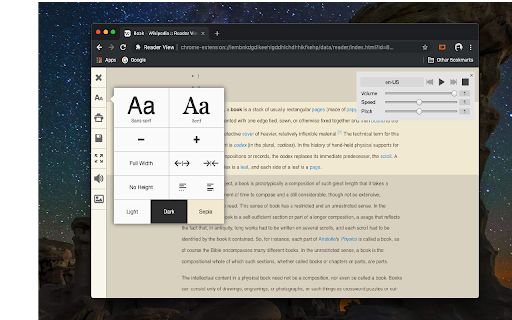
Reader View extension brings Mozilla's open-source Readability implantation to Chromium. Using this extension you can strip clutters from webpages and read them on "Reader View" mode. The extension allows you to toggle between normal view and reader view by pressing the page-action button.

Note that reader view mode works best for web pages that have a lot of content. There are some tools in the left side panel that can help you personalize your Reader View. You can change color, background-color, font-size, font-family and width of the reader view.

Features:
-> Remove distraction
-> Read in fullscreen mode
-> Remove advertisements
-> Save in HTML format
-> Print document
-> Read content using a powerful Text to Speech (TTS) engine
-> Edit HTML content (live editor)
-> Email document (with title, body, and reference to the original document)
-> Correctly display mathematical formulas (MathJax equations are Supported)
-> Highlight selected text
-> Move to the next and previous pages
-> Keyboard shortcuts for almost all actions
-> Resize images on the design-mode
-> Display DOI (Digital Object Identifier) details
-> Display publish date
-> Add persistent sticky notes
-> Bionic Reading
-> Adjust number of columns

*** 0.6.x releases ***
The extension is now running on manifest v3! Make sure you have the latest version of your browser to use this extension (The minimum acceptable Chrome version is 104). There are a few changes to make it compatible, so please report bugs if you see broken features.

For more info please visit:
https://github.com/rNeomy/reader-view/

Change Log:
0.1.3: Calling a reader view by restoring it from history will trigger history.back
0.1.4: A more visible icon. Fixes a reader bug.
0.1.5: It is now possible to toggle the reader view using keyboard shortcut (define one from Chrome's settings page)
0.2.1: Document parsing is improved. Switched to the latest Readibility.js library. Ctrl + S now saves the document same as pressing the "Save" button. Reader View now supports both rtl and ltr languages
0.2.2: It is now possible to select some content and ask the reader view to convert only the selected part. This is useful if the automatic selection tool is not detecting the content correctly.
0.2.4: Speech engine is added. You can now ask the extension to read the article for you. Estimated reading time is displayed below the article title
Technical
- Version
- 0.8.4
- Manifest
- V3
- Size
- 303KiB
- Min Chrome
- 88
- Languages
- 14
- Featured
- Yes
Metadata
- ID
- ecabifbgmdmgdllomnfinbmaellmclnh
- Developer ID
- u7816faddd64dac806af1e7ae97ee7f10
- Developer Email
- [email protected]
- Created
- Nov 29, 2016
- Last Updated (Store)
- May 11, 2026
- Last Scraped
- Jun 13, 2026
- Website
- —
- Privacy Policy
- https://add0n.com/policies/yokris.dev.txt
Similar extensions
Alternatives to Reader View, ranked by description similarity.

EasyReader
EasyReader can customize and improve the readability of long web articles
30.0K
★ 4.6

Dyslexia Reader Chrome
Change webpage styling for better readability
10.0K
★ 3.7

Chrome Reader Mode
Try Chrome Reader Mode – the easiest-to-use website reader. Enjoy comfortable reading with our eco-friendly reader mode.
4.0K
★ 4.7

Reader Mode
An all-in-one, distraction-free reader with dyslexia support, accessibility features, bookmarking, highlighting, and research tools
100.0K
★ 3.1

Text Zoom & Reader — enlarge text, hide images
Text zoom to 200%, distraction-free reader mode, and one-click hide images - improve readability in your browser now.
70.0K
★ 4.4

BiReader
Based off of the principles of Bionic Reader to improve speed and depth of reading web text!
—

Text Reader
Webpages reader
6.0K
★ 3.1

ClearRead AI — Simplify & Explain Text
AI-powered accessibility tool to simplify, summarize, rewrite, proofread and read text aloud — with multi-language support.
15
★ 5.0
Data sourced from the Chrome Web Store · last verified Jun 13, 2026.