
Cyber Quick Copy
Copy fixed text snippets quickly from a cyberpunk popup.
As of June 2026, Cyber Quick Copy has — users in the Functionality & UI category.
Usersno change0%
—
—
Ratingno change0%
—
— reviews
Reviewsno change0%
—
Version
1.0.0
Manifest V3
History
1 snapshotsTracking since Jun 12, 2026.
Not enough history yet for this metric — the chart fills in as we collect more snapshots.
View as table
| Date | Users | Rating | Reviews | Version |
|---|---|---|---|---|
| Jun 12, 2026 | — | — | — | 1.0.0 |
| Now | — | — | — | 1.0.0 |
Permissions & access
- Permissions
- None declared
- Host access
- None declared
Screenshots
About
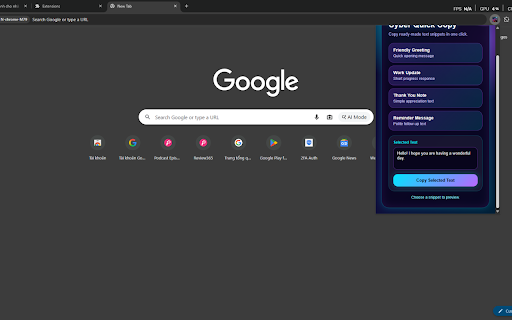
Cyber Quick Copy is a lightweight Chrome extension designed to help users quickly copy predefined text snippets directly from the browser popup. The extension provides a simple and efficient way to access frequently used text without opening documents, notes, or external applications.

Users can browse a collection of ready-made text snippets, preview the selected content, and copy it to the clipboard with a single click. This makes repetitive text usage faster and more convenient for daily communication, productivity, and workflow tasks.

Key Features:

• Access predefined text snippets instantly

• Preview selected text before copying

• One-click copy-to-clipboard functionality

• Fast and simple user experience

• Cyberpunk-inspired purple and blue interface

• Lightweight extension with minimal resource usage

• No unnecessary permissions required

• Works entirely within the browser popup

Cyber Quick Copy operates locally inside the browser and does not collect, store, transmit, analyze, or share any personal information. All text selection and clipboard operations are performed directly on the user's device.

This extension is useful for users who frequently reuse standard messages, greetings, reminders, notes, responses, templates, or other commonly used text content. By reducing repetitive typing, the extension helps improve efficiency and productivity during everyday browsing and communication activities.

The extension is intentionally designed to be simple, focused, and easy to use. Users can quickly access predefined content, select a desired text snippet, and copy it without navigating away from their current workflow.
Technical
- Version
- 1.0.0
- Manifest
- V3
- Size
- 44.79KiB
- Min Chrome
- 88
- Languages
- 1
- Featured
- No
Metadata
- ID
- ebombopcnfkdiblnejeapiehgolfoedh
- Developer ID
- u0458bfddc234e0a64d205a4fe77fe8e3
- Developer Email
- [email protected]
- Created
- Jun 11, 2026
- Last Updated (Store)
- Jun 11, 2026
- Last Scraped
- Jun 12, 2026
- Website
- —
- Support URL
- —
- Privacy Policy
- —
Data sourced from the Chrome Web Store · last verified Jun 12, 2026.