
Tower Stacking Blocks Challenge Game
Tower Stacking Blocks Challenge Game on your Google Chrome!
As of June 2026, Tower Stacking Blocks Challenge Game has 100,000 users and a 4.35/5 rating from 37 reviews in the fun category.
Usersno change0%
100.0K
100,000
Ratingdown 2.2 percent−2.2%
4.35
37 reviews
Reviewsup 12.1 percent+12.1%
37
Version
1.2.0
Manifest V3
90-day change · In the last 90 days this extension 1 version update.
History
5 snapshotsTracking since Apr 1, 2026.
View as table
| Date | Users | Rating | Reviews | Version |
|---|---|---|---|---|
| Apr 1, 2026 | 100.0K | 4.45 | 33 | 1.1.0 |
| Apr 16, 2026 | 100.0K | 4.42 | 33 | 1.2.0 |
| May 14, 2026 | 100.0K | 4.44 | 34 | 1.2.0 |
| Jun 6, 2026 | 100.0K | 4.43 | 35 | 1.2.0 |
| Jun 11, 2026 | 100.0K | 4.33 | 36 | 1.2.0 |
| Now | 100.0K | 4.35 | 37 | 1.2.0 |
Changelog
- Apr 1, 2026description
INTRODUCTION
Play Tiktok Stacking Blocks Challenge Game on your Google Chrome Browser with our simple & lightweight extension - No Internet required, no ADS, and 100% Free!

HOW TO INSTALL?
1. Click "Add to Chrome" to install the extension
2. Pin the Tiktok Stacking Blocks Challenge Game extension icon to the Chrome toolbar
3. Click the Tiktok Stacking Blocks Challenge Game icon on the Chrome toolbar, the Tiktok Stacking Blocks Challenge Game popup will open.
That's all you need to do! Have fun!

You also can Play more game on the left menu

HOW TO PLAY?
Click to play

CONTACT
Please feel free to contact us at: https://www.w3technic.com/contact

PRIVACY POLICY
Read at: https://www.w3technic.com/privacy-policy

USER'S REVIEWS
....

WHAT'S NEW?
v1.1.0
- Tiktok Challenge
v1.0.0
- First release
Tower Stacking Blocks Challenge Game (Only 1MB)

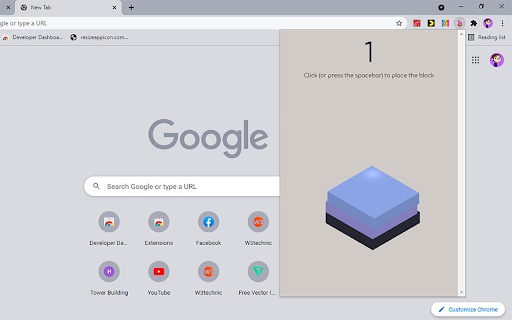
Play Tower Stacking Blocks Challenge on your Google Chrome Browser. Click or press the spacebar to place the block as precisely as you can. Stack as many blocks as possible to reach the highest score!

1. Install extension
2. Click the Tower Blocks icon on the Chrome extension toolbar
and then we will open a Tower Stacking Blocks Challenge for you to play the game! You don't need to do anything else! You also can play from any Chrome Tab.
Have fun!

....

WHAT'S NEW?

v1.1.0
- Rebranded to Tower Stacking Blocks Challenge Game

v1.0.0
- First release
- Apr 1, 2026short_description
Tiktok Stacking Blocks Challenge on your Google Chrome!
Tower Stacking Blocks Challenge Game on your Google Chrome!
- Apr 1, 2026name
Tiktok Stacking Blocks Challenge Game
Tower Stacking Blocks Challenge Game
Permissions & access
- Permissions
- None declared
- Host access
- None declared
Screenshots
About
Tower Stacking Blocks Challenge Game (Only 1MB)

Play Tower Stacking Blocks Challenge on your Google Chrome Browser. Click or press the spacebar to place the block as precisely as you can. Stack as many blocks as possible to reach the highest score!

1. Install extension
2. Click the Tower Blocks icon on the Chrome extension toolbar
and then we will open a Tower Stacking Blocks Challenge for you to play the game! You don't need to do anything else! You also can play from any Chrome Tab.
Have fun!

....

WHAT'S NEW?

v1.1.0
- Rebranded to Tower Stacking Blocks Challenge Game

v1.0.0
- First release
Technical
- Version
- 1.2.0
- Manifest
- V3
- Size
- 270KiB
- Min Chrome
- 88
- Languages
- 1
- Featured
- Yes
Metadata
- ID
- ebohipfojjgamhnfgdohlfkfagianjim
- Developer ID
- ua9da2c43b536d07f93ae73d714fd9185
- Developer Email
- [email protected]
- Created
- Sep 25, 2021
- Last Updated (Store)
- Mar 31, 2026
- Last Scraped
- Jun 23, 2026
- Website
- retrobowl.me
- Support URL
- https://retrobowl.me/contact
- Privacy Policy
- https://retrobowl.me/privacy-policy/
Data sourced from the Chrome Web Store · last verified Jun 23, 2026.