
SmartDox
Record user walkthroughs in your browser and auto-generate step-by-step docs in the InteractiveDox portal.
As of June 2026, SmartDox has — users in the Workflow & Planning category.
Usersno change0%
—
—
Ratingno change0%
—
— reviews
Reviewsno change0%
—
Version
0.1.0
Manifest V3
History
1 snapshotsTracking since Jun 11, 2026.
Not enough history yet for this metric — the chart fills in as we collect more snapshots.
View as table
| Date | Users | Rating | Reviews | Version |
|---|---|---|---|---|
| Jun 11, 2026 | — | — | — | 0.1.0 |
| Now | — | — | — | 0.1.0 |
Permissions & access
- Permissions
- storageactiveTabtabsscriptingwebNavigationcookiessidePanel
- Host access
- <all_urls>, https://api.interactivedox.com/*
Screenshots

About
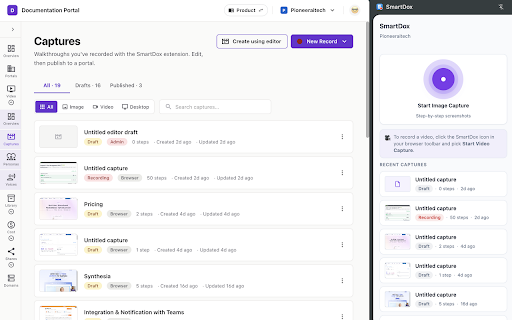
SmartDox turns the clicks you make in your browser into a polished, step-by-step documentation page — automatically.

WHAT IT DOES
• Records every click, form fill, and page navigation in any tab while you walk through a flow
• Captures a screenshot at each step, perfectly framed around what you clicked
• Sends the captured walkthrough to your InteractiveDox portal, where it becomes an editable, publishable doc — complete with screenshots, click highlights, narrated text, and a generated MP4 video

WHO IT'S FOR
• Product, support, and success teams who write "how to" docs over and over for the same flows
• Engineers documenting internal tools and onboarding playbooks
• Solo creators recording walkthroughs for customers, students, or open-source users

HOW IT WORKS
1. Sign in to InteractiveDox in the side panel
2. Pick a portal + version, then click "Start capture"
3. Walk through your flow — SmartDox quietly records each step
4. Click "Stop capture" — the recording opens in the InteractiveDox editor where you can edit titles, reorder steps, blur sensitive areas, and one-click publish

WHAT YOU GET IN THE PORTAL
• Step-by-step pages with annotated screenshots
• AI-narrated alt text and descriptions per step
• A polished walkthrough video (MP4) with click highlights, smart zoom, and an optional voiceover
• Multi-language translation of every step

PRIVACY
• Captures are scoped to the workspace you sign in to — nothing leaves your tenant
• You explicitly start and stop recording from the side panel
• You can blur or delete any step before publishing

REQUIREMENTS
A free or paid InteractiveDox workspace at https://app.interactivedox.com — sign up takes under 30 seconds.
Technical
- Version
- 0.1.0
- Manifest
- V3
- Size
- 82.69KiB
- Min Chrome
- 88
- Languages
- 1
- Featured
- No
Metadata
- ID
- eblpdjopffbedjhmolcbehiohhdgcamh
- Developer ID
- u62ea53fc4fbbb827b166b6ce069c0461
- Developer Email
- [email protected]
- Created
- Jun 10, 2026
- Last Updated (Store)
- Jun 10, 2026
- Last Scraped
- Jun 11, 2026
- Website
- —
- Support URL
- https://app.interactivedox.com
- Privacy Policy
- https://www.interactivedox.com/smartdox-privacy-policy
Data sourced from the Chrome Web Store · last verified Jun 11, 2026.