FlowTutor Live Guide
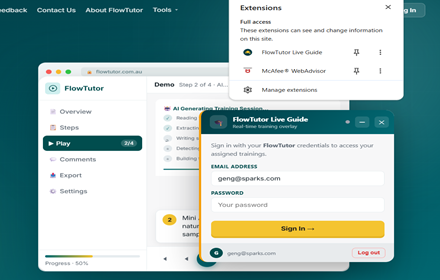
Real-time training guidance overlay — guided step-by-step on your live application with laser pointer and Mini AI narration.
As of June 2026, FlowTutor Live Guide has — users in the Education category.
Usersno change0%
—
—
Ratingno change0%
—
— reviews
Reviewsno change0%
—
Version
2.0.0
Manifest V3
History
1 snapshotsTracking since Jun 22, 2026.
Not enough history yet for this metric — the chart fills in as we collect more snapshots.
View as table
| Date | Users | Rating | Reviews | Version |
|---|---|---|---|---|
| Jun 22, 2026 | — | — | — | 2.0.0 |
| Now | — | — | — | 2.0.0 |
Permissions & access
- Permissions
- activeTabtabsstoragescriptingtts
- Host access
- <all_urls>
Screenshots


About
FlowTutor Live Guide connects your FlowTutor training assignments to the live
application you're learning — Oracle Cloud, SAP, Salesforce, or any web app.

When you launch a training from your FlowTutor account, the extension overlays
step-by-step narration, a laser pointer highlighting the exact field or button
described, and a progress bar directly onto the live application screen.

Features:
• Narrated step guidance on your live application
• Laser pointer and highlight box on the target element for each step
• Step reference screenshot panel for comparison when the UI has changed
• Automatic page detection — pauses if you're on the wrong screen
• Waits for you to act before auto-advancing to the next step
• Works with FlowTutor's BYOD architecture — your data stays in your database
• Supports Chrome and Microsoft Edge (Chromium)

Requires a FlowTutor account. Contact your IT Admin or Enablement Manager for access.
Technical
- Version
- 2.0.0
- Manifest
- V3
- Size
- 182KiB
- Min Chrome
- 88
- Languages
- 1
- Featured
- No
Metadata
- ID
- ebjimkliakkaogcdfllcpiodmfhboecb
- Developer ID
- u73198864fbcde5b31850f6580e4e111d
- Developer Email
- [email protected]
- Created
- Jun 21, 2026
- Last Updated (Store)
- Jun 21, 2026
- Last Scraped
- Jun 22, 2026
- Website
- —
- Support URL
- https://flowtutor.com.au
- Privacy Policy
- https://flowtutor.com.au/extension-privacy.html
Data sourced from the Chrome Web Store · last verified Jun 22, 2026.