
WiseFax
WiseFax enables you to send fax from Chrome to any fax number in the world.
As of June 2026, WiseFax has 868 users and a 4.06/5 rating from 48 reviews in the Workflow & Planning category.
Usersdown 8.4 percent−8.4%
868
868
Ratingdown 0.5 percent−0.5%
4.06
48 reviews
Reviewsdown 2.0 percent−2.0%
48
Version
1.6.2
Manifest V2
History
3 snapshotsTracking since Apr 1, 2026.
View as table
| Date | Users | Rating | Reviews | Version |
|---|---|---|---|---|
| Apr 1, 2026 | 948 | 4.08 | 49 | 1.6.2 |
| May 3, 2026 | 944 | 4.08 | 49 | 1.6.2 |
| Jun 2, 2026 | 895 | 4.06 | 48 | 1.6.2 |
| Now | 868 | 4.06 | 48 | 1.6.2 |
Permissions & access
- Permissions
- None declared
- Host access
- None declared
Screenshots



About
Wisefax – send fax quickly and easily

Sending fax with WiseFax was never so quick and easy. You only need internet connection on your device. Send fax in four simple steps from Chrome. Pay as you go, with no monthly or yearly subscription and send fax anywhere in the world.

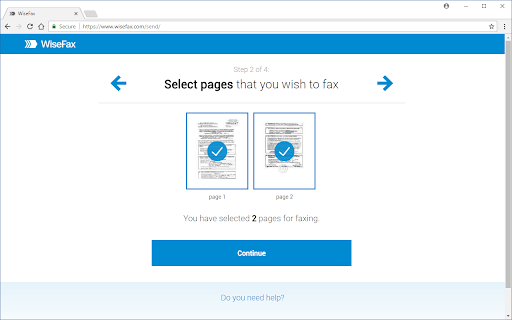
WiseFax supports numerous document and file formats such as PDF documents, Microsoft Office, OpenOffice and LibreOffice documents and spreadsheets, Hancom Hangul documents, ScanWritr documents, and JPEG, GIF, PNG, BMP images. You can also import a picture and send it directly to fax. When doing so, WiseFax efficiently detects edges of your document using advanced edge detection algorithm and makes picture clearer with picture enhancement algorithm. This makes scanning easier and fax more readable. You can easily select which pages you want to fax. Displayed preview of the pages will look the same as they will come out on fax at recipient side. Type fax number and wait for response. If it was successful or no you will get an email notification.

Sending fax with WiseFax is as simple as that. Try it, you’ll like it.

Four easy steps of how to send fax with WiseFax are:
1.) Upload your existing document or picture.
2.) Click and select / deselect pages you want to send to fax and check them on screen as you already see them as they will come out on fax.
3.) Select among 240 countries where you want to send your fax and type fax number.
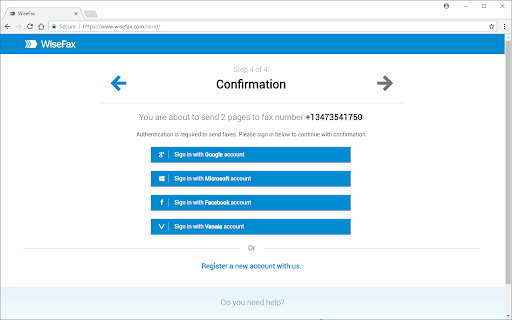
4.) Authenticate with your existing account on Facebook, Google, Windows Live and Vanaia or create a new one. Buy fax token, if you already didn’t do so, and send fax. Wait for fax status confirmation which you ‘ll receive to provided e-mail.
Technical
- Version
- 1.6.2
- Manifest
- V2
- Size
- 6.95KiB
- Min Chrome
- —
- Languages
- 1
- Featured
- No
Metadata
- ID
- ebdnoefbindlpognlepihpfaepalngda
- Developer ID
- u47d3cbe6a1f1971241c09ffe5b5cfc3c
- Developer Email
- [email protected]
- Created
- Oct 6, 2017
- Last Updated (Store)
- Dec 22, 2017
- Last Scraped
- Jun 2, 2026
- Website
- https://www.wisefax.com/
- Privacy Policy
- —
Similar extensions
Alternatives to WiseFax, ranked by description similarity.

WiseFax
WiseFax enables you to send fax from Chrome to any fax number in the world.
7.0K
★ 3.8

WhatsApp™ Bulk Message Sender - ExtBoost
🚀 Send Bulk WhatsApp™ messages (Text, Media) to Contacts, Groups, & Unsaved Numbers. Easy & Reliable WhatsApp™ Sender
379
★ 5.0

QuickSend
A Webhook and Whatsapp sender
27

WA Biz Sender (Prime)
Expand your customer-base with WhatsApp
WABiz Bulk Sender - WhatsApp Marketing Software & Automation Tool, a user can send…
1.0K
★ 5.0

WA Free Bulk Message Sender
Send Text and Images messages multiple users in bulk without saving number.
96

So Lets Talk Digital - WA Sender
WA Fast Sender and Automation Extension by So Lets Talk Digital (also known as “SLTD”):
• Personalised messaging features
•…
791
★ 2.3
WA Bulk Sender
Boost your WhatsApp marketing efforts with WA Bulk Sender, the efficient and powerful tool for sending bulk messages.
6.0K
★ 4.7

WA Number Checker - wabulk.net
Efficiently check, verify, and filter WhatsApp numbers with ease. validates large lists of numbers and filters out invalid ones.
10.0K
★ 4.7
Data sourced from the Chrome Web Store · last verified Jun 2, 2026.