
Download Station (client for Synology NAS)
A basic synology download station client chrome extension
As of June 2026, Download Station (client for Synology NAS) has 20,000 users and a 3.85/5 rating from 78 reviews in the Workflow & Planning category.
Usersno change0%
20.0K
20,000
Ratingdown 0.5 percent−0.5%
3.85
78 reviews
Reviewsup 2.6 percent+2.6%
78
Version
4.2.0
Manifest V3
90-day change · In the last 90 days this extension 2 version updates.
History
4 snapshotsTracking since Apr 21, 2026.
View as table
| Date | Users | Rating | Reviews | Version |
|---|---|---|---|---|
| Apr 21, 2026 | 20.0K | 3.87 | 76 | 3.22.1 |
| Apr 24, 2026 | 20.0K | 3.83 | 77 | 4.0.1 |
| May 11, 2026 | 20.0K | 3.83 | 77 | 4.0.1 |
| May 13, 2026 | 20.0K | 3.83 | 77 | 4.2.0 |
| Now | 20.0K | 3.85 | 78 | 4.2.0 |
Changelog
- Apr 21, 2026short_description
Chrome extension for Synology Download Station
A basic synology download station client chrome extension
Permissions & access
- Permissions
- scriptingcontextMenusnotificationsstoragetabsdownloadsdownloads.openclipboardReadsidePanel
- Host access
- http://*/*, https://*/*
Screenshots


About
Chrome extension which facilitate sending, monitoring and deleting tasks from a synology nas using download station.

It includes a dropdown interface with filtered tabs for displaying and managing download task, as well as a contentscript for allowing quick actions from magnet url links.

The popup support the following functionalities

- Tabbed download tasks display and filtering
- Task pause, play, seed, delete, destination edit
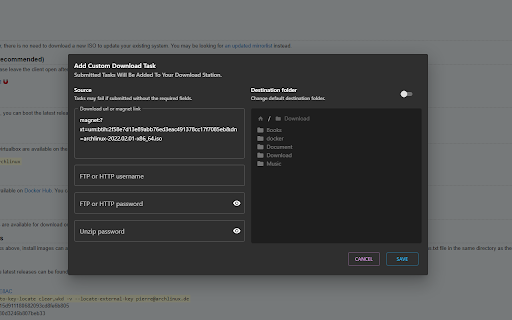
- Task creation through rich form (destination, url, ftp, zip password)
- Http, Https, 2FA login over local network
- Context menu creation (with custom destination)
- Quick action menu creation (with custom destination)
- Local download managment (play, pause, resum, retry, open, etc..)

The content script supports the following functionalities:

- One click download on magnet links
- Quick menu dropdown if more than one exist
- Rich task creation modal on quick action or context menu
- In-page notification for task creation

The service worker supports the following functionalities:

- Periodic task polling
- Custom badge number and text display for filtered tasks (by tabs, status, destination)
- Browser notifications on task completion/error (conditional on polling behavior and extensions permissions)

Support the developpment at : https://paypal.me/dvcol/5
Technical
- Version
- 4.2.0
- Manifest
- V3
- Size
- 1.51MiB
- Min Chrome
- 88
- Languages
- 1
- Featured
- No
Metadata
- ID
- ebbdkledlkjpgbbmmopgbnnjmklnkcef
- Developer ID
- uc169df2cba2329fd7316fc4743bf9ab3
- Developer Email
- [email protected]
- Created
- Feb 24, 2022
- Last Updated (Store)
- May 9, 2026
- Last Scraped
- Jun 15, 2026
- Website
- https://dvcol.github.io/
Similar extensions
Alternatives to Download Station (client for Synology NAS), ranked by description similarity.

ScriptCat
Everything can be scripted, allowing your browser to do more!
100.0K
★ 4.5

ScriptCat Beta
Everything can be scripted, allowing your browser to do more!
5.0K
★ 4.5
ZyXEL NAS Link Capture
Creates a right-click context menu to send a link to your ZyXEL home NAS device.
988
★ 4.1

Real Debrid Manager
🤗 Manage your Real Debrid downloads and links with ease!
1.0K
★ 5.0

NZBDonkey
The ultimate NZB file download tool!
9.0K
★ 4.3

Real Debrid Download Manager
A Chrome Extension to simplify downloading of torrents through Real Debrid
10.0K
★ 4.2

download station helper [Synology]
handle and view tasks for Synology Download Station
79

ArrowDL - Arrow Downloader
The easy way to download images, torrents, videos and music, from any website
3.0K
★ 2.4
Data sourced from the Chrome Web Store · last verified Jun 15, 2026.