Tor Browser (Unofficial port for Chrome)
Visit '.onion' sites and unlock blocked sites in one click and absolutely free.
As of June 2026, Tor Browser (Unofficial port for Chrome) has 30,000 users and a 3.92/5 rating from 72 reviews in the Privacy & Security category.
Usersno change0%
30.0K
30,000
Ratingdown 3.2 percent−3.2%
3.92
72 reviews
Reviewsup 18.0 percent+18.0%
72
Version
8.7.4
Manifest V3
90-day change · In the last 90 days this extension 4 version updates.
History
12 snapshotsTracking since Apr 16, 2026.
View as table
| Date | Users | Rating | Reviews | Version |
|---|---|---|---|---|
| Apr 16, 2026 | 30.0K | 4.05 | 61 | 6.1.5 |
| Apr 22, 2026 | 30.0K | 4.05 | 61 | 6.1.5 |
| Apr 26, 2026 | 30.0K | 4.06 | 62 | 6.1.5 |
| May 11, 2026 | 30.0K | 4.08 | 63 | 6.1.5 |
| May 13, 2026 | 30.0K | 4.08 | 64 | 8.1.1 |
| May 17, 2026 | 30.0K | 4.08 | 64 | 8.7.1 |
| May 20, 2026 | 30.0K | 4.00 | 67 | 8.7.3 |
| May 23, 2026 | 30.0K | 3.97 | 69 | 8.7.3 |
| May 25, 2026 | 30.0K | 3.93 | 70 | 8.7.3 |
| Jun 3, 2026 | 40.0K | 3.93 | 70 | 8.7.4 |
| Jun 11, 2026 | 40.0K | 3.93 | 71 | 8.7.4 |
| Jun 15, 2026 | 40.0K | 3.92 | 72 | 8.7.4 |
| Now | 30.0K | 3.92 | 72 | 8.7.4 |
Permissions & access
- Permissions
- storageproxywebRequestwebRequestAuthProvider
- Host access
- http://*/*, https://*/*
Screenshots

About
Tor Browser extension helps you to visit '.onion' sites and unlock blocked sites in one click and absolutely free.

🧅 Meet 'Tor Browser' your premier Chrome Extension for connecting to Tor Network. Immerse in an effortless internet browsing experience. Your don't need anything else. Only install extension and click Connect button.

💡 Key Features of 'Tor Browser' extension:
1. All in One. You don't need to download and configure something else. All is ready for using tor network.
2. You can ulock blocked site in one click by using this extension.
3. Direct access to '.onion' sites hosted in Tor network.
4. Fast connection. We use fast relay on the powerfull servers.
5. Secure connection. Your relay connection protected by SSL encryption.
6. [BONUS] Accessing to all OpenNIC domains zones: '.bbs', '.chan', '.cyb', '.dyn', '.geek', '.gopher', '.indy', '.libre', '.neo', '.null', '.o', '.oss', '.oz', '.parody', '.pirate'.
7. [BONUS] Acessing to  '.lib', '.coin', '.emc', and '.bazar' TLDs of Emercoin project.
8. [BONUS] Providing access to any '.fur' domain.


🚀 Kickstart Your Journey with 'Tor Browser' extension:
1️. Add the 'Tor Browser' extension to your Chrome.
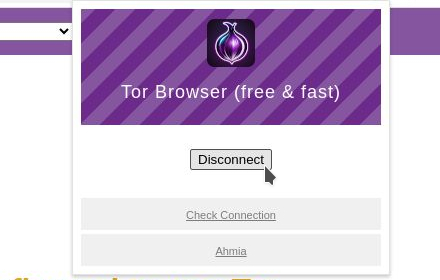
2️. Tap the Tor Browser icon and click Connect button to get started.
3️. Surf tor network/internet and enjoy.
4️. Done surfing? Click Disconnect button.

✅ Reasons to Pick Tor Browser extension:

- User-Centric Design: 'Tor Browser' boasts a simple and intuitive interface for a breezy surfing experience.
- Supreme Quality: Very wide connection and fast servers.
- Multipurpose: You can unlock blocked sites, visit tor services ('.onion' sites) and exploring OpenNIC, Emercoin and FurNIC TLDs.
- Privacy First: Our extension use SLL encryption and we do not store your data.

❓ Frequently Asked Questions:
🔹 Tor Browser is free?
Absolutely, with Tor Browser extension you can surf sites completely free.

🔹 How does Tor Browser manage my data?
We prioritize your privacy. Tor Browser doesn't retain any personal data and don't keep logs.

📮 Get in Touch:
Have queries or suggestions? Don't hesitate to drop us a line at 💌 [email protected]

Tor Browser shows ads for our other products. They won’t interrupt your experience or restrict anything — you can keep using all features in full.

Try Tor Browser now and redefine your dark net surfing experiences!
Technical
- Version
- 8.7.4
- Manifest
- V3
- Size
- 320KiB
- Min Chrome
- 88
- Languages
- 47
- Featured
- No
Metadata
- ID
- eaoamcgoidmhaficdbmcbamiedeklfol
- Developer ID
- u15b503f01394c842201672ebb782dbb7
- Developer Email
- [email protected]
- Created
- Mar 23, 2024
- Last Updated (Store)
- May 25, 2026
- Last Scraped
- Jun 22, 2026
- Website
- —
- Support URL
- —
Similar extensions
Alternatives to Tor Browser (Unofficial port for Chrome), ranked by description similarity.

Website Unblocker
Website Unblocker helps you instantly unblock access to any website or content platform, with just a single click!
3.0K
★ 3.7
Turbo VPN - Secure Free VPN Proxy
Enjoy fast streaming, secure & private internet with Turbo VPN proxy.
800.0K
★ 3.5
TOR Browser Extension
Tor for browsers, one click start.
3.0K
★ 1.4

Free VPN Premium for Chrome - OnVPN
Fast, secure, and easy to use free VPN Premium to protect your privacy online. Unlimited Traffic and Bandwidth!
2.0K
★ 3.2

Free VPN for Chrome - Titan Tunnel VPN
Get a blazing-fast, secure, and intuitive free VPN Chrome extension.
8.0K
★ 3.0

TITANIUM PROXY - Your Website Unblocker
The easiest way to access the Borderless Internet, Titanium Proxy gets you Access to the global online content you want!
1.0K
★ 3.0

AnonVPN - Free VPN / Бесплатный ВПН
Free VPN proxy: fast access to websites, protect your privacy, and browse securely. One-click connection, no signup required.
40.0K
★ 4.3

VPN TunnelFly
VPN extension for Chrome. Changes your virtual location and makes you anonymous in the Web. Leave no traces, protect your privacy
1.0K
★ 3.3
Data sourced from the Chrome Web Store · last verified Jun 22, 2026.