
Mocha Telnet
Telnet/SSH2 app with vt220 emulation.
As of June 2026, Mocha Telnet has 2,000 users and a 2.05/5 rating from 43 reviews.
Usersdown 33.3 percent−33.3%
2.0K
2,000
Ratingno change0%
2.05
43 reviews
Reviewsno change0%
43
Version
1.4
Manifest V2
90-day change · In the last 90 days this extension lost 1.0K users.
History
2 snapshotsTracking since May 3, 2026.
View as table
| Date | Users | Rating | Reviews | Version |
|---|---|---|---|---|
| May 3, 2026 | 3.0K | 2.05 | 43 | 1.4 |
| Jun 2, 2026 | 3.0K | 2.05 | 43 | 1.4 |
| Now | 2.0K | 2.05 | 43 | 1.4 |
Permissions & access
- Permissions
- contextMenusstorageclipboardReadclipboardWrite
- Host access
- None declared
Screenshots



About
*** IMPORTANT ***
We recommend using Mocha Telnet for Chromebook, as Google will soon stop supporting Chrome Apps.
https://mochasoft.dk/chromebook_telnet.htm


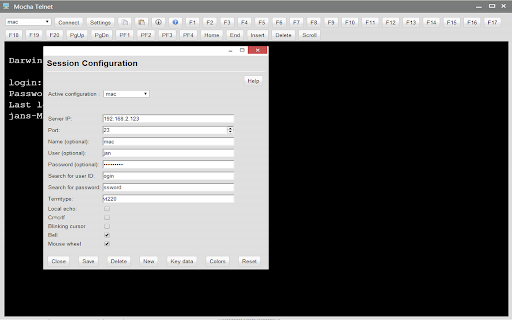
Mocha Telnet/SSH makes it possible to connect to a host with the Telnet or SSH2 protocol and emulate a VT220 terminal.

The trial is valid for 30 days. The product is fully functional. When you order, we will send a software license code, which will remove the 30 days limit.

Mocha Telnet Features:
- Operating Systems: Chrome OS 30.x or better.
- Supports VT100/VT220 emulation
- SSH2 with user/password validation. Certificates are not supported
- Scroll back buffer
- User defined functions keys
- Screen mode 24*80 or 24*132
- Smart font handling. The font size follows the Window size
- Functions keys F1-F20 are part of the Toolbar
- Autologin
- Clipboard
- Colors can be customized
- Free upgrades to new versions of the product

This is a free 30 days trial. A license is 19.85 USD, or 199 USD for a company license.

Changes:
Version 1.1
- possible to configure PF1-PF4 and changes default value to 7 bit for these 4 keys.
Version 1.2:
- TAB + ENTER key could activate the toolbar elements, such as the pop up settings screen.

Version 1.3:
- TAB + SPACE key could activate the toolbar elements, such as the pop up settings screen.

Version 1.4:
- added protocol SSH2.
- Possible to start in 24x132 mode.
Technical
- Version
- 1.4
- Manifest
- V2
- Size
- 118KiB
- Min Chrome
- 33
- Languages
- 1
- Featured
- No
Metadata
- ID
- eampcebilkabfdlnehhfpgjfceacaabj
- Developer ID
- u16103b77ed0f231120af3ee8f621d125
- Developer Email
- [email protected]
- Created
- Oct 28, 2013
- Last Updated (Store)
- Jul 1, 2020
- Last Scraped
- Jun 2, 2026
- Website
- http://www.mochasoft.dk/
- Support URL
- —
- Privacy Policy
- —
Similar extensions
Alternatives to Mocha Telnet, ranked by description similarity.

Mocha TN5250
TN5250 emulator for easy AS/400 access.
3.0K
★ 3.6
Mocha TN3270
TN3270 emulator for easy IBM mainframe access.
493
★ 3.6

DEPRECATED Secure Shell App
(DEPRECATED: USE THE EXTENSION)
Terminal emulator and SSH and SFTP client.
200.0K
★ 4.4

DEPRECATED Secure Shell App (dev)
(DEPRECATED: USE THE EXTENSION)
Terminal emulator and SSH and SFTP client.
243
★ 5.0

Secure Shell
Terminal emulator and SSH and SFTP client.
800.0K
★ 4.0
Shared network folder (SFTP)
Access a SFTP server directly from the Files app.
10.0K
★ 2.9
Mosh
Mosh (mobile shell) for Chrome
9.0K
★ 4.4

Telnet, SSH Client for Browser
This app is a free tool of SSH and Telnet for browser, along with an xterm terminal emulator. Connect to any telnet server or BBS.
2.0K
★ 2.6
Data sourced from the Chrome Web Store · last verified Jun 2, 2026.