
PasteGuard
Warns before you paste, type, or send secrets into input fields across websites. Local-first and no raw secret storage.
As of June 2026, PasteGuard has — users in the Productivity category.
Usersno change0%
—
—
Ratingno change0%
—
— reviews
Reviewsno change0%
—
Version
1.0.0
Manifest V3
History
1 snapshotsTracking since Jun 26, 2026.
Not enough history yet for this metric — the chart fills in as we collect more snapshots.
View as table
| Date | Users | Rating | Reviews | Version |
|---|---|---|---|---|
| Jun 26, 2026 | — | — | — | 1.0.0 |
| Now | — | — | — | 1.0.0 |
Permissions & access
- Permissions
- storage
- Host access
- <all_urls>
Screenshots


About
🛡️✨ **PasteGuard — A Smart Privacy Shield for Sensitive Text**

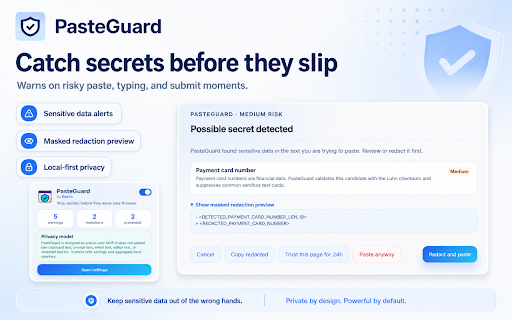
PasteGuard is a lightweight privacy companion designed to help people avoid accidental exposure of sensitive information while typing, pasting, or preparing text inside input fields. It acts as a quiet safety layer that watches for patterns commonly associated with secrets, credentials, personal data, and high-risk information before they are sent away.

🔐 **Built for moments when mistakes happen**

Everyone copies and pastes quickly. Developers move API keys between tools. Creators reuse notes across platforms. Students, founders, freelancers, and everyday users often handle phone numbers, OTP codes, wallet addresses, banking details, passwords, recovery phrases, and private tokens without always noticing what is inside the text. PasteGuard helps bring attention to these risky moments by detecting possible sensitive content and presenting a clear warning when something looks unsafe.

⚠️ **Sensitive data detection with clear risk awareness**

PasteGuard can identify different types of potentially sensitive information, including API keys, secret tokens, private keys, passwords, authentication codes, recovery phrases, crypto wallet data, bank account patterns, phone numbers, and other personal identifiers. Instead of overwhelming the user, it focuses on simple, understandable risk signals so the person can quickly understand why a piece of text may be dangerous.

🧠 **Designed for developers and everyday users**

For developers, PasteGuard helps reduce the chance of leaking environment variables, access tokens, private credentials, and project secrets into public or third-party text fields. For non-technical users, it provides a safety net against accidentally sharing personal information such as phone numbers, payment-related details, verification codes, or private notes.

The experience is designed to be calm and readable. Alerts are presented in a clean interface with clear labels, risk levels, and short explanations. The goal is not to interrupt normal work, but to make risky actions visible at the right moment.

🌙 **Clean, minimal, and privacy-focused**

PasteGuard keeps the interface simple, modern, and distraction-free. Its warning window uses a polished visual style, readable typography, and clear spacing so users can quickly scan the message without confusion. The product is built around the idea that privacy protection should feel natural, lightweight, and easy to understand.

🧩 **A practical guardrail for daily digital work**

PasteGuard is useful across many common situations: writing messages, filling forms, preparing support replies, testing developer tools, documenting code snippets, handling credentials, or copying personal information between different workspaces. It helps create a habit of checking sensitive text before it is shared, reducing accidental leaks caused by speed, distraction, or copy-paste mistakes.

🔎 **What PasteGuard helps notice**

🔑 API keys and access tokens
🔐 Password-like strings and secret values
🧾 OTP codes and verification numbers
🪙 Crypto wallet data and recovery phrases
🏦 Bank-related number patterns
📱 Phone numbers and personal identifiers
🧪 Developer credentials and environment secrets
⚠️ Suspicious high-risk text patterns

✨ **Simple idea, powerful protection**

PasteGuard adds awareness at the exact moment sensitive data is most likely to slip through. It does not try to make security complicated. It simply helps users pause, notice, and understand when a piece of text may contain something private, valuable, or risky.

🛡️ **PasteGuard makes accidental data leaks easier to catch before they become a problem.**
Technical
- Version
- 1.0.0
- Manifest
- V3
- Size
- 603KiB
- Min Chrome
- 88
- Languages
- 1
- Featured
- No
Metadata
- ID
- ealmngbfapmfaipbaopfibpcobeldooc
- Developer ID
- u87bbb70b5a3b2f5c98d17dfac150f88c
- Developer Email
- [email protected]
- Created
- Jun 25, 2026
- Last Updated (Store)
- Jun 25, 2026
- Last Scraped
- Jun 26, 2026
- Website
- —
- Support URL
- —
- Privacy Policy
- —
Data sourced from the Chrome Web Store · last verified Jun 26, 2026.