
Sales CRM in Gmail and Google Workspace
Turn Google Contacts into a simple sales CRM inside Gmail. Kanban pipelines, notes, tags & shared boards for individuals and teams.
As of June 2026, Sales CRM in Gmail and Google Workspace has 47 users and a 5.00/5 rating from 3 reviews in the Workflow & Planning category.
Usersup 17.5 percent+17.5%
47
47
Ratingno change0%
5.00
3 reviews
Reviewsno change0%
3
Version
3.1.7
Manifest V3
90-day change · In the last 90 days this extension 3 version updates, changed permissions.
History
14 snapshotsTracking since Apr 1, 2026.
View as table
| Date | Users | Rating | Reviews | Version |
|---|---|---|---|---|
| Apr 1, 2026 | 40 | 5.00 | 3 | 2.2.4 |
| Apr 16, 2026 | 39 | 5.00 | 3 | 2.2.4 |
| Apr 22, 2026 | 40 | 5.00 | 3 | 2.2.5 |
| Apr 27, 2026 | 46 | 5.00 | 3 | 2.2.5 |
| May 2, 2026 | 45 | 5.00 | 3 | 2.2.5 |
| May 7, 2026 | 43 | 5.00 | 3 | 2.2.5 |
| May 11, 2026 | 45 | 5.00 | 3 | 2.2.5 |
| May 14, 2026 | 40 | 5.00 | 3 | 3.1.3 |
| May 23, 2026 | 41 | 5.00 | 3 | 3.1.3 |
| May 28, 2026 | 43 | 5.00 | 3 | 3.1.5 |
| Jun 2, 2026 | 41 | 5.00 | 3 | 3.1.7 |
| Jun 6, 2026 | 40 | 5.00 | 3 | 3.1.7 |
| Jun 10, 2026 | 45 | 5.00 | 3 | 3.1.7 |
| Jun 22, 2026 | 46 | 5.00 | 3 | 3.1.7 |
| Now | 47 | 5.00 | 3 | 3.1.7 |
Changelog
- May 14, 2026description
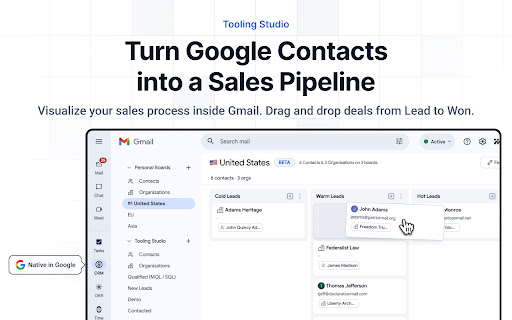
👥 Sales CRM by Tooling Studio turns your existing Google Contacts into a lightweight CRM that lives directly inside Gmail. Instead of fighting spreadsheets or heavyweight CRMs, you get a clear pipeline where every contact, company and opportunity is organized on a visual board.

📊 See your leads and deals as cards on Kanban-style stages (Lead → Qualified → Proposal → Won, etc.), add notes, tags and custom fields, and track every interaction – all from the Gmail sidebar.

Sales CRM focuses on relationships, leads and deals. For task and project boards, use our separate “Kanban Tasks” plugin. Together they cover your work (Kanban Tasks) and your pipeline (Sales CRM) in one Google-native stack.

✨ Plans & pricing

• Personal (Free forever): Personal CRM with unlimited contacts, organizations and pipelines.
• Teams ($5/user/month): Shared boards, shared contact data and collaborative pipelines for teams.

Why Google users love Sales CRM
⚡️ Built for Gmail: Your CRM opens right next to your inbox, so you stay in the same place where conversations actually happen.
👥 Uses your existing Google Contacts: Start from the data you already have instead of rebuilding everything from scratch.
📊 Clear visual pipelines: See where every lead or customer sits in your process at a glance.
👌 Simple, not bloated: Designed for individuals and small teams who just want a clean, usable CRM.

Key features
📇 Google Contacts-powered CRM
• Pulls in your Google Contacts to jump-start your CRM.
• One-way sync from Contacts into Sales CRM, so you can safely add sales-specific data without messing up your address book.

📊 Kanban-style sales pipelines
• Organize contacts and organizations into customizable stages.
• Drag and drop cards between stages as deals progress.

✍️ Rich contact and organization records

• Notes, comments and activity-style updates on every contact and organization.
• Attach proposals, contracts and other files so documents stay tied to the relationship.

🏷️ Tags and custom fields
• Segment by industry, deal size, status, region – whatever matters to your workflow.
• Build basic segments and views based on fields, tags and pipeline stage.

🔔 Follow-ups and focus
• Set reminders and next steps so you always know who to reach out to next.
• Use simple filters to focus on “hot” leads, specific owners or specific stages.

👥 Shared CRM for teams (Teams plan)
• Shared boards and records for sales, partnerships or customer success.
• Assign contact and organization owners for clear responsibility.
• Real-time updates so the whole team sees changes instantly.

🌟 Beta status and roadmap
Personal CRM is live today and great for solo users. Shared team boards are available and still evolving – your feedback shapes the roadmap. Deal objects and deeper forecasting are planned as upcoming enhancements.

📊 Frequently Asked Questions

Q: How is this different from just using Google Contacts?
A: Google Contacts is great for storing phone numbers and email addresses. Sales CRM turns that static list into a working sales system – with pipelines, stages, notes, tags, attachments, reminders and ownership.

Q: How does the Google Contacts sync work? Is it two-way?
A: Right now, Sales CRM syncs from Google Contacts into the CRM to get you started quickly. Changes you make inside Sales CRM (notes, tags, custom fields, pipeline stage) live in the CRM and don’t overwrite your Google Contacts. Two-way sync depends on what Google’s APIs allow and may be added later.

Q: Can I share my CRM boards with my team?
A: Yes. On the Teams plan you can create shared CRM boards, invite colleagues, and collaborate on the same contact and organization records in real time.

Q: What happens to my data after the beta?
A: Everything you add – contacts, notes, tags, pipelines – carries over. The “beta” label is about polishing features and stability, not about throwing away your data.

Q: What does Sales CRM cost?
A: Personal use is free forever. Team features (shared boards, collaboration, shared ownership) are $5/user/month, aligned with the pricing for Kanban Tasks.

Q: Is this integrated with Kanban Tasks or separate?
A: It’s a separate plugin that works alongside Kanban Tasks. Both live in your Gmail sidebar. Use Sales CRM for relationships and deals, and Kanban Tasks for projects and execution.

Q: Do I need to be tech-savvy to use this?
A: No. It’s built with the same visual, Google-style UI as our other tools. If you’re comfortable in Gmail, you’ll be fine in Sales CRM.
🔎 Overview

Sales teams waste hours every week bouncing between their inbox, a spreadsheet, and a bloated CRM platform that nobody keeps current. Sales CRM by Tooling Studio solves this by building your entire pipeline directly inside Gmail, where your conversations already live.

This Gmail CRM pulls your existing Google Contacts into a visual Kanban pipeline so you can see exactly where every lead, deal, and relationship stands at a glance. Setup takes minutes because your data is already there. A clean, intuitive CRM integration with Gmail means your pipeline stays accurate because updating it costs almost no effort.

Solo founders managing outreach and sales teams tracking dozens of active deals both get the structure they need without the overhead of enterprise software.

📈 Enhance Your Sales Workflow

Stop losing deals in your inbox: Emails that need action stop disappearing into the scroll. Turn any Gmail message into a CRM contact or note in one click, with a direct link back to the original conversation so nothing loses context.

Cut the tab count and keep the context: Your pipeline lives in the Gmail sidebar, so you stay in one place instead of managing your inbox in one window and your CRM in another.

Get your team aligned in minutes: Share a board, invite a teammate, and your team is collaborating on the same pipeline immediately, all inside the Google accounts they already use.

Always know which deals need attention today: Smart filters and pipeline views surface the contacts and opportunities that need action now, across every stage of your funnel.

Replace a $49 per month platform with a $5 one: Sales CRM covers the core functionality that most teams actually use, at a fraction of the cost and without the setup overhead or the learning curve.

🧩 The Best CRM for Google Workspace Users

Your CRM lives where your deals happen: Sales CRM opens as a sidebar directly inside Gmail, giving you instant access to pipeline stages, contact notes, and deal history right alongside your inbox. Your CRM integration with Gmail is seamless and immediate, so context is always one glance away.

Start with what you already have: Your Google Contacts become the foundation of your CRM the moment you install. Sales CRM syncs your contacts into a fully organized pipeline so you're never starting from scratch. This is the CRM for Google Workspace that respects your existing workflow instead of disrupting it.

A clear visual pipeline built for how salespeople think: Drag and drop contacts through customizable stages (Lead, Qualified, Proposal, Negotiation, Won) and always know where every relationship stands. A smart CRM strategy starts with visibility, and this pipeline gives you exactly that.

Rich records that capture every detail: Every contact and company gets a dedicated record with notes, comments, file attachments, custom fields, and tags. Track deal size, industry, region, or any field that matters to your workflow. This cloud-based CRM software scales with your process as your team and pipeline grow.

Reminders and follow-ups that keep deals moving: Set next steps, schedule follow-ups, and use smart filters to surface your hottest leads at the right moment. Warm opportunities stay visible, and nothing falls through the cracks.

🤖 A New Way to Manage Your Pipeline with AI

Sales CRM is evolving beyond a static contact list into an actionable system you can operate through AI. With MCP integration, you can connect large language models directly to your CRM and instruct them to take real actions on your pipeline.

This changes how relationship management works. Instead of manually logging calls, updating contact stages, and chasing follow-ups, you can delegate those actions to AI and focus on selling.

Use natural language to operate your CRM:

• Ask an AI to read a call transcript and automatically create or update contact records, assign ownership, and move deals to the right pipeline stage based on what was discussed.
• Have the AI scan email threads in Gmail and extract commitments, next steps, and new contacts, turning them into structured CRM records linked to the original conversation.
• Update your pipeline in bulk by intent. Mark all contacts from a specific campaign as qualified, reassign ownership across a territory, or move groups of deals through stages in seconds.
• Generate a prioritized outreach list based on deal stage, last contact date, and tags, so you always know who deserves attention today.

Key advantages of AI and MCP for your CRM:

• Reduce the manual logging and admin work that causes CRM adoption to break down. When updating records takes effort, people stop doing it. AI removes that friction entirely.
• Keep context tied to every contact. Records generated from emails or call transcripts stay linked to their source, so your team always understands the full history behind a relationship.
• Operate your pipeline at scale. Actions that would take an hour of manual data entry can be completed in seconds across your entire contact base.
• Apply consistent logic to how contacts are created, tagged, and advanced through stages, reducing the inconsistency that makes CRM data unreliable over time.

For sales teams looking for AI-powered CRM tools, this is a shift from passive record-keeping to an active system that works alongside you.

👥 Built for Teams, Accessible to Everyone

Sales CRM is permanently free for individuals. Sales teams that need shared pipelines and collaborative records can upgrade to the Teams plan for shared CRM boards, real-time updates, contact ownership, and a collaborative workflow that keeps everyone aligned.

This is one of the best CRM solutions for sales teams who live inside Google Workspace and want a system that actually gets used because it fits where they already work.

• Personal (free forever): Unlimited contacts, organizations, and pipelines for individual users. The best free CRM for Google Workspace with no strings attached.
• Teams ($5/user/month): Shared boards, collaborative pipelines, contact ownership, and real-time team updates. A complete Gmail CRM system for small and growing sales teams.

✨ The CRM That Lives in Gmail

Sales CRM by Tooling Studio is the Gmail CRM system built for people who want a real sales process without the complexity of enterprise software. It is the best CRM for Google Workspace users who value simplicity, clarity, and tools that fit into how they work.

Install the Chrome CRM extension today and turn your Gmail into a pipeline that closes deals.

📊 Frequently Asked Questions

Q: How is this different from just using Google Contacts?
A: Google Contacts stores names and numbers. Sales CRM turns that list into a working sales pipeline with stages, notes, tags, attachments, reminders, and ownership. It is the CRM for Google Contacts that adds everything Contacts was never designed to do.

Q: Is the Gmail CRM integration two-way?
A: Sales CRM syncs your existing Google Contacts into your pipeline to get you started immediately. Any CRM-specific data you add, including notes, tags, pipeline stages, and custom fields, stays inside Sales CRM and never overwrites your address book. Two-way sync is on the roadmap.

Q: Can my whole team use the same pipeline?
A: On the Teams plan, shared CRM boards let your entire sales team collaborate on the same contact and company records in real time. It is the CRM that integrates with Gmail and keeps your team working from a single source of truth.

Q: What does it cost?
A: Personal use is completely free. Team collaboration features are $5/user/month, the same pricing as our Kanban Tasks plugin, so you can run your full workflow in Google Workspace without adding another expensive platform.

Q: How does this work alongside Kanban Tasks?
A: Sales CRM and Kanban Tasks are separate plugins that complement each other inside your Gmail sidebar. Use Sales CRM for relationships, leads, and deals, and Kanban Tasks for projects and execution. Together they give you a complete business process automation workflow inside Google Workspace without leaving your inbox.

Q: Do I need technical skills to get started?
A: None at all. This Chrome CRM extension is designed for salespeople and small business owners. If you are comfortable using Gmail, you will feel right at home.
- May 11, 2026host_permissions
https://mail.google.com/mail/, https://backend.tooling.studio/, https://application.tooling.studio/
https://mail.google.com/, https://backend.tooling.studio/, https://application.tooling.studio/
Permissions & access
- Permissions
- scriptingidentitycookiesstoragemanagement
- Host access
- https://mail.google.com/, https://backend.tooling.studio/, https://application.tooling.studio/
Screenshots


About
🔎 Overview

Sales teams waste hours every week bouncing between their inbox, a spreadsheet, and a bloated CRM platform that nobody keeps current. Sales CRM by Tooling Studio solves this by building your entire pipeline directly inside Gmail, where your conversations already live.

This Gmail CRM pulls your existing Google Contacts into a visual Kanban pipeline so you can see exactly where every lead, deal, and relationship stands at a glance. Setup takes minutes because your data is already there. A clean, intuitive CRM integration with Gmail means your pipeline stays accurate because updating it costs almost no effort.

Solo founders managing outreach and sales teams tracking dozens of active deals both get the structure they need without the overhead of enterprise software.

📈 Enhance Your Sales Workflow

Stop losing deals in your inbox: Emails that need action stop disappearing into the scroll. Turn any Gmail message into a CRM contact or note in one click, with a direct link back to the original conversation so nothing loses context.

Cut the tab count and keep the context: Your pipeline lives in the Gmail sidebar, so you stay in one place instead of managing your inbox in one window and your CRM in another.

Get your team aligned in minutes: Share a board, invite a teammate, and your team is collaborating on the same pipeline immediately, all inside the Google accounts they already use.

Always know which deals need attention today: Smart filters and pipeline views surface the contacts and opportunities that need action now, across every stage of your funnel.

Replace a $49 per month platform with a $5 one: Sales CRM covers the core functionality that most teams actually use, at a fraction of the cost and without the setup overhead or the learning curve.

🧩 The Best CRM for Google Workspace Users

Your CRM lives where your deals happen: Sales CRM opens as a sidebar directly inside Gmail, giving you instant access to pipeline stages, contact notes, and deal history right alongside your inbox. Your CRM integration with Gmail is seamless and immediate, so context is always one glance away.

Start with what you already have: Your Google Contacts become the foundation of your CRM the moment you install. Sales CRM syncs your contacts into a fully organized pipeline so you're never starting from scratch. This is the CRM for Google Workspace that respects your existing workflow instead of disrupting it.

A clear visual pipeline built for how salespeople think: Drag and drop contacts through customizable stages (Lead, Qualified, Proposal, Negotiation, Won) and always know where every relationship stands. A smart CRM strategy starts with visibility, and this pipeline gives you exactly that.

Rich records that capture every detail: Every contact and company gets a dedicated record with notes, comments, file attachments, custom fields, and tags. Track deal size, industry, region, or any field that matters to your workflow. This cloud-based CRM software scales with your process as your team and pipeline grow.

Reminders and follow-ups that keep deals moving: Set next steps, schedule follow-ups, and use smart filters to surface your hottest leads at the right moment. Warm opportunities stay visible, and nothing falls through the cracks.

🤖 A New Way to Manage Your Pipeline with AI

Sales CRM is evolving beyond a static contact list into an actionable system you can operate through AI. With MCP integration, you can connect large language models directly to your CRM and instruct them to take real actions on your pipeline.

This changes how relationship management works. Instead of manually logging calls, updating contact stages, and chasing follow-ups, you can delegate those actions to AI and focus on selling.

Use natural language to operate your CRM:

• Ask an AI to read a call transcript and automatically create or update contact records, assign ownership, and move deals to the right pipeline stage based on what was discussed.
• Have the AI scan email threads in Gmail and extract commitments, next steps, and new contacts, turning them into structured CRM records linked to the original conversation.
• Update your pipeline in bulk by intent. Mark all contacts from a specific campaign as qualified, reassign ownership across a territory, or move groups of deals through stages in seconds.
• Generate a prioritized outreach list based on deal stage, last contact date, and tags, so you always know who deserves attention today.

Key advantages of AI and MCP for your CRM:

• Reduce the manual logging and admin work that causes CRM adoption to break down. When updating records takes effort, people stop doing it. AI removes that friction entirely.
• Keep context tied to every contact. Records generated from emails or call transcripts stay linked to their source, so your team always understands the full history behind a relationship.
• Operate your pipeline at scale. Actions that would take an hour of manual data entry can be completed in seconds across your entire contact base.
• Apply consistent logic to how contacts are created, tagged, and advanced through stages, reducing the inconsistency that makes CRM data unreliable over time.

For sales teams looking for AI-powered CRM tools, this is a shift from passive record-keeping to an active system that works alongside you.

👥 Built for Teams, Accessible to Everyone

Sales CRM is permanently free for individuals. Sales teams that need shared pipelines and collaborative records can upgrade to the Teams plan for shared CRM boards, real-time updates, contact ownership, and a collaborative workflow that keeps everyone aligned.

This is one of the best CRM solutions for sales teams who live inside Google Workspace and want a system that actually gets used because it fits where they already work.

• Personal (free forever): Unlimited contacts, organizations, and pipelines for individual users. The best free CRM for Google Workspace with no strings attached.
• Teams ($5/user/month): Shared boards, collaborative pipelines, contact ownership, and real-time team updates. A complete Gmail CRM system for small and growing sales teams.

✨ The CRM That Lives in Gmail

Sales CRM by Tooling Studio is the Gmail CRM system built for people who want a real sales process without the complexity of enterprise software. It is the best CRM for Google Workspace users who value simplicity, clarity, and tools that fit into how they work.

Install the Chrome CRM extension today and turn your Gmail into a pipeline that closes deals.

📊 Frequently Asked Questions

Q: How is this different from just using Google Contacts?
A: Google Contacts stores names and numbers. Sales CRM turns that list into a working sales pipeline with stages, notes, tags, attachments, reminders, and ownership. It is the CRM for Google Contacts that adds everything Contacts was never designed to do.

Q: Is the Gmail CRM integration two-way?
A: Sales CRM syncs your existing Google Contacts into your pipeline to get you started immediately. Any CRM-specific data you add, including notes, tags, pipeline stages, and custom fields, stays inside Sales CRM and never overwrites your address book. Two-way sync is on the roadmap.

Q: Can my whole team use the same pipeline?
A: On the Teams plan, shared CRM boards let your entire sales team collaborate on the same contact and company records in real time. It is the CRM that integrates with Gmail and keeps your team working from a single source of truth.

Q: What does it cost?
A: Personal use is completely free. Team collaboration features are $5/user/month, the same pricing as our Kanban Tasks plugin, so you can run your full workflow in Google Workspace without adding another expensive platform.

Q: How does this work alongside Kanban Tasks?
A: Sales CRM and Kanban Tasks are separate plugins that complement each other inside your Gmail sidebar. Use Sales CRM for relationships, leads, and deals, and Kanban Tasks for projects and execution. Together they give you a complete business process automation workflow inside Google Workspace without leaving your inbox.

Q: Do I need technical skills to get started?
A: None at all. This Chrome CRM extension is designed for salespeople and small business owners. If you are comfortable using Gmail, you will feel right at home.
Technical
- Version
- 3.1.7
- Manifest
- V3
- Size
- 2.18MiB
- Min Chrome
- 88
- Languages
- 1
- Featured
- Yes
Metadata
- ID
- eahohjgacannimpjhncdkdemhgndobph
- Developer ID
- u1d105ab43d2782f3b1716fe60a76de56
- Developer Email
- [email protected]
- Created
- Dec 1, 2025
- Last Updated (Store)
- May 27, 2026
- Last Scraped
- Jun 22, 2026
- Website
- tooling.studio
- Support URL
- https://tooling.studio/#faq
- Privacy Policy
- https://tooling.studio/privacy-policy
Similar extensions
Alternatives to Sales CRM in Gmail and Google Workspace, ranked by description similarity.

Kanban Boards in Gmail and Google Workspace
Visual Kanban for Google Tasks & Gmail: turn emails into tasks, share boards, track with due dates, tags & comments.
1.0K
★ 4.4

GramSales — AI CRM for Telegram
AI-powered CRM for Telegram Web — manage contacts, labels, notes, reminders, quick replies and deals directly inside Telegram.
11

Teamopipe CRM for Gmail
Teamopipe is a simple, affordable CRM that works right inside Gmail.
Built for solopreneurs, freelancers, and small teams,…
421
★ 5.0

Salesmate CRM for Gmail
Chrome Extension for Salesmate lets you access your CRM data and manage your day to day interactions with customers inside Gmail
771
★ 4.5

LeadCRM: CRM Sync & Lead Finder (Email/Phone)
Sync and Enrich leads to your CRM, find verified email/phone, and view CRM deals & fields where you prospect.
1.0K
★ 4.7
Salesforza Gmail Mail Merge & CRM on GSheets
Chrome Extension CRM for Gmail leveraging Google Sheets with ability to create mail merges
795
★ 4.6

NetHunt CRM for Gmail
From a Gmail inbox to a full-featured CRM. Access 100% of CRM functionality from Gmail inbox.
8.0K
★ 4.8

Donna CRM
Gmail-native CRM for pipelines, contacts, follow-ups, email tracking, and AI summaries—right inside your inbox.
27
★ 4.8
Data sourced from the Chrome Web Store · last verified Jun 22, 2026.