Pleasant Password Server Auto-Filler
Access & fill site passwords with Pleasant Password Server
As of June 2026, Pleasant Password Server Auto-Filler has 10,000 users and a 3.86/5 rating from 7 reviews in the Workflow & Planning category.
Usersno change0%
10.0K
10,000
Ratingno change0%
3.86
7 reviews
Reviewsno change0%
7
Version
2.0.6
Manifest V3
90-day change · In the last 90 days this extension 2 version updates.
History
3 snapshotsTracking since Apr 16, 2026.
View as table
| Date | Users | Rating | Reviews | Version |
|---|---|---|---|---|
| Apr 16, 2026 | 10.0K | 3.86 | 7 | 2.0.2 |
| Apr 26, 2026 | 10.0K | 3.86 | 7 | 2.0.5 |
| May 2, 2026 | 10.0K | 3.86 | 7 | 2.0.5 |
| Now | 10.0K | 3.86 | 7 | 2.0.6 |
Permissions & access
- Permissions
- storagecookiestabsidentityscripting
- Host access
- <all_urls>
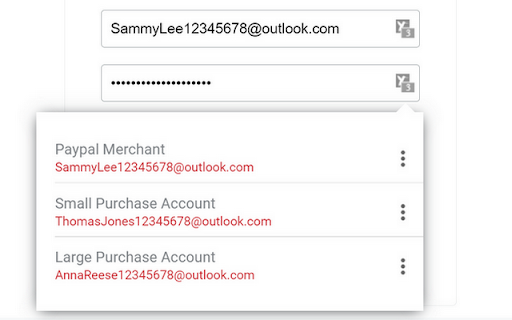
Screenshots


About
Access & fill site passwords with Pleasant Password Server

Put Passwords at your fingertips with Chrome Auto-Filler.

Auto-Filler fills website logins from Pleasant Password Server. It protects the privacy and security of your information by saving password entries into an encrypted database hosted on your Windows machine and/or cloud location.

★ Convenient Benefits

    - Save & share passwords with your team… a Multi-User solution
    - Quick and easy password filling
    - Together with the KeePass for Pleasant client app: Easy and Powerful!

★ Features
    - Search
    - Access & fill site passwords with Pleasant Password Server, also known as KeePass Hub.
    - Select & Autofill entries matching the current site URL
    - Save & Update entries back to Password Server
    - In-Place Editing of Entries
    - Do-Not-Prompt (Domain Specific)
    - Authenticator (TOTP)
    - Language Support: English, French, German, Spanish, Dutch, ...more coming!

★ Secure Integration
    - Secure Login (OAuth 2.0, SAML SSO)
    - Authentication via Azure, AD/LDAP, other Identity Providers
    - Strong Encryption with Server Certificates
    - User Role access, customizable Access Levels
    - 2FA/MFA: 6-digit codes, YubiKey, Email, DUO, RADIUS
    - Domain and Subdomain Matching, Cross-Site Scripting Protections
    - In-time Password Retrieval (no password cache)
    - Safety Shutoff Switch
    - Logout on Timeout, Lockout on Login Attempts

★ Improved field detection, form filling, and password

★ Coming: better browser compatibility, integration with mobile, ... and much more!


★ Questions/Suggestions:
Please contact Technical Support for excellent service and provide any product improvement suggestions.
https://pleasantpasswords.com/contact-us

★ Getting Started
Enter the web address of your Pleasant Password Server (version 7.11.11 or higher). Then login/authenticate.

If your Admin has enabled plugin usage, you're done! You can set your preferences in the settings.


★ About Pleasant Password Server
Pleasant Password Server is an award-winning multi-user password management tool compatible with "KeePass Password Safe" and Bruce Schneier's "Password Safe", the most popular password management systems in the world. https://pleasantsolutions.com/passwordserver

➤ Easy to use			➤ Secure
➤ Trusted				➤ Affordable
➤ Award Winning			➤ In Your Control, on Your Server

Users can use Single Sign-On (SSO), perform Password Resets; Teams can provide powerful custom integrations via API; Admins can define customer Access Levels, setup Auto Change Passwords, and view Reports and specific Audit events... and many more Enterprise level features.

★ Trusted by Thousands of Organizations
Worldwide, our secure software helps protect trillions of dollars in corporate value. Our system is trusted globally by both small businesses and large companies with thousands of users, including those with rigorous needs.

★ Download Pleasant Password Server
https://pleasantpasswords.com/demo-download

★ End User License Agreement (EULA)
https://pleasantpasswords.com/info/pleasant-password-server/y-end-user-license-agreement
Technical
- Version
- 2.0.6
- Manifest
- V3
- Size
- 965KiB
- Min Chrome
- 88
- Languages
- 5
- Featured
- No
Metadata
- ID
- eaedglemlchhplocegehpjfeganapaij
- Developer ID
- u525363f103f2a8c7b2f1e9ce80c1aa05
- Developer Email
- [email protected]
- Created
- Dec 26, 2020
- Last Updated (Store)
- Apr 30, 2026
- Last Scraped
- Jun 22, 2026
- Website
- pleasantpasswords.com
- Privacy Policy
- https://pleasantpasswords.com/privacy-policy
Similar extensions
Alternatives to Pleasant Password Server Auto-Filler, ranked by description similarity.

Passbolt - Open source password manager
Passbolt extension for the open source password manager for teams.
400.0K
★ 4.1

EasyPass – Secure Passwords in One Click
Create secure passwords instantly – simple, smart, and safe with EasyPass.
3

PasswordLab - Self-hosted password manager
PasswordLab is a self-hosted password manager designed for businesses & enterprises. This browser extension is a part of our…
—

Passwordstate
Passwordstate for Chrome is a form filler extension that obtains credentials from Passwordstate.
100.0K
★ 3.2

TeamPassword
Password sharing for collaborative teams.
7.0K
★ 4.6

Safepass: password generator - unique, random, and strong
SafePass – a unique, strength-driven password generator ensures your passwords are robust and random, offering security for free.
1.0K
★ 4.3
Password Boss
Remember every password and and login to websites automatically.
20.0K
★ 3.8

Pass Protect
Secure your digital life with Pass Protect, the ultimate password manager.
15
Data sourced from the Chrome Web Store · last verified Jun 22, 2026.