
AI PromptBox: Save your prompts on ChatGPT, Claude, Gemini and DeepSeek!
AI PromptBox is a browser extension that helps you save and reuse your best prompts right from ChatGPT, Claude, Gemini and DeepSeek.
As of June 2026, AI PromptBox: Save your prompts on ChatGPT, Claude, Gemini and DeepSeek! has 76 users and a 5.00/5 rating from 1 reviews in the Productivity category.
Usersdown 3.8 percent−3.8%
76
76
Ratingno change0%
5.00
1 reviews
Reviewsno change0%
1
Version
0.0.4
Manifest V3
History
5 snapshotsTracking since Apr 1, 2026.
View as table
| Date | Users | Rating | Reviews | Version |
|---|---|---|---|---|
| Apr 1, 2026 | 79 | 5.00 | 1 | 0.0.4 |
| Apr 21, 2026 | 119 | 5.00 | 1 | 0.0.4 |
| May 6, 2026 | 113 | 5.00 | 1 | 0.0.4 |
| May 18, 2026 | 80 | 5.00 | 1 | 0.0.4 |
| Jun 1, 2026 | 73 | 5.00 | 1 | 0.0.4 |
| Now | 76 | 5.00 | 1 | 0.0.4 |
Permissions & access
- Permissions
- storage
- Host access
- None declared
Screenshots


About
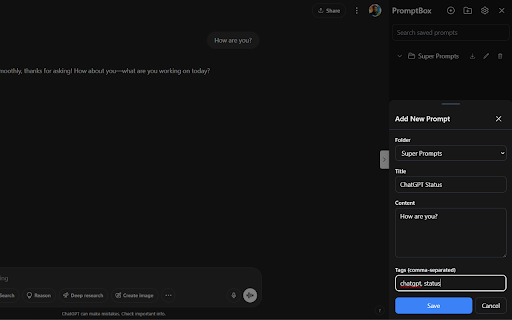
PromptBox - AI Prompt Management Extension. Save your best prompts on ChatGPT, Claude, Gemini and DeepSeek!

PromptBox is a browser extension designed to help users organize, manage, and quickly access their AI prompts across various AI platforms (ChatGPT, Claude, Gemini, DeepSeek).

Core Features

1. Sidebar Interface
Collapsible sidebar that integrates seamlessly with AI platforms
Persistent state option to remember sidebar open/close preference
Dark/light mode support that automatically matches system preferences
Clean, modern interface with intuitive controls

2. Folder Management

Create custom folders to organize prompts by category, project, or purpose
Edit folder names to keep organization up-to-date
Delete folders with confirmation to prevent accidental removal
Export folder contents as CSV for backup or sharing
Expandable/collapsible folder view for better workspace management

3. Prompt Management

Create and store prompts within organized folders
Each prompt includes:
Title for quick reference
Content (the actual prompt text)
Custom tags for additional organization and searchability
Edit existing prompts to refine and improve them
Quick-copy functionality to instantly use prompts in the AI interface
Delete prompts with confirmation
Preview prompt content in a compact format

4. User Experience Features

Bottom sheet interface for adding/editing prompts and accessing settings
Search functionality for finding specific prompts
Tag system for cross-folder organization
Intuitive icons and buttons for common actions
Responsive design that works across different screen sizes
Confirmation dialogs for destructive actions

5. Data Management

Local storage for persistent data across browser sessions
Export functionality for data backup and sharing
Settings management for user preferences
Configurable persistence options

Technical Features

TypeScript implementation for type safety
React-based component architecture
Tailwind CSS for styling
Dark mode support with system preference detection
Local storage integration for data persistence
Modern UI components (floating icons, bottom sheets, toggles)

Use Cases

AI Prompt Libraries: Build and maintain collections of effective prompts
Project Organization: Separate prompts by project or purpose
Team Sharing: Export and share prompt collections with team members
Quick Access: Rapidly access frequently used prompts
Prompt Iteration: Refine and improve prompts over time with easy editing
Cross-Platform Use: Use the same prompt library across different AI platforms
The extension serves as a comprehensive prompt management solution, helping users maintain an organized library of AI prompts while providing quick access and efficient management tools.
Technical
- Version
- 0.0.4
- Manifest
- V3
- Size
- 287KiB
- Min Chrome
- 88
- Languages
- 1
- Featured
- No
Metadata
- ID
- eadnknnjeefjgcnpoadelddgjnjkekaa
- Developer ID
- ue02d19cd507f9b3ba57b0c2c4612ca93
- Developer Email
- [email protected]
- Created
- May 13, 2025
- Last Updated (Store)
- May 26, 2025
- Last Scraped
- Jun 1, 2026
- Website
- —
- Support URL
- —
- Privacy Policy
- —
Similar extensions
Alternatives to AI PromptBox: Save your prompts on ChatGPT, Claude, Gemini and DeepSeek!, ranked by description similarity.

PromptBox
Your AI Prompt Library - Save and fill variables in prompts easily.
111

Prompt Box
Store and organize your AI prompts
32
★ 3.0

PromptPal
PromptPal is a Chrome extension that helps you save, organize, and access your AI prompts from anywhere.
12
★ 5.0

AI Prompt Manager – PromptIn for ChatGPT, Claude, Gemini & More
AI Prompt Manager for ChatGPT, Claude, Gemini, Perplexity & Grok. Save, organize & reuse your best prompts in one place.
178
★ 5.0

PromptShelf
Save, organize, and quickly paste your favorite prompts into AI tools.
16
★ 5.0

PromptBox - AI Prompt Manager
Store, manage, and reuse AI prompts with automatic Chrome sync. Features dynamic variables and side panel access.
58

PromptBox
PromptBox V1.0.3 - Quickly access and insert your saved AI prompts.
12

PromptCache
Lightning-fast prompt management for AI workflows
13
★ 5.0
Data sourced from the Chrome Web Store · last verified Jun 1, 2026.