
Manga Reader
Manga Reader
As of June 2026, Manga Reader has 907 users and a 3.36/5 rating from 14 reviews in the Education category.
Usersdown 4.5 percent−4.5%
907
907
Ratingno change0%
3.36
14 reviews
Reviewsno change0%
14
Version
1.3.9
Manifest V3
History
3 snapshotsTracking since Apr 1, 2026.
View as table
| Date | Users | Rating | Reviews | Version |
|---|---|---|---|---|
| Apr 1, 2026 | 950 | 3.36 | 14 | 1.3.9 |
| May 3, 2026 | 964 | 3.36 | 14 | 1.3.9 |
| Jun 2, 2026 | 946 | 3.36 | 14 | 1.3.9 |
| Now | 907 | 3.36 | 14 | 1.3.9 |
Permissions & access
- Permissions
- storagescriptingactiveTabidentitycontextMenus
- Host access
- None declared
Screenshots
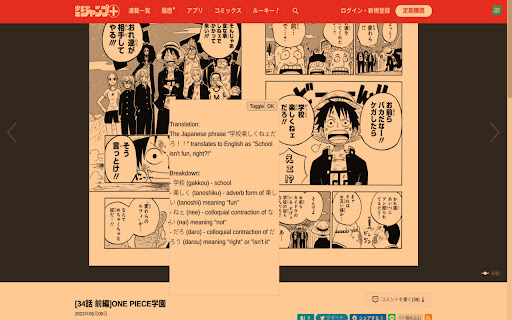
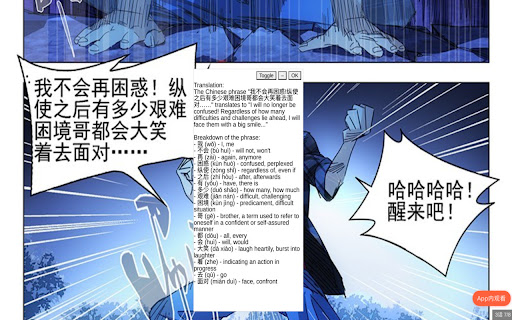
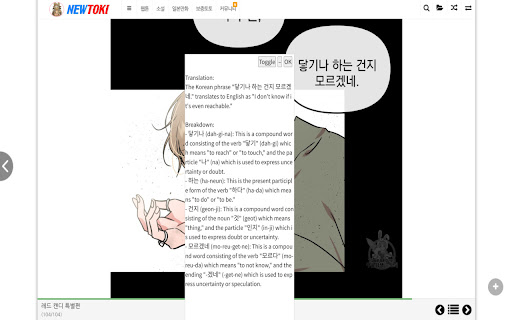
About
Join the discord at http://discord.veebee.fun to get updates on server status and new features or submit feedback and requests. Support me at https://www.patreon.com/MangaReader276

**What Does this Extension Offer?**

This extension offers a unique approach to manga/manhwa/manhua translation and Japanese/Korean/Chinese learning:

1. **Side-by-side translation**: Unlike existing manga translation tools that simply replace Japanese text with English, this extension allows you to see the original Japanese text alongside the translated text. This feature provides a learning opportunity by enabling you to compare and understand the language in its original form. First click on the extension icon or use a keyboard shortcut to initiate cropping. Then crop the text bubble or the phrase to be translated. Feel free to toggle to see the original text to ensure that OCR (Optical Character Recognition) identifies the correct text to be translated.

2. **AI-powered Tutor**: While the extension offers conventional translation, it also provides the option to harness the power of a large language model. This cutting-edge feature breaks down sentences or phrases into easily digestible words or compound words, along with their translations. This approach enables a deeper understanding of the context and nuances within the text.

3. **Not just manga**: You can use this for manhwa and manhua as well since Korean and Chinese are also supported! You can also use this on other platforms like Youtube or Netflix subtitles!

**Try it out yourself**

0. Pin the extension
1. Go to https://shonenjumpplus.com/episode/4856001361458138514
2. Right click the extension icon to open the options page from the menu
3. Sign in with google account
4. Feel free to change the other options
5. Go back to the manga
6. Click on the extension icon to start cropping.
7. Crop any text bubbles
8. (optional) switch between gpt/deepl on the options page. Choose the former if you want in depth translation. Choose the latter if you want a quicker translation
9. (optional) choose different capture modes that best suit your reading needs. Single is the most reliable at the moment. Multiple works best on large manga panels or an entire page.
10. (optional) switch between the supported languages on the options page.
11. (optional) enter you own GPT key for faster translations. The key is local to your browser and will not be uploaded to any servers. (This can be publicly verified in the client code.)

**Important note**

This is an early prototype. Depending on how many users find this idea useful, I will work on polishing it and adding new features. Please send me feature requests and bugs and I will do my best to fix them. Sometimes the first translation might take a while because the server restarts. Thanks for your patience!
Technical
- Version
- 1.3.9
- Manifest
- V3
- Size
- 1.08MiB
- Min Chrome
- 88
- Languages
- 1
- Featured
- Yes
Metadata
- ID
- eabnmbpmoencafnpbobahdeamaljhoef
- Developer ID
- u894c9f0c67571bd65ebb8340e514bfb9
- Developer Email
- [email protected]
- Created
- Jul 9, 2023
- Last Updated (Store)
- Nov 20, 2023
- Last Scraped
- Jun 2, 2026
- Website
- —
- Support URL
- https://www.veebee.fun
- Privacy Policy
- https://veebee.fun/faq
Similar extensions
Alternatives to Manga Reader, ranked by description similarity.

ManabiDojo - Learn Japanese on the Web (Manga OCR, YouTube, NHK & more!)
Learn Japanese by browsing the web or reading your favorite Manga.
264
★ 5.0

Kimchi Reader
Korean popup dictionary for YouTube, Netflix & any website
3.0K
★ 4.8

English to Japanese Translator
Translate ANY and ALL English text to Japanese (TextToSpeech & Romaji included)
30

Udemy Subtitle Translator
Translate Udemy subtitles in real-time using AI translation APIs
34
★ 2.0

Kanji popup translator
A very simple kanji translator that creates a popup!
10

Better Translator for Reddit™: Threads, Comments & AI
Better Reddit™ Translator. Unlimited & Private. No account needed. Surgical translation of threads. Supports Ollama & AI.
886
★ 5.0

Quick Dictionary & Translator
Select text to get translation and comprehensive vocabulary information in English and Japanese
6

AI Reading Assistant
Using advanced AI language models to explain selected text and summarize web pages just with one quick click
99
★ 5.0
Data sourced from the Chrome Web Store · last verified Jun 2, 2026.