
Share webpage via Gmail
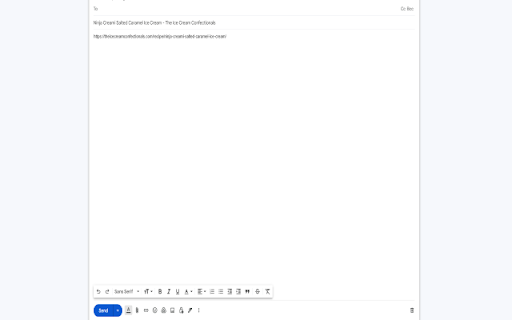
Email current webpage. Website title becomes the subject and website URL becomes the message body.
As of June 2026, Share webpage via Gmail has 207 users and a 4.00/5 rating from 3 reviews in the Workflow & Planning category.
Usersup 6.7 percent+6.7%
207
207
Ratingno change0%
4.00
3 reviews
Reviewsno change0%
3
Version
1.0.0
Manifest V3
History
3 snapshotsTracking since Apr 1, 2026.
View as table
| Date | Users | Rating | Reviews | Version |
|---|---|---|---|---|
| Apr 1, 2026 | 194 | 4.00 | 3 | 1.0.0 |
| May 3, 2026 | 205 | 4.00 | 3 | 1.0.0 |
| Jun 2, 2026 | 201 | 4.00 | 3 | 1.0.0 |
| Now | 207 | 4.00 | 3 | 1.0.0 |
Permissions & access
- Permissions
- activeTab
- Host access
- None declared
Screenshots
About
This Chrome Extension provides a convenient way to compose and send emails using information from the active tab. Upon activation, the Extension launches Gmail in a new tab, with the current webpage's title automatically set as the email subject and the URL inserted into the email body. This allows users to effortlessly communicate with intended recipients by simply filling out the designated "To:" field.
Technical
- Version
- 1.0.0
- Manifest
- V3
- Size
- 6.36KiB
- Min Chrome
- 88
- Languages
- 1
- Featured
- Yes
Metadata
- ID
- dpmgfbniiojpbadgbgcimklddcgiibgn
- Developer ID
- ue2c99116447ab41ccbb132d3e815e219
- Developer Email
- [email protected]
- Created
- Apr 9, 2023
- Last Updated (Store)
- Apr 9, 2023
- Last Scraped
- Jun 2, 2026
- Website
- —
- Support URL
- https://linksaw.com/contact
- Privacy Policy
- —
Similar extensions
Alternatives to Share webpage via Gmail, ranked by description similarity.

Send from Gmail (by Google)
Makes Gmail your default email application and provides a button to compose a Gmail message to quickly share a link via email
800.0K
★ 4.0

MailTrack - Write entire mail track document.
An automatic email generator is a program or tool that generates email, and works on all sites.
156

MailPro - Write entire mail with AI.
An automatic email generator and email tracking tool.
19

Gmail Link Sender
This add-on opens a Gmail compose window with the current page URL automatically inserted into the email body.
8

Rewrite with AI
Rewrite text beautifully using Groq AI.
4

Send from Gmail - Share Link Via Email
provides a button which allows you to send a webpage URL (link) via email.
6.0K
★ 4.9

Tab for Google Tasks
Opens Google Tasks in a new tab. Light and Fast!
1.0K
★ 2.5

Send URL to Gmail
This simple extension forwards urls in gmail so you don't have to copy and paste them!
173
★ 2.0
Data sourced from the Chrome Web Store · last verified Jun 2, 2026.