Bookmark, AI Tagging, Cache & Screenshot | PageOrg
Organize, ai tagging bookmarks. Cache page offline. Take, edit screenshots. Team collaboration.
As of June 2026, Bookmark, AI Tagging, Cache & Screenshot | PageOrg has 1,000 users and a 4.47/5 rating from 30 reviews in the Productivity category.
Usersno change0%
1.0K
1,000
Ratingno change0%
4.47
30 reviews
Reviewsno change0%
30
Version
1.6.5
Manifest V3
Permissions & access
- Permissions
- activeTabbookmarkscontextMenusdeclarativeNetRequesthistoryidentitypageCapturestoragetabsunlimitedStoragewindows
- Host access
- http://applinks.pageorg.com/app*, https://applinks.pageorg.com/app*
Screenshots



About
Functionality:

1. Bookmark Management: Import bookmarks and search by text, tags, domain, or URL.

2. Browsing History Search: Import browsing history and search by text, date range, domain, or URL.

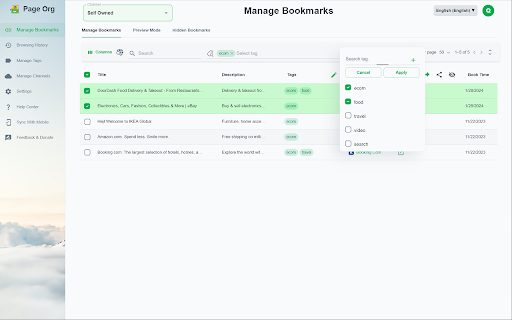
3. Easy Bookmark Organization: Edit titles inline, bulk-apply and drag & drop tags, and leverage AI-driven auto-tagging for efficient organization.

4. Offline Page Caching: Cache pages locally for offline access with an option to auto-cache bookmarked pages. All data is stored locally to ensure privacy.

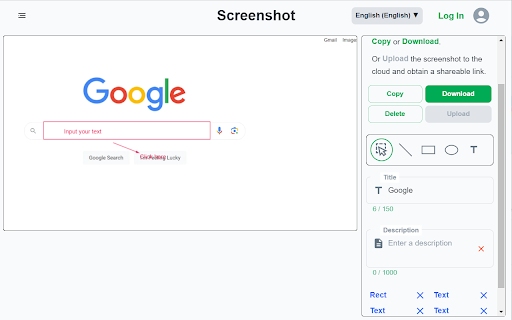
5. Screenshot Capture & Editing: Capture, annotate, and download screenshots easily, or upload to share via a unique link.

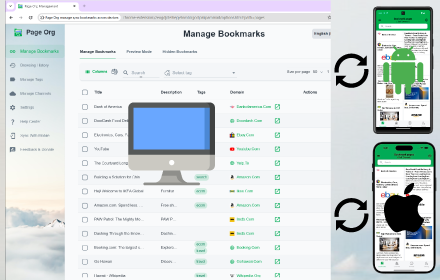
6. Cross-Device Sync & Collaboration: Sync data across devices and collaborate on bookmarks with friends and colleagues for seamless teamwork.

Introduction:
Page Org – the ultimate Chrome extension for seamlessly managing bookmarks, browsing history, and more across devices, with powerful collaboration tools for teams. Cache pages for offline access, capture and annotate screenshots.  Organize, search, cache and share content—all with productivity-focused features designed to streamline your workflow.
With Page Org, elevate your browsing experience through tools that let you:

✔️ Efficiently Manage Bookmarks & Browsing History : Import bookmarks and history, then find what you need quickly by searching through keywords, tags, domains, URLs, or date ranges.
Advanced Tagging & Editing: Edit titles inline, bulk-apply and drag & drop tags, and let AI-powered auto-tagging organize your collection faster than ever.

✔️ Offline Page Caching: Cache any page for offline access, with options to auto-cache bookmarked pages—all stored locally for your privacy.

✔️ Enhanced Screenshot Capture & Editing: Capture, annotate, and edit screenshots on any page. Save locally or upload to share through a unique link.

✔️ Cross-Device Sync & Collaboration: Download our app for mobile, sync data across devices, and create channels to collaboratively manage bookmarks and tags with friends or colleagues for efficient teamwork.

Our Help Center offers step-by-step guidance and tips for maximizing productivity. Say goodbye to cluttered bookmarks and disorganized browsing history. Experience streamlined browsing with Page Org, your partner in efficient online organization.


Support Languages:
 العربية, Deutsch, Español, English, Français,  日本語, 한국어, 简体/繁体中文
Technical
- Version
- 1.6.5
- Manifest
- V3
- Size
- 1.99MiB
- Min Chrome
- 88
- Languages
- 9
- Featured
- No
Metadata
- ID
- dplkeopkcdalfhbmfpcenfinodanncej
- Developer ID
- u41ab338f46d25c2829621a28f14e0317
- Developer Email
- [email protected]
- Created
- Mar 2, 2023
- Last Updated (Store)
- Sep 10, 2025
- Last Scraped
- Jun 1, 2026
- Website
- pageorg.com
- Privacy Policy
- https://www.pageorg.com/page-org/privacy
Similar extensions
Alternatives to Bookmark, AI Tagging, Cache & Screenshot | PageOrg, ranked by description similarity.

Bookmark Manager
Manage your bookmarks with custom categories and notes.
6

Bookmark +
A premium bookmark manager with nested folders, smart tags, instant search, and optional cloud sync.
1

Beautiful Bookmarks
A beautiful way to save and manage your favorite URLs with Google Tasks sync
24
★ 5.0

Advanced Bookmark Manager
Manage and organize your bookmarks with advanced features.
124
★ 4.2

Bookmark History Manager PRO
Bookmark History Manager PRO & share helper
12

Favorites Management
A powerful Chrome extension for managing your bookmarks with advanced features. Free for up to 200 bookmarks.
88
★ 5.0

FavURL - Bookmark Manager
A Chrome extension for bookmark management with local sync
4
★ 5.0

Bookmark Manager+
Bookmark Manager+ is a comprehensive browser bookmark enhancement tool that supports one-click access via shortcut keys and offers…
7
Data sourced from the Chrome Web Store · last verified Jun 1, 2026.