
LMS Dash
LMS Dash helps instructors, instructional designers, and administrators spend less time managing Canvas.
As of June 2026, LMS Dash has 82 users and a 5.00/5 rating from 1 reviews in the Productivity category.
Usersup 67.3 percent+67.3%
82
82
Ratingno change0%
5.00
1 reviews
Reviewsno change0%
1
Version
0.4.0
Manifest V3
90-day change · In the last 90 days this extension 1 version update.
History
4 snapshotsTracking since Apr 1, 2026.
View as table
| Date | Users | Rating | Reviews | Version |
|---|---|---|---|---|
| Apr 1, 2026 | 49 | 5.00 | 1 | 0.3.0 |
| May 3, 2026 | 50 | 5.00 | 1 | 0.3.0 |
| Jun 2, 2026 | 51 | 5.00 | 1 | 0.3.0 |
| Jun 8, 2026 | 75 | 5.00 | 1 | 0.4.0 |
| Now | 82 | 5.00 | 1 | 0.4.0 |
Changelog
- Jun 2, 2026description
Note: LMS Dash will only work for Canvas installations on the "instructure.com" domain.

LMS Dash is your Canvas assistant that is always ready in your browser. This browser extension helps instructors, instructional designers, and administrators spend less time on managing Canvas and more time on delivering great courses. LMS Dash simplifies course and LMS management tasks by offering features that are not natively available in Canvas.

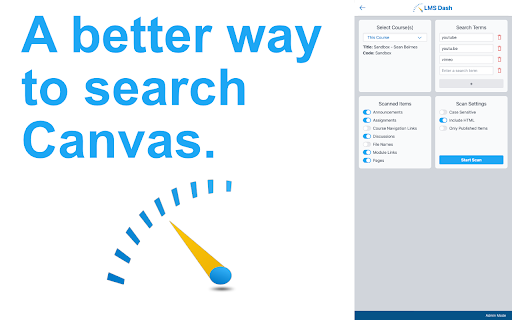
One of the most important features of LMS Dash is the course scanner. Do your courses have old assignment dates, addresses, or contact information that need to be updated or removed? Do you need to know if faculty have a link visible in the course navigation? Do you need to find and replace a lot of broken links? Without LMS Dash, you would spend countless hours manually clicking through courses to find these. LMS Dash can help you find these in your own courses and (if you are a Canvas admin) help you find these in every course in an enrollment term. You can search for text in announcements, assignments, course navigation links, discussions, file names, module links, and pages. You can also scan the HTML of course items to find CSS styling, URLs, iframes, and more!

LMS Dash will show you in which course it found the text and give you a link directly to the item where it was found. The preview button next to each result will also help you narrow down where it found the text. Once you are ready to view the course item, just click the link to go straight to it in Canvas. If you scanned a lot of courses, you can also export the results as a CSV file.

The set up is simple. Just click install and open a new Canvas tab. Yes, that's it!
LMS Dash is your shortcut to faster Canvas course management.

Note: LMS Dash only works with Canvas instances on the instructure.com domain.

🚀 What it does
LMS Dash is built for instructors, instructional designers, and Canvas admins. It adds time-saving tools for managing Canvas courses more efficiently.

🔎 Key feature: Course Scanner
Quickly scan Canvas courses to find:
• outdated dates
• old addresses or contact information
• broken links
• visible course navigation links
• text in course content
• HTML elements like URLs, CSS, and iframes

LMS Dash can search:
• announcements
• assignments
• discussions
• pages
• module links
• file names
• course navigation links

📍 Why it helps
LMS Dash helps you quickly see where matches were found, preview results, and jump straight to the item in Canvas. If you're a Canvas admin, you can also scan every course in an enrollment term.

📁 Export results
Need to share or review findings later? Export scan results as a CSV.

⚡ Simple setup
1. Install LMS Dash
2. Open Canvas in a new tab
3. Start using LMS Dash

🆕 Release Notes — v0.4.0
• Added a bulk date adjuster for Canvas Announcements — makes it faster to update announcement dates across courses
• Performance improvements
• Bug fixes
Permissions & access
- Permissions
- sidePaneltabs
- Host access
- None declared
Screenshots


About
LMS Dash is your shortcut to faster Canvas course management.

Note: LMS Dash only works with Canvas instances on the instructure.com domain.

🚀 What it does
LMS Dash is built for instructors, instructional designers, and Canvas admins. It adds time-saving tools for managing Canvas courses more efficiently.

🔎 Key feature: Course Scanner
Quickly scan Canvas courses to find:
• outdated dates
• old addresses or contact information
• broken links
• visible course navigation links
• text in course content
• HTML elements like URLs, CSS, and iframes

LMS Dash can search:
• announcements
• assignments
• discussions
• pages
• module links
• file names
• course navigation links

📍 Why it helps
LMS Dash helps you quickly see where matches were found, preview results, and jump straight to the item in Canvas. If you're a Canvas admin, you can also scan every course in an enrollment term.

📁 Export results
Need to share or review findings later? Export scan results as a CSV.

⚡ Simple setup
1. Install LMS Dash
2. Open Canvas in a new tab
3. Start using LMS Dash

🆕 Release Notes — v0.4.0
• Added a bulk date adjuster for Canvas Announcements — makes it faster to update announcement dates across courses
• Performance improvements
• Bug fixes
Technical
- Version
- 0.4.0
- Manifest
- V3
- Size
- 204KiB
- Min Chrome
- 88
- Languages
- 1
- Featured
- No
Metadata
- ID
- dphccimingcbmlkehpflgkningeomenp
- Developer ID
- u26eed890579732f7c0edafc84f5f2eec
- Developer Email
- [email protected]
- Created
- Aug 21, 2024
- Last Updated (Store)
- Jun 1, 2026
- Last Scraped
- Jun 8, 2026
- Website
- —
- Support URL
- —
- Privacy Policy
- —
Data sourced from the Chrome Web Store · last verified Jun 8, 2026.