
VOX Music Player Helper
Easy way to import and play any track from YouTube or SoundCloud in VOX Music Player for Mac.
As of June 2026, VOX Music Player Helper has 199 users in the Productivity category.
Usersup 19.9 percent+19.9%
199
199
Ratingno change0%
—
— reviews
Reviewsno change0%
—
Version
1.3
Manifest V3
History
3 snapshotsTracking since Apr 1, 2026.
View as table
| Date | Users | Rating | Reviews | Version |
|---|---|---|---|---|
| Apr 1, 2026 | 166 | — | — | 1.3 |
| May 3, 2026 | 161 | — | — | 1.3 |
| Jun 2, 2026 | 169 | — | — | 1.3 |
| Now | 199 | — | — | 1.3 |
Permissions & access
- Permissions
- storage
- Host access
- http://*/*, https://*/*
Screenshots

About
Easy and intuitive. VOX Music Helper is an extension designed to import and combine your favorite YouTube and SoundCloud tracks in the VOX Player on your Mac.

Key Features

Effortless YouTube and SoundCloud Import:

With VOX Music Helper, listening to your favorite SoundCloud or YouTube tracks through VOX Music Player on your Mac has never been easier.
Install VOX Music Helper to import all favorite music tracks to VOX Music Player for Mac, and enjoy a unified music library in one place.

Transition and playback:

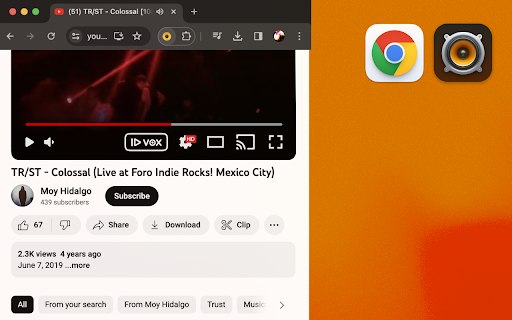
Right after you have an extension installed in your Chrome browser, a functional "Play in VOX" button [ ▶ VOX ] will appear on the track bar of the YouTube or SoundCloud webpages interface. Press this button to launch the VOX Music Player on your Mac and import the chosen track to the Playlist tab in VOX.

After the imported track appears in VOX Music Player, the VOX application grants you instant control over playback, creating new playlists, etc.
Which means that you can import and combine your SoundCloud favorites with YouTube tracks to mix them all together in a single playback queue in VOX Music Player, enhancing your convenience and overall user experience.

VOX Music Helper ensures that your YouTube or SoundCloud tracks are imported to play seamlessly in VOX Player, allowing you to enjoy music effortlessly, without using your browser! You will still need an internet connection though.

"Play in VOX" button should be Enabled for YouTube and SoundCloud sources by default, so you can start importing and enjoying your music with VOX Music Player without any technical hurdles. You may find the VOX Helper icon on Chrome extensions list, click on the icon to open settings.

Advanced playback tools:
Make advantage of the crisp and unique playback experience that VOX Music Player for macOS offers. Various audio tweaks, such as EQ, cross-fade, 200% volume boost, Apple AudioUnits support and more, will definitely make your SoundCloud and YouTube listening sessions more immersive and enjoyable.

Discover a more convenient, efficient, and high-quality way to listen to your favorite tracks seamlessly with VOX Player on your Mac.

Streamlined, effortless, and enhanced music enjoyment awaits!
Technical
- Version
- 1.3
- Manifest
- V3
- Size
- 105KiB
- Min Chrome
- 88
- Languages
- 1
- Featured
- No
Metadata
- ID
- dpfmpmojnekopmaodgdgmimghpdhehnh
- Developer ID
- u0923add69aa9804ab26d2374ccb261ee
- Developer Email
- [email protected]
- Created
- Sep 27, 2023
- Last Updated (Store)
- Oct 24, 2023
- Last Scraped
- Jun 2, 2026
- Website
- —
- Support URL
- —
- Privacy Policy
- https://vox.rocks/privacy
Similar extensions
Alternatives to VOX Music Player Helper, ranked by description similarity.

SoundCloud to MP3 Player
Use SoundCloud to MP3 Player to play music in background, control playback, and stream music online without switching tabs.
6.0K
★ 4.3

YouTube Equalizer & Normalizer Disabler
Disables YouTube's automatic volume normalization and provides a 3-band/10-band equalizer.
1.0K
★ 5.0

MP3 Converter
Convert sound fast with mp3 converter. Easily video to mp3, convert mp4 to mp3, and change your audio format right in Chrome.
541

DropBeats for YouTube Music
Control YouTube Music from your Mac menu bar. Seamlessly manage your music without switching tabs.
36
★ 5.0

Video to Audio Converter
Use Video to Audio Converter: online convert video to audio (mp4 to mp3, etc). App for file convert to mp3 and extract music, sound.
10.0K
★ 4.9

Volumax - Volume Booster
Up to 600% volume boost. The simplest and most reliable volume booster with advanced features.
50
★ 5.0

Extract audio from video
One-click extract audio from video - upload file, click to extract button, get your music from video, enjoy fast audio extractor.
2.0K
★ 5.0

OGG to MP3
Use OGG to MP3: convert audio format like Opus, aac, m4a to mp3 and m4a to wav. High-quality fast file converter (ogg, mp3 to wav).
731
★ 5.0
Data sourced from the Chrome Web Store · last verified Jun 2, 2026.