
Reply Better AI
Improve your messages using AI. Pick from 500+ OpenRouter models with search, pricing, and free filter.
As of June 2026, Reply Better AI has 3 users in the Productivity category.
Usersno change0%
3
3
Ratingno change0%
—
— reviews
Reviewsno change0%
—
Version
1.3.0
Manifest V3
90-day change · In the last 90 days this extension 2 version updates.
History
4 snapshotsTracking since May 15, 2026.
View as table
| Date | Users | Rating | Reviews | Version |
|---|---|---|---|---|
| May 15, 2026 | — | — | — | 1.2.2 |
| May 21, 2026 | — | — | — | 1.2.2 |
| May 27, 2026 | 1 | — | — | 1.2.2 |
| Jun 3, 2026 | 1 | — | — | 1.2.3 |
| Now | 3 | — | — | 1.3.0 |
Changelog
- Jun 3, 2026description
Reply Better AI rewrites your drafts using the AI model you choose. Pick any of OpenRouter's 500+ models — free or paid — and rewrite right where you're typing, on any website.

KEY FEATURES

• Dynamic model picker. Search the live OpenRouter catalog inside the extension, with three tabs (Popular, Free, All), provider filter, live per-token pricing, and context-window badges. The list refreshes hourly so you never use a model that's been deprecated.

• Inline button on every long-form composer. Click into a textarea on any website, and a small ✍️ button appears in the corner. One click rewrites the field's content in your default style. The button only shows on actual message composers — it stays out of search bars and form fields.

• Multiple writing styles. Professional, friendly, customer service, concise — pick one or write your own custom prompts and pick them as the default style.

• TextBlaze-style snippets. Define triggers like /addr or /sig and they expand to longer text wherever you type, no AI call required.

• Standalone full-tab settings page in addition to the toolbar popup, so you can manage your key and default model without juggling popups.

PRIVACY-FIRST

The extension is local. Your API key, prompts, and snippets are stored in your browser's local storage, never synced to a cloud account, never sent anywhere except OpenRouter when you actually request a rewrite. Zero telemetry, zero analytics, no third-party SDKs. The only outbound network host is openrouter.ai. Read the full policy at https://github.com/dantnan/reply-better-ai/blob/main/docs/privacy.md

GETTING STARTED

1. Install the extension and open it from the toolbar.
2. Get a free OpenRouter API key at https://openrouter.ai/keys (no credit card needed for free models).
3. Paste the key into the popup, pick a default model from the picker.
4. Either type into the popup textarea and click Improve, or focus any text composer on a website and click the ✍️ button.

OPEN SOURCE

Source code, issue tracker, and full changelog at https://github.com/dantnan/reply-better-ai (MIT licensed). Built and bundled with esbuild — no obfuscation, every transformation reproducible from the public source.
Reply Better AI rewrites your drafts using the AI model you choose. Pick any of OpenRouter's 500+ models, free or paid, and rewrite right where you're typing, on any website.

KEY FEATURES

• Dynamic model picker. Search the live OpenRouter catalog inside the extension, with three tabs (Popular, Free, All), a provider filter, live per-token pricing, and context-window badges. The list refreshes hourly so you never use a model that's been deprecated.

• Live streaming results. Watch the improved version type itself out as it's generated, then flip to the Changes view to see exactly what was edited, word by word. Want another take? Hit Regenerate and cycle through versions.

• Inline button on every long-form composer. Click into a textarea on any website and a small ✍️ button appears in the corner. Click it to open a quick review panel: pick a writing style, preview the result with a diff of the changes, and insert it into the field. Prefer one click? Switch the button to instant rewrite in settings. The button only shows on actual message composers, so it stays out of search bars and form fields.

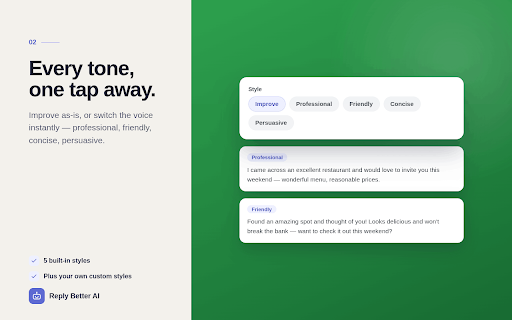
• Multiple writing styles. Improve, Professional, Friendly, Concise, and Persuasive built in, or write your own custom prompts and set one as the default.

• TextBlaze-style snippets. Define triggers like /addr or /sig and they expand to longer text wherever you type, no AI call required.

• Refreshed design with dark mode, plus a standalone full-tab settings page in addition to the toolbar popup, so you can manage your key and default model without juggling popups.

PRIVACY-FIRST

The extension is local. Your API key, prompts, and snippets are stored in your browser's local storage, never synced to a cloud account, never sent anywhere except OpenRouter when you actually request a rewrite. Zero telemetry, zero analytics, no third-party SDKs. The only outbound network host is openrouter.ai. Read the full policy at https://github.com/dantnan/reply-better-ai/blob/main/docs/privacy.md

GETTING STARTED

1. Install the extension and open it from the toolbar.
2. Get a free OpenRouter API key at https://openrouter.ai/keys (no credit card needed for free models).
3. Paste the key into the popup and pick a default model from the picker.
4. Either type into the popup textarea and click Improve, or focus any text composer on a website and click the ✍️ button.

OPEN SOURCE

Source code, issue tracker, and full changelog at https://github.com/dantnan/reply-better-ai (MIT licensed). Built and bundled with esbuild, no obfuscation, every transformation reproducible from the public source.
Permissions & access
- Permissions
- storage
- Host access
- https://openrouter.ai/*
Screenshots



About
Reply Better AI rewrites your drafts using the AI model you choose. Pick any of OpenRouter's 500+ models, free or paid, and rewrite right where you're typing, on any website.

KEY FEATURES

• Dynamic model picker. Search the live OpenRouter catalog inside the extension, with three tabs (Popular, Free, All), a provider filter, live per-token pricing, and context-window badges. The list refreshes hourly so you never use a model that's been deprecated.

• Live streaming results. Watch the improved version type itself out as it's generated, then flip to the Changes view to see exactly what was edited, word by word. Want another take? Hit Regenerate and cycle through versions.

• Inline button on every long-form composer. Click into a textarea on any website and a small ✍️ button appears in the corner. Click it to open a quick review panel: pick a writing style, preview the result with a diff of the changes, and insert it into the field. Prefer one click? Switch the button to instant rewrite in settings. The button only shows on actual message composers, so it stays out of search bars and form fields.

• Multiple writing styles. Improve, Professional, Friendly, Concise, and Persuasive built in, or write your own custom prompts and set one as the default.

• TextBlaze-style snippets. Define triggers like /addr or /sig and they expand to longer text wherever you type, no AI call required.

• Refreshed design with dark mode, plus a standalone full-tab settings page in addition to the toolbar popup, so you can manage your key and default model without juggling popups.

PRIVACY-FIRST

The extension is local. Your API key, prompts, and snippets are stored in your browser's local storage, never synced to a cloud account, never sent anywhere except OpenRouter when you actually request a rewrite. Zero telemetry, zero analytics, no third-party SDKs. The only outbound network host is openrouter.ai. Read the full policy at https://github.com/dantnan/reply-better-ai/blob/main/docs/privacy.md

GETTING STARTED

1. Install the extension and open it from the toolbar.
2. Get a free OpenRouter API key at https://openrouter.ai/keys (no credit card needed for free models).
3. Paste the key into the popup and pick a default model from the picker.
4. Either type into the popup textarea and click Improve, or focus any text composer on a website and click the ✍️ button.

OPEN SOURCE

Source code, issue tracker, and full changelog at https://github.com/dantnan/reply-better-ai (MIT licensed). Built and bundled with esbuild, no obfuscation, every transformation reproducible from the public source.
Technical
- Version
- 1.3.0
- Manifest
- V3
- Size
- 104KiB
- Min Chrome
- 109
- Languages
- 1
- Featured
- No
Metadata
- ID
- dpdibbijcljdjnafjnmaljphpkfojlkb
- Developer ID
- ue0a9b176cde938994a981895edb8c83d
- Developer Email
- [email protected]
- Created
- May 14, 2026
- Last Updated (Store)
- Jun 2, 2026
- Last Scraped
- Jun 9, 2026
- Website
- —
Data sourced from the Chrome Web Store · last verified Jun 9, 2026.