
Trade-Off Assessment Tool
You can quickly verify if something is worth it relative to your golden standard
As of June 2026, Trade-Off Assessment Tool has 11 users and a 3.00/5 rating from 2 reviews in the Shopping category.
Usersup 120.0 percent+120.0%
11
11
Ratingno change0%
3.00
2 reviews
Reviewsno change0%
2
Version
1.0
Manifest V3
History
3 snapshotsTracking since Apr 1, 2026.
View as table
| Date | Users | Rating | Reviews | Version |
|---|---|---|---|---|
| Apr 1, 2026 | 5 | 3.00 | 2 | 1.0 |
| May 3, 2026 | 6 | 3.00 | 2 | 1.0 |
| Jun 2, 2026 | 13 | 3.00 | 2 | 1.0 |
| Now | 11 | 3.00 | 2 | 1.0 |
Permissions & access
- Permissions
- None declared
- Host access
- None declared
Screenshots

About
Trade-Off Assessment Tool

Overview:
The "Trade-Off Assessment Tool" is a Chrome extension designed to assist users in evaluating trade-offs between two items by providing insights into their relative values. This extension aims to simplify decision-making processes by offering a direct and visual comparison between the costs of different items.

Key Features:
Item Cost Comparison:
Users can input the names and costs of two items, denoted as A and B.
Prices can be set in the user's local currency.

No Currency Constraints:
There are no currency constraints, as long as the user uses the same currency for both items. The extension provides flexibility in currency input.

Trade-Off Analysis:
The extension calculates and displays how many units of item A can be acquired with the cost of item B and vice versa.
This feature allows users to understand the trade-offs involved in choosing one item over another.

User-Friendly Interface:
The interface is designed for simplicity, ensuring users can effortlessly input prices, view comparisons, and make informed decisions.


How to Use:

Installation:
Easily install the extension from the Chrome Web Store.
Access the extension through the Chrome toolbar.

Input Prices:
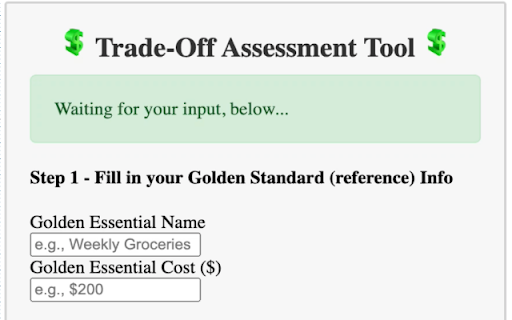
Click on the extension icon to open a pop-up where users can enter the names and costs of items A and B.
Choose the preferred currency for price input.

View Trade-Off:
After entering prices, the extension instantly calculates and displays the trade-off between the two items.

Dynamic Updates:
Users can dynamically update prices and witness real-time adjustments to the trade-off comparison.

Example Scenarios:

Budgeting for Groceries:
Scenario: User has a weekly grocery budget of $200.
Input: Set item A as "Groceries" with a cost of $200 per week, and item B as "Dining Out" with a price of $50 per dining-out experience (assuming the person goes out 4 times a month).
Result: The extension shows that with the cost of one dining-out experience, the user could cover the expenses of one week's groceries, aiding in budget optimization. This comparison helps the user understand the equivalent value of dining out in terms of their weekly grocery budget.

Major Purchase Decision:
Scenario: User is considering purchasing a car for $15,000.
Input: Set item A as "Car" with a cost of $15,000 and item B as "Weekend Getaways" with a price of $500 each.
Result: The extension reveals that the cost of the car is equivalent to 30 weekend getaways, assisting the user in making informed decisions.


Benefits:
Informed Decision-Making:
Users can make informed decisions by directly comparing the trade-offs between different items.

Budget Optimization:
The extension assists users in optimizing their budget by visualizing the trade-offs in costs.

Prioritization of Spending:
Users can prioritize spending based on trade-offs, aligning with their financial goals and preferences.

Time-Saving:
Streamlines decision-making processes, saving users time and effort in manual calculations.

Conclusion:
The "Trade-Off Assessment Tool" extension empowers users to make strategic decisions by providing clear and visual representations of the trade-offs involved in choosing between two items. Whether managing a weekly budget or contemplating a significant purchase, this extension enhances financial awareness and supports users in aligning their spending with their priorities and goals. Install the extension today and embark on a more informed trade-off assessment journey!
Technical
- Version
- 1.0
- Manifest
- V3
- Size
- 1.1MiB
- Min Chrome
- 88
- Languages
- 1
- Featured
- Yes
Metadata
- ID
- dpcolopidkabopokfpbbgelmbhabgkjf
- Developer ID
- ucde88f67f41275bb330bb29bcdeec8be
- Developer Email
- [email protected]
- Created
- Nov 28, 2023
- Last Updated (Store)
- Nov 28, 2023
- Last Scraped
- Jun 2, 2026
- Website
- —
- Support URL
- —
- Privacy Policy
- —
Similar extensions
Alternatives to Trade-Off Assessment Tool, ranked by description similarity.

Work Hours Price Converter
Convert product prices into the work hours required based on your hourly wage.
11
★ 5.0

Let's Compare - Same Product Less Money!
Let's Compare is a powerful all-in-1 shopping assistant which allows users to shop, compare and save items for future purchases.
389
★ 3.0

Price Perspective
Convert prices to meaningful perspectives
3
★ 5.0

Amazon Value Analyzer
Analyze Amazon search results to find the best value items based on price per unit and quantity metrics
—

Worthwhile
Reveal the real prices of your purchases.
7

Price Comparison Tool
Compare prices and save product details.
1.0K
★ 4.2

WorthIt - Smart Shopping Assistant
Make smarter buying decisions with dynamic currency conversion, cost per use and affordability calculations
26
★ 5.0

Good Deal Or Not - GDON
Compare prices instantly and get the best deal — new, used, or direct from the official site.
5.0K
★ 4.2
Data sourced from the Chrome Web Store · last verified Jun 2, 2026.