
FoxyProxy Basic
Easy to use advanced Proxy Management tool for everyone
As of June 2026, FoxyProxy Basic has 30,000 users and a 3.96/5 rating from 80 reviews in the Privacy & Security category.
Usersno change0%
30.0K
30,000
Ratingno change0%
3.96
80 reviews
Reviewsno change0%
80
Version
9.2
Manifest V3
History
4 snapshotsTracking since Apr 21, 2026.
View as table
| Date | Users | Rating | Reviews | Version |
|---|---|---|---|---|
| Apr 21, 2026 | 30.0K | 3.96 | 80 | 9.2 |
| May 6, 2026 | 30.0K | 3.96 | 80 | 9.2 |
| Jun 4, 2026 | 30.0K | 3.96 | 80 | 9.2 |
| Jun 16, 2026 | 40.0K | 3.96 | 80 | 9.2 |
| Now | 30.0K | 3.96 | 80 | 9.2 |
Changelog
- Jun 1, 2026description
FoxyProxy is an open-source, advanced proxy management tool that completely replaces Chrome's limited proxying capabilities. No paid accounts are necessary; bring your own proxies or buy from any vendor. The original proxy tool, since 2006. FoxyProxy has been owned and developed consistently by the same team since 2006. It has never been sold and never will.

WHAT IS IT?
FoxyProxy is a Chrome and Firefox extension which switches an internet connection across one or more proxy servers:

1. by point-and-click of colored icons
2. by URL (define URL patterns with wildcards or regular expressions)
3. by browser tab - set individual proxies per tab: assign up to 4 proxy servers for use on 4 different tabs.

FoxyProxy automates the manual process of editing your browser's proxy settings.

* Customize colors and country flags to make it easy to see which proxy is in use
* Proxy per tab, by URL, or by point-and-click of colored icons
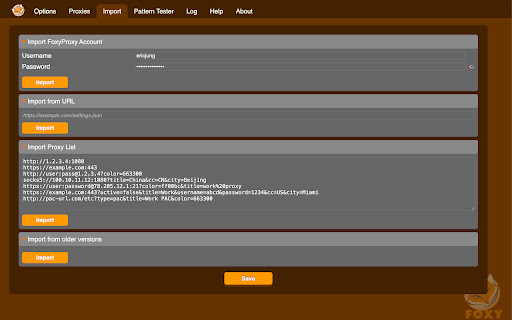
* Import/Export all of your settings, or just URL patterns, to share with others (fixed in 8.0 and above)
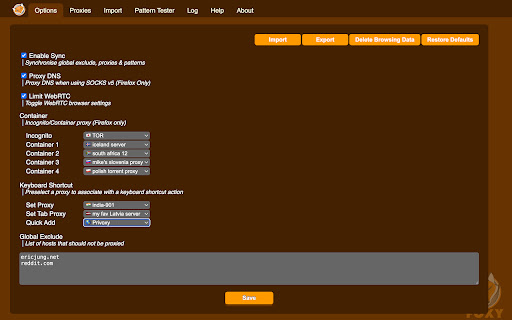
* Select a proxy specifically to use in Incognito Mode
* Keyboard shortcuts
* Globally exclude any domain from proxying
* Create patterns with wildcards or regular expressions. A pattern tester is included.
* (optional) Automatically synchronize all of your proxy settings with your other Chrome instances when you use Sync.
* Turn WebRTC on/off to further limit discovery of your IP address
* Built-in predefined selections for tor, privoxy, and psiphon
* Extensive built-in help


Source code is at https://github.com/foxyproxy/browser-extension

FoxyProxy has been owned and developed consistently by the same team since 2006. It has never been sold and never will.

PERMISSIONS

* downloads: Required to export the extension settings to a file. Users can import that file to other Chrome/Firefox instances, or share it with colleagues, in order to keep the same settings. It can also be backed up and used later.

* proxy: The core function of the extension is to allow users to set the proxy server used by the browser.

* storage: Required to store proxy server settings (hostname, port, username, and which proxy
server is enabled by the user).

* tabs: Required so that users can set separate proxies to use per tab. It is also needed for "QuickAdd" to quickly add a URL pattern that applies to the current/active tab. It is also used to open a URL to getfoxyproxy.org where there is online help.
webRequest: Required to authenticate with proxy servers via webRequest.onAuthRequired
webRequestAuthProvider: Required to authenticate with proxies servers via webRequest.onAuthRequired

* browsingData: Required so the extension can delete cookies, indexedDB, and localStorage when requested by the user on the Options page (Delete Browsing Data button)
privacy: Required so the extension can call browser.privacy.network.webRTCIPHandlingPolicy to turn on/off webRTC in Chrome (Limit WebRTC checkbox in Options page)

* host permission: Required to proxy all webRequests and provide proxy server authentication. <all_urls> is used because users may choose to load any/all URLs through proxy servers (chrome.webRequest.onAuthRequired and chrome.webRequest.onAuthRequired.addListener) . Required to proxy all webRequests and provide proxy server authentication. Also needed to get accounts details from FoxyProxy servers, if requested by the user with the Import FoxyProxy Account on the Import tab.

** No remote code is used in this extension. **
FoxyProxy is an open-source, advanced proxy management tool that completely replaces Chrome's limited proxying capabilities. No paid accounts are necessary; bring your own proxies or buy from any vendor. The original proxy tool, since 2006.

WHAT IS IT?
FoxyProxy is a Chrome and Firefox extension which switches an internet connection across one or more proxy servers:

1. by point-and-click of colored icons
2. by URL (define URL patterns with wildcards or regular expressions)
3. by browser tab - set individual proxies per tab: assign up to 4 proxy servers for use on 4 different tabs.

FoxyProxy automates the manual process of editing your browser's proxy settings.

* Customize colors and country flags to make it easy to see which proxy is in use
* Proxy per tab, by URL, or by point-and-click of colored icons
* Import/Export all of your settings, or just URL patterns, to share with others (fixed in 8.0 and above)
* Select a proxy specifically to use in Incognito Mode
* Keyboard shortcuts
* Globally exclude any domain from proxying
* Create patterns with wildcards or regular expressions. A pattern tester is included.
* (optional) Automatically synchronize all of your proxy settings with your other Chrome instances when you use Sync.
* Turn WebRTC on/off to further limit discovery of your IP address
* Built-in predefined selections for tor, privoxy, and psiphon
* Extensive built-in help


Source code is at https://github.com/foxyproxy/browser-extension

FoxyProxy has been owned and developed consistently by the same team since 2006. It has never been sold and never will.

PERMISSIONS

* downloads: Required to export the extension settings to a file. Users can import that file to other Chrome/Firefox instances, or share it with colleagues, in order to keep the same settings. It can also be backed up and used later.

* proxy: The core function of the extension is to allow users to set the proxy server used by the browser.

* storage: Required to store proxy server settings (hostname, port, username, and which proxy
server is enabled by the user).

* tabs: Required so that users can set separate proxies to use per tab. It is also needed for "QuickAdd" to quickly add a URL pattern that applies to the current/active tab. It is also used to open a URL to getfoxyproxy.org where there is online help.
webRequest: Required to authenticate with proxy servers via webRequest.onAuthRequired
webRequestAuthProvider: Required to authenticate with proxies servers via webRequest.onAuthRequired

* browsingData: Required so the extension can delete cookies, indexedDB, and localStorage when requested by the user on the Options page (Delete Browsing Data button)
privacy: Required so the extension can call browser.privacy.network.webRTCIPHandlingPolicy to turn on/off webRTC in Chrome (Limit WebRTC checkbox in Options page)

* host permission: Required to proxy all webRequests and provide proxy server authentication. <all_urls> is used because users may choose to load any/all URLs through proxy servers (chrome.webRequest.onAuthRequired and chrome.webRequest.onAuthRequired.addListener) . Required to proxy all webRequests and provide proxy server authentication. Also needed to get accounts details from FoxyProxy servers, if requested by the user with the Import FoxyProxy Account on the Import tab.

** No remote code is used in this extension. **
Permissions & access
- Permissions
- contextMenusdownloadsnotificationsproxystoragetabswebRequestwebRequestAuthProvider
- Host access
- <all_urls>
Screenshots



About
FoxyProxy is an open-source, advanced proxy management tool that completely replaces Chrome's limited proxying capabilities. No paid accounts are necessary; bring your own proxies or buy from any vendor. The original proxy tool, since 2006.

WHAT IS IT?
FoxyProxy is a Chrome and Firefox extension which switches an internet connection across one or more proxy servers:

1. by point-and-click of colored icons
2. by URL (define URL patterns with wildcards or regular expressions)
3. by browser tab - set individual proxies per tab: assign up to 4 proxy servers for use on 4 different tabs.

FoxyProxy automates the manual process of editing your browser's proxy settings.

* Customize colors and country flags to make it easy to see which proxy is in use
* Proxy per tab, by URL, or by point-and-click of colored icons
* Import/Export all of your settings, or just URL patterns, to share with others (fixed in 8.0 and above)
* Select a proxy specifically to use in Incognito Mode
* Keyboard shortcuts
* Globally exclude any domain from proxying
* Create patterns with wildcards or regular expressions. A pattern tester is included.
* (optional) Automatically synchronize all of your proxy settings with your other Chrome instances when you use Sync.
* Turn WebRTC on/off to further limit discovery of your IP address
* Built-in predefined selections for tor, privoxy, and psiphon
* Extensive built-in help


Source code is at https://github.com/foxyproxy/browser-extension

FoxyProxy has been owned and developed consistently by the same team since 2006. It has never been sold and never will.

PERMISSIONS

* downloads: Required to export the extension settings to a file. Users can import that file to other Chrome/Firefox instances, or share it with colleagues, in order to keep the same settings. It can also be backed up and used later.

* proxy: The core function of the extension is to allow users to set the proxy server used by the browser.

* storage: Required to store proxy server settings (hostname, port, username, and which proxy
server is enabled by the user).

* tabs: Required so that users can set separate proxies to use per tab. It is also needed for "QuickAdd" to quickly add a URL pattern that applies to the current/active tab. It is also used to open a URL to getfoxyproxy.org where there is online help.
webRequest: Required to authenticate with proxy servers via webRequest.onAuthRequired
webRequestAuthProvider: Required to authenticate with proxies servers via webRequest.onAuthRequired

* browsingData: Required so the extension can delete cookies, indexedDB, and localStorage when requested by the user on the Options page (Delete Browsing Data button)
privacy: Required so the extension can call browser.privacy.network.webRTCIPHandlingPolicy to turn on/off webRTC in Chrome (Limit WebRTC checkbox in Options page)

* host permission: Required to proxy all webRequests and provide proxy server authentication. <all_urls> is used because users may choose to load any/all URLs through proxy servers (chrome.webRequest.onAuthRequired and chrome.webRequest.onAuthRequired.addListener) . Required to proxy all webRequests and provide proxy server authentication. Also needed to get accounts details from FoxyProxy servers, if requested by the user with the Import FoxyProxy Account on the Import tab.

** No remote code is used in this extension. **
Technical
- Version
- 9.2
- Manifest
- V3
- Size
- 223KiB
- Min Chrome
- 108
- Languages
- 12
- Featured
- No
Metadata
- ID
- dookpfaalaaappcdneeahomimbllocnb
- Developer ID
- u864d7d6e99ffc53c6f2b1c7e74aaad07
- Developer Email
- [email protected]
- Created
- Jan 6, 2014
- Last Updated (Store)
- Jun 4, 2026
- Last Scraped
- Jun 24, 2026
- Website
- getfoxyproxy.org
- Support URL
- https://getfoxyproxy.org/contact/
- Privacy Policy
- https://getfoxyproxy.org/privacy-policy/
Similar extensions
Alternatives to FoxyProxy Basic, ranked by description similarity.

FoxyProxy
Easy to use advanced Proxy Management tool for everyone
600.0K
★ 3.8

FoxySpoofers
Chrome extension: virtual camera, spoof geolocation & user agent, and manage a local proxy directly in your browser.
142
★ 5.0

ANyONe Extension
Privacy-focused Socks5 proxy management
261
★ 5.0

SmartProxy
Smart Proxy will automatically enable/disable proxy for the sites you visit, based on customizable patterns.
100.0K
★ 4.5

LightningProxies Extension
Quick & easy proxy management. One click connection, unique cache clear system.
1.0K
★ 3.4

PulseProxy VPN
Simple proxy switcher extension
22

ProxyQ Pro
ProxyQ Pro - Secure & Private Browsing
7

LunaProxy Extension
LunaProxy Extension
1.0K
★ 4.0
Data sourced from the Chrome Web Store · last verified Jun 24, 2026.