
Color Picker — Eyedropper & Palettes
Pick colors with the native eyedropper and manage palettes — no access to any web page. Colors stay on your device.
As of July 2026, Color Picker — Eyedropper & Palettes has — users in the Developer Tools category.
Usersno change0%
—
—
Ratingno change0%
—
— reviews
Reviewsno change0%
—
Version
0.1.0
Manifest V3
History
1 snapshotsTracking since Jul 8, 2026.
Not enough history yet for this metric — the chart fills in as we collect more snapshots.
View as table
| Date | Users | Rating | Reviews | Version |
|---|---|---|---|---|
| Jul 8, 2026 | — | — | — | 0.1.0 |
| Now | — | — | — | 0.1.0 |
Permissions & access
- Permissions
- storage
- Host access
- None declared
Screenshots


About
Color Picker — Eyedropper & Palettes grabs any color on your screen and hands it back as hex, RGB, and HSL — for designers, frontend devs, and anyone who needs the exact color of something they're looking at, right now.

NO PAGE ACCESS, BY DESIGN Most color pickers work by injecting a script into every page you visit so they can read pixels off it. This one doesn't. A single click in the popup launches the browser's own native eyedropper tool right there — it samples whatever is under your cursor directly, anywhere on screen, without ever asking to see the content of a page. (On the handful of setups where the browser closes the popup as the eyedropper opens, that pick simply doesn't go through — but the extension notices the pattern and automatically switches your next pick on that device to the same native picker running in a small window of its own, which isn't affected by the same issue.) There's nothing to inject and nothing to grant: the manifest requests a single permission (local storage for your history and palettes) and nothing else. This extension collects no data of any kind — no analytics, no tracking, no telemetry. The only network traffic it ever makes is a purchase-verification check with ExtensionPay if you choose to upgrade.

FREE, AND GENUINELY USEFUL
• One-click native eyedropper pick, from any open tab.
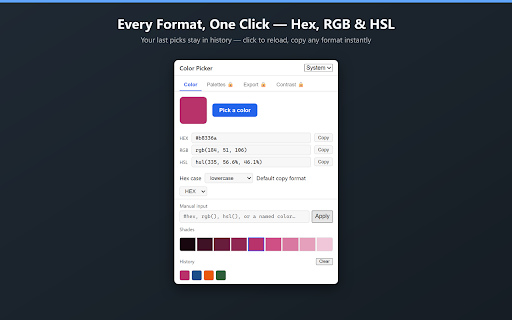
• Hex, RGB(A), and HSL(A) shown together the moment you pick, each with its own copy button. Choose uppercase or lowercase hex.
• History: your last 30 picks, saved locally — click any one to reload it, or clear the list.
• Manual input: paste or type any CSS color — hex, rgb(), hsl(), or a named color like "rebeccapurple" — and see it converted into every format instantly.
• Shade strip: a 9-step lighten-to-darken ramp for whatever color is loaded, every step clickable and copyable on its own.
• Your hex case, default copy format, and theme are remembered between sessions.

PREMIUM ($5 one-time)
For building and shipping an actual color system:
• Named palettes: organize picks into palettes you create, rename, reorder, and delete, saved locally.
• Export a palette as CSS custom properties, SCSS variables, or
JSON — paste straight into a codebase.
• WCAG contrast checker: pick or enter a foreground and background color and get the exact contrast ratio plus AA/AAA pass-fail for normal and large text.

No subscription, no account — pay once, keep the features.

Single-click in-popup picking, converting, and organizing colors — with an automatic small-window fallback for reliability — without ever needing to see what's on the page you're looking at.
Technical
- Version
- 0.1.0
- Manifest
- V3
- Size
- 83.51KiB
- Min Chrome
- 88
- Languages
- 1
- Featured
- No
Metadata
- ID
- dojeohppgbcnadaeljeigkbimmdodagh
- Developer ID
- ubb8ee13e0ffece4c64c9063e37871cb3
- Developer Email
- [email protected]
- Created
- Jul 7, 2026
- Last Updated (Store)
- Jul 7, 2026
- Last Scraped
- Jul 8, 2026
- Website
- sourwoodlabs.com
- Support URL
- https://sourwoodlabs.com
- Privacy Policy
- https://sourwoodlabs.com/privacy
Data sourced from the Chrome Web Store · last verified Jul 8, 2026.