
GitHub <> Jira Links
Extension to make jira ticket references in GitHub Issues and PRs link to jira
As of June 2026, GitHub <> Jira Links has 12 users and a 5.00/5 rating from 1 reviews in the Developer Tools category.
Usersdown 7.7 percent−7.7%
12
12
Ratingno change0%
5.00
1 reviews
Reviewsno change0%
1
Version
1.0.0.1
Manifest V3
History
1 snapshotsTracking since May 3, 2026.
View as table
| Date | Users | Rating | Reviews | Version |
|---|---|---|---|---|
| May 3, 2026 | 13 | 5.00 | 1 | 1.0.0.1 |
| Now | 12 | 5.00 | 1 | 1.0.0.1 |
Permissions & access
- Permissions
- storage
- Host access
- None declared
Screenshots
About
Effortless Jira Ticket Linking in GitHub: Boost Your Workflow

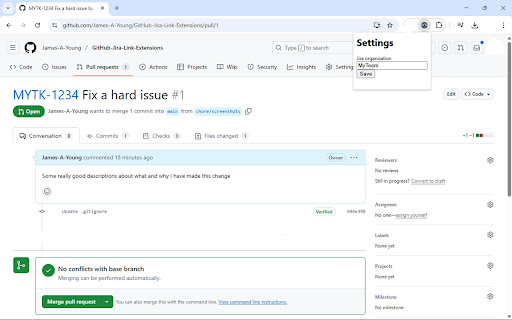
Tired of constantly switching between GitHub and Jira to find the context behind referenced tickets? This lightweight Chrome extension automatically turns Jira ticket references (like ABCD-1234) found in your GitHub issue and pull request titles into direct, clickable links.

Stop wasting time on manual searches and context switching. This extension seamlessly integrates with your existing GitHub workflow, allowing you to:

Instantly access Jira tickets: Click directly from GitHub to the relevant Jira issue with a single click.
Improve team collaboration: Ensure everyone can easily understand the connection between code changes and project tasks.
Streamline your development process: Keep your focus on coding and collaboration, not on searching for information.
Currently supports automatic linking of Jira tickets found in:

GitHub Issue Titles
GitHub Pull Request Titles
Instructions:

Click the extension icon in your browser toolbar or access "Options." via the chrome extension settings menu.

Enter your Atlassian organization name. This is the first part of your Jira URL (e.g., if your Jira is https://YourTeam.atlassian.net/, enter YourTeam).
Navigate to your GitHub repositories and browse Issues and Pull Requests as usual. Jira ticket references in the titles will now be automatically linked!
Install now and experience a more efficient and connected GitHub-Jira workflow!

By implementing these improvements, your Chrome Web Store listing will be more engaging, informative, and likely to attract more users. Good luck!

Change Log:
1.0.0.1 -> Bug Fix tab changes now reapply linking for pull requests.
Technical
- Version
- 1.0.0.1
- Manifest
- V3
- Size
- 294KiB
- Min Chrome
- 88
- Languages
- 1
- Featured
- No
Metadata
- ID
- doehgbonfnggbnicanekhepcfpellfop
- Developer ID
- u6a83bef45cf52b17f1f9a96145146bb3
- Developer Email
- [email protected]
- Created
- Mar 28, 2025
- Last Updated (Store)
- Mar 29, 2025
- Last Scraped
- Jun 2, 2026
- Website
- —
- Support URL
- —
Similar extensions
Alternatives to GitHub <> Jira Links, ranked by description similarity.

GitHub Jira Integration
Shows contents of linked tasks from Jira in Github
—

Github Link Creator (Auto link)
Creates buttons with links to GitHub from patterns like JIRA-123 on any webpage
9
★ 5.0

JIRA Ticket Extractor
Extracts JIRA ticket numbers from GitHub PR titles
3
★ 5.0

JIRA Link Creator (Auto link)
Creates links from JIRA-like issue references on any page
21
★ 5.0

Jira Peek
Peek at Jira tickets without leaving GitHub.
4

Jira Spotter
Seamlessly connect your codebase with Jira tickets. View, manage, and track issues directly from Chrome's side panel.
2

Jira - Create New Branch Command Generator
Jira - Create New Branch Command Generator
21

Alright: Autolink references in GitHub titles
Alright adds autolink references to GitHub pull request titles.
210
★ 5.0
Data sourced from the Chrome Web Store · last verified Jun 2, 2026.