
Ruttl
Overview: Download this extension and sign-in to to your Ruttl account, and get the ability to review password-protected sites or…
As of June 2026, Ruttl has 2,000 users and a 5.00/5 rating from 16 reviews in the Workflow & Planning category.
Usersno change0%
2.0K
2,000
Ratingno change0%
5.00
16 reviews
Reviewsno change0%
16
Version
3.1.1
Manifest V3
History
1 snapshotsTracking since Apr 19, 2026.
View as table
| Date | Users | Rating | Reviews | Version |
|---|---|---|---|---|
| Apr 19, 2026 | 2.0K | 5.00 | 16 | 3.1.1 |
| Now | 2.0K | 5.00 | 16 | 3.1.1 |
Permissions & access
- Permissions
- activeTabcookiesscriptingtabs
- Host access
- <all_urls>
Screenshots


About
Overview:

Download this extension and sign-in to to your Ruttl account, and get the ability to review password-protected sites or login-based apps on Ruttl.

Go through the 3 simple steps explained below to begin reviewing:

Steps:

1. Download our Chrome extension: Download the extension and pin it for easier access.

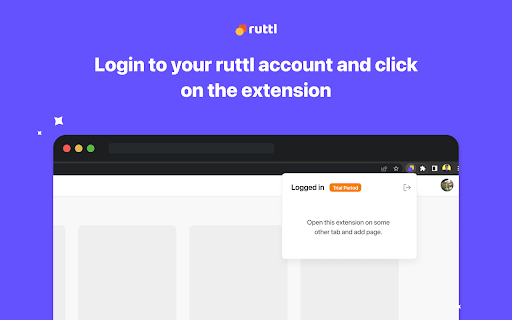
2. Click on the extension to login with your Ruttl account: Once you’ve added the extension to your browser, please click on the same to login with your Ruttl account.

3: Open your site or app in a new tab, click on our extension and select the type of project you'd like to create:

For website projects - Add new projects, or add new pages to your existing projects & review them quickly.

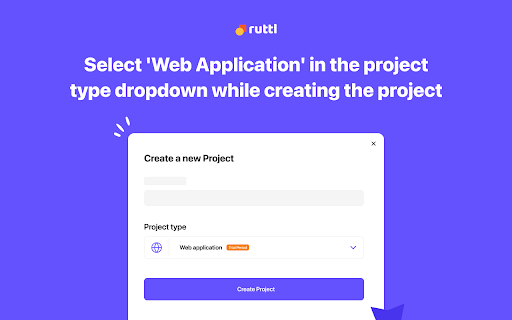
For web apps - Once you open your web app in the logged-in state, scroll to the bottom of the page, click on our extension and add it to your project.

For bug tracking - Once you open your site in a new tab, click on our extension, create a new project and you'll be able to instantly see the floating action pill on the bottom-left of your screen. Now create tickets, which will reflect on your project (dashboard/workflow). You can also add tickets to your existing project(s) respectively once you switch the toggle on for that project.
Technical
- Version
- 3.1.1
- Manifest
- V3
- Size
- 1.72MiB
- Min Chrome
- 88
- Languages
- 1
- Featured
- Yes
Metadata
- ID
- doecfodblgfnjmmphbedjgllipnbgbld
- Developer ID
- u960fe7e7958f03796986dc4bb6d447d0
- Developer Email
- [email protected]
- Created
- May 11, 2020
- Last Updated (Store)
- Oct 6, 2025
- Last Scraped
- Jun 6, 2026
- Website
- ruttl.com
- Support URL
- —
- Privacy Policy
- https://ruttl.com/privacy-policy/
Similar extensions
Alternatives to Ruttl, ranked by description similarity.

ClickUp: Tasks, Screenshots, Email, Time
ClickUp is a productivity platform that makes your personal and work lives more productive, saving you time.
200.0K
★ 2.6

ReviewBolt - Company Revenue & Traffic
See company revenue, traffic, employees, growth metrics, and competitors for any website. Free business intelligence.
22

ClickUp Champ
A browser extension for ClickUp
1.0K
★ 4.0

Approveit Helper
Approveit Helper
27
★ 5.0

TeamPassword
Password sharing for collaborative teams.
7.0K
★ 4.6

Unread for ClickUp
A simple Extension that allows you to access your clickup WorkSpaces and Tasks!
40
★ 3.7

resetWeb - Visual Feedback for resetDocs
Add comments and create tasks directly on any live website. Integrated with resetDocs for seamless team collaboration.
—

Website Review and Rate
This extension allows users to review and rate websites.
36
★ 1.8
Data sourced from the Chrome Web Store · last verified Jun 6, 2026.