
Red Ink Browser Extension
Sends the selected text to the user's Red Ink Outlook or Word add-in running for being processed and, as the case may be, returned.
As of June 2026, Red Ink Browser Extension has 275 users in the Productivity category.
Usersdown 3.2 percent−3.2%
275
275
Ratingno change0%
—
— reviews
Reviewsno change0%
—
Version
1.1
Manifest V3
History
7 snapshotsTracking since Apr 1, 2026.
View as table
| Date | Users | Rating | Reviews | Version |
|---|---|---|---|---|
| Apr 1, 2026 | 284 | — | — | 1.1 |
| Apr 18, 2026 | 276 | — | — | 1.1 |
| Apr 28, 2026 | 271 | — | — | 1.1 |
| May 8, 2026 | 273 | — | — | 1.1 |
| May 15, 2026 | 282 | — | — | 1.1 |
| May 24, 2026 | 270 | — | — | 1.1 |
| Jun 3, 2026 | 268 | — | — | 1.1 |
| Now | 275 | — | — | 1.1 |
Permissions & access
- Permissions
- contextMenusactiveTabscriptingtabswindows
- Host access
- http://127.0.0.1/*, <all_urls>
Screenshots
About
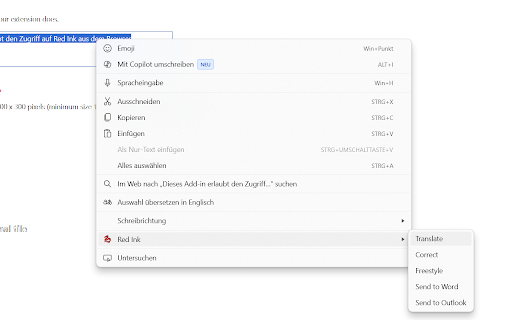
This browser extension allows you to use your Red Ink add-in for Word and Outlook also from your Chrome browser, for instance for having your text translated, corrected or other AI prompts applied to it. If you open your PDFs in the browser, you can also have them processed by the AI, e.g., for answering questions related to them. You can also send selected text directly to Outlook or Word. No personal data is collected by us by your use of the extension. If you want the full add-in, get it at https://vischer.com/redink.
Technical
- Version
- 1.1
- Manifest
- V3
- Size
- 22.05KiB
- Min Chrome
- 88
- Languages
- 1
- Featured
- No
Metadata
- ID
- doagmfoemngdlbghobfkbobehbodgdoa
- Developer ID
- u3f7ac62ca90ac6e18fc18d7993e0ac47
- Developer Email
- [email protected]
- Created
- Jan 23, 2025
- Last Updated (Store)
- Dec 1, 2025
- Last Scraped
- Jun 3, 2026
- Website
- —
- Support URL
- —
- Privacy Policy
- —
Similar extensions
Alternatives to Red Ink Browser Extension, ranked by description similarity.

click translate
An open-source Chrome extension that uses AI to translate words or sentences when you click or select text.
It works on Chrome for…
3

WebEdit AI - ai web annotation tool
A Chrome extension that provides annotation, and AI assistant features for web pages.
39
★ 4.5

4EVER
4EVER lets you use AI for free, anytime and anywhere. It's easy to use and helps with tasks, ideas, or anything you need.
—
★ 5.0

Inventive AI
Inventive AI Browser Extension
20
★ 5.0

Alinea AI
Alinea is an AI productivity extension that helps you write faster and work smarter directly from your Chrome browser. Generate…
2
★ 5.0

RightClickAI
Right-click context menu with AI-powered actions like summarize, explain, translate, & more. Supports major AI platforms.
19
★ 5.0

Ai Writer
AI-powered text rewriting, grammar correction, and enhancement tool for Chrome
11

ask AI
askAI is a simple and powerful Chrome extension that helps you understand selected text using AI technology.
14
Data sourced from the Chrome Web Store · last verified Jun 3, 2026.