
ClipShelf Extension
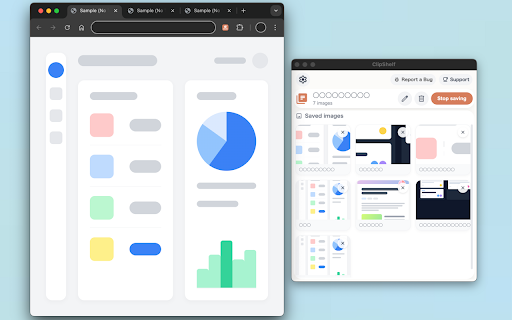
Easily crop and capture any part of a webpage! A simple tool to organize screenshots and URLs into named collections called Shelves.
As of June 2026, ClipShelf Extension has 2 users and a 5.00/5 rating from 1 reviews in the Productivity category.
Usersno change0%
2
2
Ratingno change0%
5.00
1 reviews
Reviewsno change0%
1
Version
0.1.0
Manifest V3
History
4 snapshotsTracking since May 7, 2026.
View as table
| Date | Users | Rating | Reviews | Version |
|---|---|---|---|---|
| May 7, 2026 | — | — | — | 0.1.0 |
| May 11, 2026 | — | — | — | 0.1.0 |
| May 17, 2026 | 1 | 5.00 | 1 | 0.1.0 |
| Jun 13, 2026 | 3 | 5.00 | 1 | 0.1.0 |
| Now | 2 | 5.00 | 1 | 0.1.0 |
Permissions & access
- Permissions
- activeTabtabsstoragescriptingunlimitedStorage
- Host access
- <all_urls>
Screenshots



About
ClipShelf is a tool designed to help you efficiently capture, organize, and manage visual information from the web.

[Key Features]

・Quick Crop & Capture: Instantly capture any area of your screen using a keyboard shortcut (Default: S + Drag).

・Save with URLs: The URL of the original webpage is automatically saved alongside your screenshot.

・Organize with "Shelves": Keep your captured images neatly sorted by creating "Shelves" for different projects or themes.

・Fast and Secure: All data is stored locally in your browser's database, ensuring high speed and privacy.

[Perfect for]

・Students and researchers gathering information.

・Creators and designers collecting visual references.

・Anyone who wants to scrapbook favorite products or articles.
Technical
- Version
- 0.1.0
- Manifest
- V3
- Size
- 5.13MiB
- Min Chrome
- 88
- Languages
- 6
- Featured
- No
Metadata
- ID
- dnlfgpemgjgglkpggfbacanifanefnob
- Developer ID
- u908143981d965814d6295c36ac021cdc
- Developer Email
- [email protected]
- Created
- May 6, 2026
- Last Updated (Store)
- May 6, 2026
- Last Scraped
- Jun 13, 2026
- Website
- —
- Support URL
- —
- Privacy Policy
- —
Data sourced from the Chrome Web Store · last verified Jun 13, 2026.