
AI-Fusion
Unleash the power of cutting-edge AI in your Bard experience with "Super AI" - an innovative Google Chrome extension. Designed to…
As of May 2026, AI-Fusion has 23 users in the Accessibility category.
Usersup 9.5 percent+9.5%
23
23
Ratingno change0%
—
— reviews
Reviewsno change0%
—
Version
1.0
Manifest V3
History
3 snapshotsTracking since Apr 1, 2026.
View as table
| Date | Users | Rating | Reviews | Version |
|---|---|---|---|---|
| Apr 1, 2026 | 21 | — | — | 1.0 |
| Apr 30, 2026 | 23 | — | — | 1.0 |
| May 28, 2026 | 26 | — | — | 1.0 |
| Now | 23 | — | — | 1.0 |
Permissions & access
- Permissions
- storage
- Host access
- https://bard.google.com/*
Screenshots
About
Unleash the power of cutting-edge AI in your Bard experience with "Super AI" - an innovative Google Chrome extension. Designed to enrich and enhance Bard's artificial intelligence capabilities, this extension works by integrating the powerful and highly advanced ChatGPT APIs into your Bard platform.

When you interact with Bard, Super AI steps in to improve the quality of responses. Here's how it works: Whenever you ask Bard a question, Super AI directs that query to the ChatGPT API first. It then fetches the response from ChatGPT and presents it to Bard. Inspired by the response from ChatGPT, Bard refines its own answer, resulting in a more informative, precise, and contextually accurate response.

With Super AI, you'll experience a noticeable upgrade in Bard's response quality, bringing your interaction to an entirely new level. This extension makes Bard smarter and more conversational, providing you with the insights and clarity you need.

Whether you're a long-time Bard user looking to upgrade your AI experience or a new user aiming to make the most out of this platform, Super AI is a game-changer. Experience an enhanced Bard today by adding the Super AI extension to your Google Chrome.

Note: "Super AI" does not store or share any of your queries or responses. It only acts as a bridge between Bard and ChatGPT to enhance your Bard experience. Your privacy is our priority.

Get ready to embark on a seamless journey with Bard and Super AI, where artificial intelligence meets real-world intelligence.

#####Check This video to learn how to install and use
https://www.youtube.com/watch?v=sdKd4K2Y5d0

Step 1: Installation

Go to the Chrome Web Store and search for your extension by name (or provide a direct link to your extension).
Click on the "Add to Chrome" button to install the extension.
Confirm the installation in the pop-up dialog.
Step 2: Configuration

After installation, you'll see the extension icon added to the Chrome toolbar.

Click on the extension icon to open the popup page.

On the popup page, you'll find two input fields for configuration: "API Secret Key" and "Model."

To get the "API Secret Key":
a. Go to the OpenAI website (https://openai.com/) and sign in to your account or create a new account if you don't have one.
b. Navigate to the API settings or dashboard to generate a new API secret key.
c. Copy the generated API secret key and paste it into the "API Secret Key" field on the extension popup page.

Choose a model:
a. The extension provides a dropdown or a list of available models for ChatGPT.
b. Select the desired model from the list. Each model might have different capabilities and pricing plans, so choose the one that fits your needs.

Click the "Save" button to save your configuration.

Step 3: Usage

With the API secret key and model configured, you can now use the extension's capabilities.

Open "bard.google.com" in a new tab or navigate to the Bard website where you'll find a question textarea.

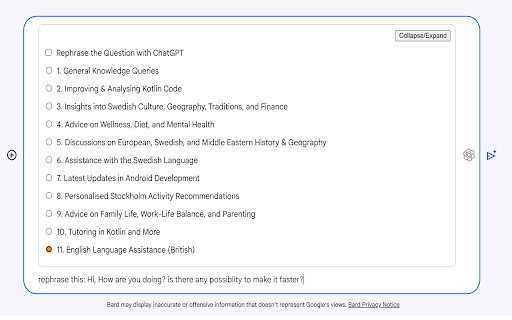
At the bottom of the page, you'll find a new box added by the extension.

Write your question in the new box and choose one of the radio buttons to set the role for ChatGPT. The available roles are:

General Knowledge Queries
Improving & Analysing Kotlin Code
Insights into Swedish Culture, Geography, Traditions, and Finance
Advice on Wellness, Diet, and Mental Health
Discussions on European, Swedish, and Middle Eastern History & Geography
Assistance with the Swedish Language
Latest Updates in Android Development
Personalised Stockholm Activity Recommendations
Advice on Family Life, Work-Life Balance, and Parenting
Tutoring in Kotlin and More
English Language Assistance (British)
Press the AI-fusion icon (the extension icon) to send the question to ChatGPT.

The extension will receive and rewrite the prompt for Bard based on ChatGPT's response.

You can now submit the rephrased and improved question/answer to Bard.

Bard can now provide you with much better answers as it was inspired by ChatGPT.
Technical
- Version
- 1.0
- Manifest
- V3
- Size
- 290KiB
- Min Chrome
- 88
- Languages
- 1
- Featured
- Yes
Metadata
- ID
- dneddkfmeilnfjciaaemhadiblfpnjge
- Developer ID
- u39593b76b60a6b8d1b9a8e05218f61e1
- Developer Email
- [email protected]
- Created
- Aug 7, 2023
- Last Updated (Store)
- Aug 7, 2023
- Last Scraped
- May 28, 2026
- Website
- —
- Support URL
- —
- Privacy Policy
- —
Similar extensions
Alternatives to AI-Fusion, ranked by description similarity.

AI Assistant Sidebar
Multi-AI assistant in Chrome sidebar with Vertex AI, Azure OpenAI, ChatGPT, and AWS Bedrock
31

GPT Assistant - All AI Together
Access ChatGPT, Gemini, Grok & Claude in one panel. Instant AI assistant for productivity.
5

Chat with AI model (ChatGpt)
AI Sidebar: Chat with AI Model (ChatGpt) for Easy AI Search, Writing, and Learning
—

BrowserGPT by CIVAI
What's New: Live Tab Agent, Shareable Automations, Image generation, Free Text Tools, Tab Management, Accessibility, Voice Browsing
86
★ 4.3
PromptGPT - Speak/Listen/GPTify
Turn any text field into a ChatGPT prompt and get the response right there, + Speaking and Listening abilities with ChatGPT web
13
★ 4.8

Complete AI - Text Autocomplete for ChatGPT
Chrome extension that helps you write prompts faster on ChatGPT with AI-powered autocompletion.
289
★ 2.5

ChatGPT Side Agent
ChatGPT side panel assistant for any website—summaries, replies, forms, translations, and quick insights without tab switching
278
★ 5.0

HearChat: Accessible and Enhanced ChatGPT
adds features to make AI web apps more friendly for screen reader users.
14
★ 5.0
Data sourced from the Chrome Web Store · last verified May 28, 2026.