
Ship.Cars Dispatch PDF Extension
Take your auto transport business to the next level with Ship.Cars Dispatch PDF Extension
As of May 2026, Ship.Cars Dispatch PDF Extension has 1,000 users and a 5.00/5 rating from 4 reviews in the Workflow & Planning category.
Usersno change0%
1.0K
1,000
Ratingno change0%
5.00
4 reviews
Reviewsno change0%
4
Version
2.10.0
Manifest V3
Permissions & access
- Permissions
- identitydeclarativeNetRequestWithHostAccesswebRequesttabscontextMenusnotificationsscriptingwebNavigationstorageidentity.email
- Host access
- https://api.rollbar.com/, <all_urls>
Screenshots
About
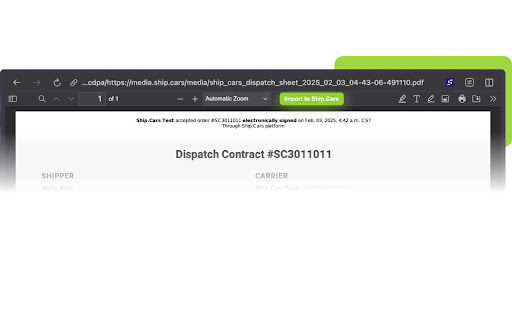
The Ship.Cars Dispatch PDF Extension gives a convenient way to create car shipping orders into your Ship.Cars account with a single click. Just open a dispatch sheet PDF in a new tab and click on the “Import to Ship.Cars” button.

---

Why should you import your PDF orders into Ship.Cars?

BENEFITS:
1) Get advantage of all features and automation Ship.Cars has for carrier operations
2) Assigned drivers get the order details right on their app, just as any booked order from our loadboard, so they can use the information and send back updates
3) The driver’s app also handles instant electronic paperwork generation (Invoicing, customer signed BOLs, geotagged vehicle pictures)
4) Automatically update the broker/shipper with the order status. No more phone calls, no manual emails
5) Automatically email the broker/shipper all necessary paperwork. Keep everyone in the loop
6) Generate reports based on your order details to get your accounting and operations to the next level

Speed up your payments, don’t spend time on collecting paperwork to get paid.


INSTALLATION
1) Click on ‘Add To Chrome’

USE
1) Open a dispatch sheet PDF in a new tab
2) Click the ‘Import to Ship.Cars’ button to import the order into your account
3) Log into your Ship.Cars account if prompted
4) In Ship.Cars, find the ‘Broker’ section and add the brokers’ email
5) Assign a driver
6) Add the order to a trip
7) Repeat 1) thru 6) until the trip plan is ready


Ship.Cars Help Center:
https://help.ship.cars/

Privacy Policy:
https://ship.cars/legal/privacy-policy/

Issues?
Go to https://ship.cars/ and contact us via live chat
Or email us at support(at)ship.cars

Follow us on social media:
Facebook: @shipdotcars
Instagram: @ship.cars
Twitter: @ship_cars
YouTube: https://www.youtube.com/channel/UCdPjGYwrVbqISUHpkEkPggg
Vimeo: https://vimeo.com/user73212316

Ship.Cars, your home for car hauling!
---

Auto transport, car hauling, vehicle shipping, central dispatch, dispatching, load board, dashboard, EPOD, invoicing, BOLs, billing, trucking, mobile app. We’ve got you covered.
Technical
- Version
- 2.10.0
- Manifest
- V3
- Size
- 3.93MiB
- Min Chrome
- 88
- Languages
- 1
- Featured
- No
Metadata
- ID
- dmpjiaifmhmnbbphkchdpjejooggcdem
- Developer ID
- ued0ab00c61f8790cf3b52901c2d89b71
- Developer Email
- [email protected]
- Created
- Dec 20, 2016
- Last Updated (Store)
- Mar 17, 2025
- Last Scraped
- May 28, 2026
- Website
- https://ship.cars/
- Support URL
- https://help.ship.cars/
- Privacy Policy
- https://ship.cars/legal/privacy-policy/
Similar extensions
Alternatives to Ship.Cars Dispatch PDF Extension, ranked by description similarity.

Super Dispatch: Connection
Stay Connected to What Drives Your Business with the Super Dispatch Connection Chrome Extension
10.0K
★ 4.6

Dispatch Buddy
Plugin that simplifies communication between carriers and brokers by allowing carriers to send emails with one click from loadboard
229
★ 5.0

CarShipIO Load Importer 2023
Export Loads to CarShipIO Platform
85

AIShipMyAuto Route Scout
AiShipMyAuto is a tech that helps car carriers book the best paying cars much faster from multiple car loadboards on specific routes
13

LoadCompanion
Streamline dispatch with one-click emails from DAT ONE & Sylectus. Features advanced editing, RPM calculations and more.
876
★ 5.0

DatX
DatX helps you work with loads faster and smarter than ever before
31
★ 5.0

HaulEx Importer
Import/Parse orders into HaulEx System
84

LoadConnect
Plugin that simplifies communication between carriers and brokers by allowing carriers to send emails with one click from loadboard
10.0K
★ 4.7
Data sourced from the Chrome Web Store · last verified May 28, 2026.