
ViewGraph Capture
Capture DOM structure, screenshots, and annotations for AI-powered UI analysis
As of June 2026, ViewGraph Capture has 59 users in the Developer Tools category.
Usersno change0%
59
59
Ratingno change0%
—
— reviews
Reviewsno change0%
—
Version
0.9.2
Manifest V3
90-day change · In the last 90 days this extension 3 version updates, changed permissions.
History
10 snapshotsTracking since Apr 16, 2026.
View as table
| Date | Users | Rating | Reviews | Version |
|---|---|---|---|---|
| Apr 16, 2026 | — | — | — | 0.1.0 |
| Apr 22, 2026 | — | — | — | 0.1.0 |
| Apr 26, 2026 | 19 | — | — | 0.4.0 |
| May 4, 2026 | 42 | — | — | 0.4.5 |
| May 9, 2026 | 45 | — | — | 0.9.2 |
| May 14, 2026 | 53 | — | — | 0.9.2 |
| May 21, 2026 | 54 | — | — | 0.9.2 |
| May 27, 2026 | 56 | — | — | 0.9.2 |
| Jun 3, 2026 | 51 | — | — | 0.9.2 |
| Jun 9, 2026 | 56 | — | — | 0.9.2 |
| Now | 59 | — | — | 0.9.2 |
Changelog
- May 4, 2026description
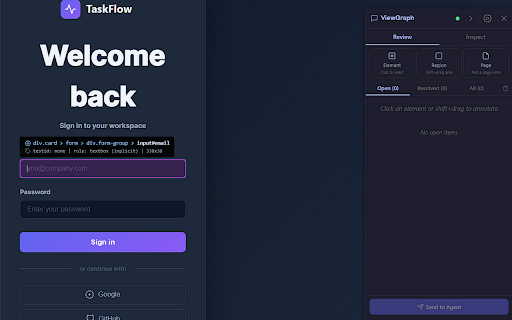
ViewGraph is the UI context layer for AI coding agents. When you see a bug in the browser, click it, describe what's wrong, and send it to your agent. The agent receives the element's exact CSS selector, computed styles, accessibility state, and your comment - then finds the source file and fixes the code.

Features:
- Click any element to annotate with comments, severity, and category
- Shift+drag to select a region
- Idea mode: toggle the lightbulb to switch from bug reporting to feature ideation
- Smart suggestions: clickable chips for detected issues (missing aria-label, no testid, low contrast)
- Keyboard shortcuts: Ctrl+Enter (send), Ctrl+Shift+C (copy), 1/2/3 (severity), Esc (close)
- 17 enrichment collectors: network, console, accessibility, layout, components, client storage, transient state, and more
- Page Activity: captures toasts, flash content, animation jank, and render thrashing automatically
- Built-in diagnostics: copy or create notes from any section - no DevTools needed
- Auto-audit: automatically runs a11y, layout, and testid audits after each capture
- Three export modes: Send to Agent (MCP), Copy Markdown (Jira/GitHub), Download ZIP report
- HMAC-signed communication: secure connection between extension and server
- Baseline management: set and compare structural baselines from the sidebar
- Multi-project support with automatic URL routing (up to 4 simultaneous projects)
- Session recording for multi-step user journeys
- HTML snapshots and screenshots saved alongside captures
- Works with Kiro, Claude Code, Cursor, Windsurf, Cline, and any MCP-compatible agent
- 37 MCP tools for querying, auditing, diffing, and generating specs

No account required. No data sent to external servers. All captures stay on your machine and are sent only to a localhost server you control. Open source (AGPL-3.0).

Quick Start: https://chaoslabz.gitbook.io/viewgraph/getting-started/quick-start
ViewGraph is the UI context layer for AI coding agents. When you see a bug in the browser, click it, describe what's wrong, and send it to your agent. The agent receives the element's exact CSS selector, computed styles, accessibility state, and your comment - then finds the source file and fixes the code. Features: - Click any element to annotate with comments, severity, and category - Shift+drag to select a region - Panic capture (Ctrl+Shift+V): instant DOM + screenshot snapshot mid-action, without opening the sidebar - Live annotation status: see real-time progress as your agent works (queued -> fixing -> resolved) - Idea mode: toggle the lightbulb to switch from bug reporting to feature ideation - Smart suggestions: clickable chips for detected issues (missing aria-label, no testid, low contrast) - Keyboard shortcuts: Ctrl+Enter (send), Ctrl+Shift+C (copy), 1/2/3 (severity), Esc (close) - 21 enrichment collectors: network, console, accessibility, layout, components, client storage, transient state, error boundaries, service worker state, build metadata, and more - Page Activity: captures toasts, flash content, animation jank, and render thrashing automatically - Built-in diagnostics: copy or create notes from any section - no DevTools needed - Auto-audit: automatically runs a11y, layout, and testid audits after each capture - Three export modes: Send to Agent (MCP), Copy Markdown (Jira/GitHub), Download ZIP report - HMAC-signed communication: secure connection between extension and server - Baseline management: set and compare structural baselines from the sidebar - Multi-project support with automatic URL routing (up to 4 simultaneous projects) - Session recording for multi-step user journeys - HTML snapshots and screenshots saved alongside captures - Works with Kiro, Claude Code, Cursor, Windsurf, Cline, and any MCP-compatible agent - 41 MCP tools for querying, auditing, diffing, and generating specs NEW IN v0.9: - v3 format: Action Manifest with pre-indexed interactive elements and short refs (@e1-@eN) - 80-85% fewer tokens for interactive queries - 64% smaller content script: axe-core loaded on demand instead of bundled (856KB -> 305KB) - Container merging: semantically empty wrapper divs removed at capture time (30-50% fewer nodes) - observationDepth: request only interactive elements (~400 tokens) instead of full capture (~100K) - Structural fingerprint: topology hash for cache-hit detection between captures - Spatial index: O(log n) element queries by coordinate - Performance instrumentation: capture timings (traverse, enrich, serialize) in every snapshot - TracePulse integration: frontend errors bridged to backend monitoring - Welcome page on first install - verify_fix: one-call smoke test replaces 3-4 separate tool calls - Uninstall CLI: npx @viewgraph/core uninstall NO AGENT REQUIRED Testers and reviewers can use ViewGraph standalone. Annotate issues, copy as Markdown for Jira/GitHub, or download a ZIP report with screenshots. No MCP server needed. PRIVACY - Runs entirely on localhost - no data leaves your machine - No analytics, no tracking, no external services - Captures stored locally in your project's .viewgraph/ directory - Open source (AGPL-3.0): https://github.com/sourjya/viewgraph SETUP Add to your agent's MCP config: { "command": "npx", "args": ["-y", "@viewgraph/core"] } Quick Start: https://chaoslabz.gitbook.io/viewgraph/getting-started/quick-start - May 4, 2026permissions
activeTab, storage, scripting
activeTab, storage, scripting, alarms
- Apr 26, 2026description
ViewGraph is the UI context layer for AI coding agents. When you see a bug in the browser, click it, describe what's wrong, and send it to your agent. The agent receives the element's exact CSS selector,
  computed styles, accessibility state, and your comment - then finds the source file and fixes the code.

  Features:
  - Click any element to annotate with comments, severity, and category
  - Shift+drag to select a region
  - Idea mode: toggle the lightbulb to switch from bug reporting to feature ideation
  - Smart suggestions: clickable chips for detected issues (missing aria-label, no testid, low contrast)
  - Keyboard shortcuts: Ctrl+Enter (send), Ctrl+Shift+C (copy), 1/2/3 (severity), Esc (close)
  - 16 enrichment collectors: network, console, accessibility, layout, components, client storage, and more
  - Built-in diagnostics: copy or create notes from any section - no DevTools needed
  - Auto-audit: automatically runs a11y, layout, and testid audits after each capture
  - Three export modes: Send to Agent (MCP), Copy Markdown (Jira/GitHub), Download ZIP report
  - Baseline management: set and compare structural baselines from the sidebar
  - Multi-project support with automatic URL routing (up to 4 simultaneous projects)
  - Session recording for multi-step user journeys
  - HTML snapshots and screenshots saved alongside captures
  - Works with Kiro, Claude Code, Cursor, Windsurf, Cline, and any MCP-compatible agent
  - 37 MCP tools for querying, auditing, diffing, and generating specs

  No account required. No data sent to external servers. All captures stay on your machine and are sent only to a localhost server you control. Open source (AGPL-3.0).

  Quick Start: https://chaoslabz.gitbook.io/viewgraph/getting-started/quick-start
ViewGraph is the UI context layer for AI coding agents. When you see a bug in the browser, click it, describe what's wrong, and send it to your agent. The agent receives the element's exact CSS selector, computed styles, accessibility state, and your comment - then finds the source file and fixes the code.

Features:
- Click any element to annotate with comments, severity, and category
- Shift+drag to select a region
- Idea mode: toggle the lightbulb to switch from bug reporting to feature ideation
- Smart suggestions: clickable chips for detected issues (missing aria-label, no testid, low contrast)
- Keyboard shortcuts: Ctrl+Enter (send), Ctrl+Shift+C (copy), 1/2/3 (severity), Esc (close)
- 17 enrichment collectors: network, console, accessibility, layout, components, client storage, transient state, and more
- Page Activity: captures toasts, flash content, animation jank, and render thrashing automatically
- Built-in diagnostics: copy or create notes from any section - no DevTools needed
- Auto-audit: automatically runs a11y, layout, and testid audits after each capture
- Three export modes: Send to Agent (MCP), Copy Markdown (Jira/GitHub), Download ZIP report
- HMAC-signed communication: secure connection between extension and server
- Baseline management: set and compare structural baselines from the sidebar
- Multi-project support with automatic URL routing (up to 4 simultaneous projects)
- Session recording for multi-step user journeys
- HTML snapshots and screenshots saved alongside captures
- Works with Kiro, Claude Code, Cursor, Windsurf, Cline, and any MCP-compatible agent
- 37 MCP tools for querying, auditing, diffing, and generating specs

No account required. No data sent to external servers. All captures stay on your machine and are sent only to a localhost server you control. Open source (AGPL-3.0).

Quick Start: https://chaoslabz.gitbook.io/viewgraph/getting-started/quick-start
- Apr 22, 2026description
ViewGraph captures structured DOM snapshots from any web page and exposes them to AI coding assistants via the Model Context Protocol (MCP).

Click any element, describe what's wrong, send to your AI agent. The agent receives the element's exact CSS selector, computed styles, accessibility state, bounding box, and your comment - then finds the
source file and fixes the code.

Features:
- Click/drag annotation with severity and category
- 14 enrichment collectors (network, console, a11y, layout, components)
- Export: Send to Agent (MCP), Copy Markdown, Download ZIP report
- Works with Kiro, Claude Code, Cursor, Windsurf, Cline, and any MCP agent
- Multi-project support with automatic URL routing
- Session recording for multi-step user journeys

No account required. No data sent to external servers. All captures stay on your machine.

Documentation: https://chaoslabz.gitbook.io/viewgraph
Source: https://github.com/sourjya/viewgraph

5. Click Submit for review - takes 1-3 business days

Screenshots needed

Take these at 1280x800:

1. Sidebar with 2-3 annotations on the demo login page
2. Inspect tab showing network/console data
3. Hover highlight with tooltip
ViewGraph is the UI context layer for AI coding agents. When you see a bug in the browser, click it, describe what's wrong, and send it to your agent. The agent receives the element's exact CSS selector,
  computed styles, accessibility state, and your comment - then finds the source file and fixes the code.

  Features:
  - Click any element to annotate with comments, severity, and category
  - Shift+drag to select a region
  - Idea mode: toggle the lightbulb to switch from bug reporting to feature ideation
  - Smart suggestions: clickable chips for detected issues (missing aria-label, no testid, low contrast)
  - Keyboard shortcuts: Ctrl+Enter (send), Ctrl+Shift+C (copy), 1/2/3 (severity), Esc (close)
  - 16 enrichment collectors: network, console, accessibility, layout, components, client storage, and more
  - Built-in diagnostics: copy or create notes from any section - no DevTools needed
  - Auto-audit: automatically runs a11y, layout, and testid audits after each capture
  - Three export modes: Send to Agent (MCP), Copy Markdown (Jira/GitHub), Download ZIP report
  - Baseline management: set and compare structural baselines from the sidebar
  - Multi-project support with automatic URL routing (up to 4 simultaneous projects)
  - Session recording for multi-step user journeys
  - HTML snapshots and screenshots saved alongside captures
  - Works with Kiro, Claude Code, Cursor, Windsurf, Cline, and any MCP-compatible agent
  - 37 MCP tools for querying, auditing, diffing, and generating specs

  No account required. No data sent to external servers. All captures stay on your machine and are sent only to a localhost server you control. Open source (AGPL-3.0).

  Quick Start: https://chaoslabz.gitbook.io/viewgraph/getting-started/quick-start
Permissions & access
- Permissions
- activeTabstoragescriptingalarms
- Host access
- <all_urls>
Screenshots


About
ViewGraph is the UI context layer for AI coding agents. When you see a bug in the browser, click it, describe what's wrong, and send it to your agent. The agent receives the element's exact CSS selector, computed styles, accessibility state, and your comment - then finds the source file and fixes the code.

Features:
- Click any element to annotate with comments, severity, and category
- Shift+drag to select a region
- Panic capture (Ctrl+Shift+V): instant DOM + screenshot snapshot mid-action, without opening the sidebar
- Live annotation status: see real-time progress as your agent works (queued -> fixing -> resolved)
- Idea mode: toggle the lightbulb to switch from bug reporting to feature ideation
- Smart suggestions: clickable chips for detected issues (missing aria-label, no testid, low contrast)
- Keyboard shortcuts: Ctrl+Enter (send), Ctrl+Shift+C (copy), 1/2/3 (severity), Esc (close)
- 21 enrichment collectors: network, console, accessibility, layout, components, client storage, transient state, error boundaries, service worker state, build metadata, and more
- Page Activity: captures toasts, flash content, animation jank, and render thrashing automatically
- Built-in diagnostics: copy or create notes from any section - no DevTools needed
- Auto-audit: automatically runs a11y, layout, and testid audits after each capture
- Three export modes: Send to Agent (MCP), Copy Markdown (Jira/GitHub), Download ZIP report
- HMAC-signed communication: secure connection between extension and server
- Baseline management: set and compare structural baselines from the sidebar
- Multi-project support with automatic URL routing (up to 4 simultaneous projects)
- Session recording for multi-step user journeys
- HTML snapshots and screenshots saved alongside captures
- Works with Kiro, Claude Code, Cursor, Windsurf, Cline, and any MCP-compatible agent
- 41 MCP tools for querying, auditing, diffing, and generating specs

NEW IN v0.9:
- v3 format: Action Manifest with pre-indexed interactive elements and short refs (@e1-@eN) - 80-85% fewer tokens for interactive queries
- 64% smaller content script: axe-core loaded on demand instead of bundled (856KB -> 305KB)
- Container merging: semantically empty wrapper divs removed at capture time (30-50% fewer nodes)
- observationDepth: request only interactive elements (~400 tokens) instead of full capture (~100K)
- Structural fingerprint: topology hash for cache-hit detection between captures
- Spatial index: O(log n) element queries by coordinate
- Performance instrumentation: capture timings (traverse, enrich, serialize) in every snapshot
- TracePulse integration: frontend errors bridged to backend monitoring
- Welcome page on first install
- verify_fix: one-call smoke test replaces 3-4 separate tool calls
- Uninstall CLI: npx @viewgraph/core uninstall

NO AGENT REQUIRED
Testers and reviewers can use ViewGraph standalone. Annotate issues, copy as Markdown for Jira/GitHub, or download a ZIP report with screenshots. No MCP server needed.

PRIVACY
- Runs entirely on localhost - no data leaves your machine
- No analytics, no tracking, no external services
- Captures stored locally in your project's .viewgraph/ directory
- Open source (AGPL-3.0): https://github.com/sourjya/viewgraph

SETUP
Add to your agent's MCP config:
{ "command": "npx", "args": ["-y", "@viewgraph/core"] }

Quick Start: https://chaoslabz.gitbook.io/viewgraph/getting-started/quick-start
Technical
- Version
- 0.9.2
- Manifest
- V3
- Size
- 286KiB
- Min Chrome
- 88
- Languages
- 1
- Featured
- No
Metadata
- ID
- dmgbneoidgmkdcfnlegmfijkedijjnjj
- Developer ID
- u55eb280ffb490885d396e7fba13fc7b5
- Developer Email
- [email protected]
- Created
- Apr 15, 2026
- Last Updated (Store)
- Apr 30, 2026
- Last Scraped
- Jun 9, 2026
- Website
- —
- Support URL
- https://github.com/sourjya/viewgraph/issues
Data sourced from the Chrome Web Store · last verified Jun 9, 2026.