
LumiFrame
Your Face Deserves Better Light. A customizable virtual ring light for video calls.
As of June 2026, LumiFrame has 10 users and a 5.00/5 rating from 10 reviews in the Developer Tools category.
Usersup 25.0 percent+25.0%
10
10
Ratingno change0%
5.00
10 reviews
Reviewsno change0%
10
Version
1.0
Manifest V3
History
8 snapshotsTracking since Apr 9, 2026.
View as table
| Date | Users | Rating | Reviews | Version |
|---|---|---|---|---|
| Apr 9, 2026 | 8 | 5.00 | 10 | 1.0 |
| Apr 20, 2026 | 10 | 5.00 | 10 | 1.0 |
| Apr 25, 2026 | 11 | 5.00 | 10 | 1.0 |
| May 2, 2026 | 11 | 5.00 | 10 | 1.0 |
| May 9, 2026 | 10 | 5.00 | 10 | 1.0 |
| May 13, 2026 | 11 | 5.00 | 10 | 1.0 |
| May 26, 2026 | 9 | 5.00 | 10 | 1.0 |
| Jun 2, 2026 | 11 | 5.00 | 10 | 1.0 |
| Now | 10 | 5.00 | 10 | 1.0 |
Permissions & access
- Permissions
- storageactiveTab
- Host access
- <all_urls>
Screenshots


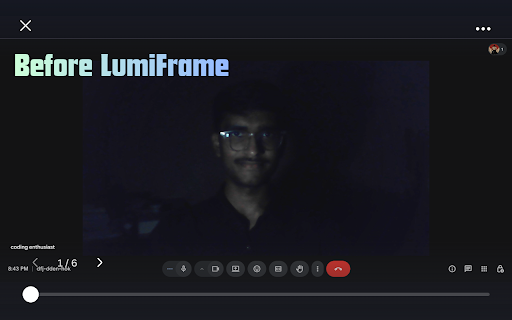
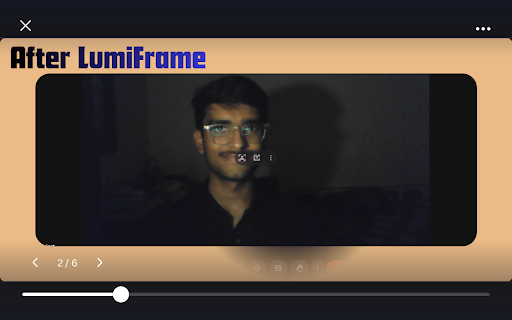
About
LumiFrame – Your Face Deserves Better Light

LumiFrame turns your screen into a powerful virtual ring light, helping you look brighter and more professional on video calls — without buying any physical lighting equipment.

Whether you're attending meetings, online classes, interviews, or live sessions, LumiFrame enhances your on-screen lighting instantly.

✨ Why Install LumiFrame?

Most laptops and desktops don’t provide proper front lighting during video calls. Poor lighting makes your face look dark, grainy, or unclear.

LumiFrame solves this by:

• Creating a customizable edge lighting panel around your screen
• Providing adjustable brightness control
• Offering rounded corner styling for a premium look
• Supporting Glow Mode and Solid Studio Mode
• Working across all websites

No external hardware required.

🎛 Key Features

• Adjustable Brightness (0–100%)
• Custom Light Colors
• Edge Thickness Control
• Rounded Corner Control
• Glow Mode & Solid Mode
• Cursor Transparency Reveal Effect
• Clean and Minimal Interface
• One-click or Double-click Toggle

🔒 Privacy First

LumiFrame:

• Does NOT collect personal data
• Does NOT track browsing history
• Does NOT record camera or microphone
• Does NOT store video content
• Runs entirely locally inside your browser

Your privacy is fully respected.

🖥 Works Everywhere

LumiFrame works on:

• Google Meet
• Zoom Web
• Microsoft Teams
• YouTube
• Any website

It overlays lighting without modifying webpage content.

💡 Perfect For

• Remote workers
• Students
• Online teachers
• Content creators
• Professionals attending virtual meetings

Improve your video presence instantly.

Your Face Deserves Better Light.
Technical
- Version
- 1.0
- Manifest
- V3
- Size
- 30.74KiB
- Min Chrome
- 88
- Languages
- 1
- Featured
- No
Metadata
- ID
- dlkjnicbocicldehndjcaleneidofdnh
- Developer ID
- u99c722c6c183bc6a0f0017f72a27d762
- Developer Email
- [email protected]
- Created
- Mar 5, 2026
- Last Updated (Store)
- Mar 5, 2026
- Last Scraped
- Jun 8, 2026
- Website
- —
- Support URL
- codingenthusiast.in
- Privacy Policy
- https://ratnawat-01.github.io/privacypolicyLumiFrame/
Similar extensions
Alternatives to LumiFrame, ranked by description similarity.

Lumi
Visual Prompt Builder - What You See is What You Prompt
9

Framey
Highlight elements on your page with your chosen color & styles for easy inspection.
2
★ 5.0

Flip & Rotate Ultimate
Flip or rotate any page or element. Includes context menu integration and whitelist support.
1.0K
★ 4.2

Light: QA Assistant
Maeris records real user flows and runs automated UI, API, and Security tests to help you make every release safe.
60
★ 5.0

FramedShot: Screenshot Frames, Mockup & Editor
Polish screenshots and tab recordings with frames, annotations, redactions, mockups, and local export.
114
★ 5.0

ZScreenshot
Screenshot, screen recording, and image editing tool. Capture pages, record tabs with audio, and edit with advanced tools.
18
★ 5.0

Slash Mark - BlurWeb Anything Pro
Blur selected text, images, or entire webpages with adjustable intensity. Undo, clear all, draggable panel, and auto popup.
11
★ 5.0

Vexel Studio Pro
Create cinematic software demos automatically. Our AI applies intelligent zooms and renders in 4K without manual editing.
1
★ 5.0
Data sourced from the Chrome Web Store · last verified Jun 8, 2026.