Convert Picture to Text
Convert Picture to Text: Effortlessly extract text from picture with our powerful Chrome extension. Simplify convert image to text.
As of May 2026, Convert Picture to Text has 50,000 users and a 4.81/5 rating from 489 reviews in the Productivity category.
Usersno change0%
50.0K
50,000
Ratingdown 0.6 percent−0.6%
4.81
489 reviews
Reviewsup 5.6 percent+5.6%
489
Version
1.0.3
Manifest V3
History
3 snapshotsTracking since Apr 1, 2026.
View as table
| Date | Users | Rating | Reviews | Version |
|---|---|---|---|---|
| Apr 1, 2026 | 50.0K | 4.84 | 463 | 1.0.3 |
| Apr 30, 2026 | 50.0K | 4.84 | 467 | 1.0.3 |
| May 28, 2026 | 50.0K | 4.82 | 482 | 1.0.3 |
| Now | 50.0K | 4.81 | 489 | 1.0.3 |
Permissions & access
- Permissions
- storagescriptingcontextMenus
- Host access
- <all_urls>
Screenshots
About
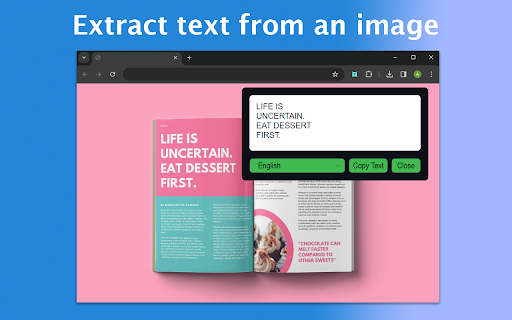
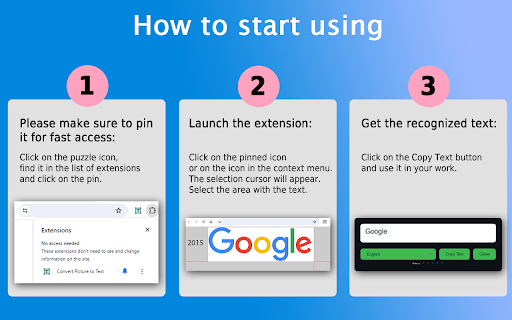
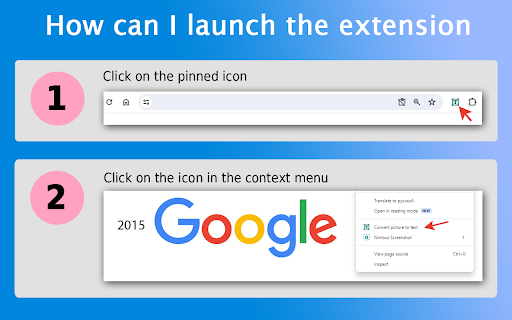
😩 Tired of typing out lengthy text from images? 📷 Wish there was an easier way to extract text from an image? ⏱️ Look no further! Convert picture to text is your go-to solution for effortlessly converting pictures to text in a matter of seconds. 💻 With our user-friendly Google Chrome extension, you can seamlessly convert text in pictures to text, making your work more efficient and saving you valuable time. ❓ How to start using? 📌 Please make sure to pin it for fast access: Click on the puzzle icon, find it in the list of extensions and click on the pin. 💥 Launch the extension: ❶ Click on the pinned icon or on the icon in the context menu. ❷ The selection cursor will appear. ❸ Select the area with the text. ❹ Get the recognized text: ❺ Click on the Copy Text button and use it in your work. 📚 Whether you're a student needing to extract text from scanned notes, a professional converting images to text for reports, or simply someone who wants to quickly extract text from photos, our extension has got you covered. 💫Our advantages: 1️⃣ Easy and convenient interface 2️⃣ Multilingual 3️⃣ Fast recognition 4️⃣ Unlimited number of requests 5️⃣ Lack of registration 6️⃣ Data protection 7️⃣ Using the OCR engine 8️⃣ Image area recognition Key Features: ✨ Effortless Conversion: Our extension simplifies the process of extracting text from a picture. Just install the extension, select the area to be converted, and watch as it swiftly converts from picture to text. 🔍 Accurate OCR Technology: Powered by advanced Optical Character Recognition (ocr online) technology, our extension ensures accurate text extract from image. 🔄 Versatile Compatibility: 🔸 JPEG 🔸 PNG 🔸 BMP 🔸 TIFF 🔸 WEBP 🔸 SVG ⏲️ Time-Saving Solution: Say goodbye to manual typing! Our extension significantly reduces the time and effort required to transcribe text from a picture, allowing you to focus on more important tasks. 🔒 Privacy Protection: We understand the importance of your privacy. Rest assured, your images and extracted text are processed securely, with no risk of data breaches or leaks. 🌐 Online and Offline Mode: Whether you're connected to the internet or working offline, our extension offers seamless text extraction from image, ensuring flexibility and convenience. 🖼️ Intuitive Interface: Our user-friendly interface makes it easy for users of all levels to convert from picture to text effortlessly. No technical expertise required jpg to word! This innovative procedure entails the conversion of visual representations, such as photographs or illustrations, into coherent and understandable written representations. ⚡ Benefits: ✓ Efficiently convert text from images for academic, professional, or personal purposes. ✓ Enhance productivity by eliminating manual transcription tasks. ✓ Accessible and convenient solution for all your needs. ✓ Stay organized by converting pictures to words containing important information. ✓ Compatible with various image formats and accessible directly from your Chrome browser. ✓ Streamline document management process. ✓ Convert scanned invoices, receipts, and contracts using text from image. ✓ Save time and resources. ✓ Improve efficiency and reduce costs by using convert picture to text for data handling. 💡 Whether you need to extract words from: 1️⃣ scanned documents 2️⃣ handwritten notes 3️⃣ images with embedded text Our converter is your reliable companion. 🖱️ Experience the convenience with just a few clicks img to text! 📜 List of features: 🔹 Selecting a fragment of a page. 🔹 Ability to select transcription language. 🔹 Automatic addition of recognized words to the extension window. 🔹 Ability to edit recognized words. 🔹 Possibility of copying. ✍️ Try today and revolutionize the way you pic to text. Say goodbye to tedious manual transcription! 🎓 Image to text converter for learning: 👨🎓 Students: ➤ Digitize printed materials, like textbooks or journal articles, for research purposes using convert pictures to text. ➤ Make printed materials searchable and editable with image text extractor. 👨🏫 Educators: ➤ Convert handwritten notes or diagrams into digital format using convert text in picture to text. ➤ Facilitate sharing and collaboration among students with digitized content. 😎 For professionals: ⚖️ Legal professionals: ➤ Utilize extract text from image to quickly search through case files and contracts. 👩⚕️ Medical practitioners: ➤ Digitize patient records for easy reference using convert picture to text. 📈 Financial analysts: ➤ Extract data from financial statements with ease using picture to text converter. 🧐 FAQs about the extension: ❓ How do I install? 💡 To install convert picture to text, just click on the "Add to Chrome" button. It will be added to your browser, and you can start using it. ❓ How does is it work? 💡 Convert picture to text is a Chrome extension that allows you to convert a picture to text format. ❓ Can I use it for free? 💡 Yes, extension is available as a free Chrome extension. ❓ Can extension transcribe any image? 💡 Yes, It can transcribe any pictures to words format. It supports multiple languages. ❓ Is my privacy protected when using extension? 💡 Absolutely! Extension operates locally within your browser, ensuring the privacy and security of your personal information. It does not collect or store any user data. 📧 Feedback: If you have any questions, please contact us in any way convenient for you.
Technical
- Version
- 1.0.3
- Manifest
- V3
- Size
- 2.67MiB
- Min Chrome
- 88
- Languages
- 52
- Featured
- No
Metadata
- ID
- dlkjdkiladlnclocjpcikagojeddmkeh
- Developer ID
- ue373d47831a314466ec5be62e7af3357
- Developer Email
- [email protected]
- Created
- Mar 20, 2024
- Last Updated (Store)
- Apr 3, 2024
- Last Scraped
- May 28, 2026
- Website
- —
- Support URL
- —
Similar extensions
Alternatives to Convert Picture to Text, ranked by description similarity.

Copy Text from Picture
Copy text from picture is your ocr software. Use it if you want to extract text from image for free.
70.0K
★ 4.0

Image Text to Text
Use Image Text to Text – image to text converter for Chrome, offering seamless OCR online to pull any info from your screen!
10.0K
★ 4.6

Extract Text From Picture
Use Extract Text From Picture - a powerful image to text converter that lets you easily copy text from images with just a click.
1.0K
★ 4.8

JPG to TEXT: Image To Text Converter
With JPG to TEXT, turn text in image to text quickly using a powerful picture to text converter that extracts effortlessly.
352
★ 5.0

JPG to Text
Use JPG to Text converter to enhance your productivity and easily convert image to text with a powerful built-in OCR
148
★ 5.0

Text Extractor From Image
Using Text Extractor From Image is an easy way to convert image to text. Extract text from picture in one click with high accuracy!
2.0K
★ 4.6

Copy Text From Image
Discover Copy Text From Image, the tool to pic to text and image to text converter. Upgrade your workflow with our extension.
206
★ 5.0

Image Text Extractor - Free OCR Tool
Extract text from any image with OCR. Screen capture, file upload, right-click support. Free tool for PDFs, screenshots & documents.
27
Data sourced from the Chrome Web Store · last verified May 28, 2026.