
ImageFX Bulk Generator
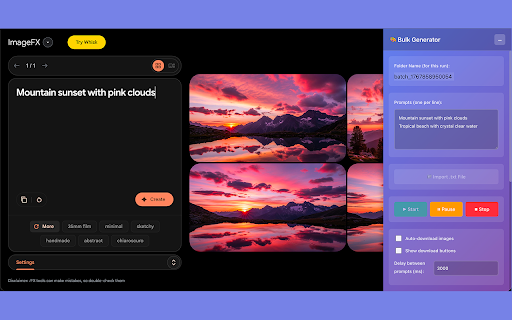
Bulk image generation tool for Google ImageFX with queue management, progress tracking, and automatic downloads
As of June 2026, ImageFX Bulk Generator has 124 users in the Productivity category.
Usersup 275.8 percent+275.8%
124
124
Ratingno change0%
—
— reviews
Reviewsno change0%
—
Version
1.0.1
Manifest V3
History
8 snapshotsTracking since Apr 1, 2026.
View as table
| Date | Users | Rating | Reviews | Version |
|---|---|---|---|---|
| Apr 1, 2026 | 33 | — | — | 1.0.1 |
| Apr 9, 2026 | 35 | — | — | 1.0.1 |
| Apr 20, 2026 | 40 | — | — | 1.0.1 |
| Apr 29, 2026 | 46 | — | — | 1.0.1 |
| May 9, 2026 | 52 | — | — | 1.0.1 |
| May 17, 2026 | 116 | — | — | 1.0.1 |
| May 26, 2026 | 139 | — | — | 1.0.1 |
| Jun 4, 2026 | 131 | — | — | 1.0.1 |
| Now | 124 | — | — | 1.0.1 |
Permissions & access
- Permissions
- storagedownloads
- Host access
- https://labs.google/fx/*
Screenshots


About
Streamline your AI image generation workflow with ImageFX Bulk Generator - the ultimate automation tool for Google's ImageFX platform.
Key Features:
🚀 Bulk Generation Queue

Add multiple prompts to a queue for automated processing
Process images one by one without manual intervention
Track progress with real-time status updates

📥 Automatic Downloads

Instantly detect and download generated images
Custom folder naming for organized project management
Simplified filename patterns for easy file identification

🎨 Smart Workflow

Collapsible sidebar interface that doesn't interfere with ImageFX
Queue management (add, remove, clear prompts)
Progress tracking with completion status
Seamless integration with ImageFX's native interface

Perfect For:

Content creators managing multiple image projects
Designers working on bulk creative assets
Marketers generating campaign visuals
Anyone who needs to generate multiple AI images efficiently

HOW TO USE:

1. Install the extension and refresh your ImageFX page
2. Click into ImageFX's prompt box (important - allows extension to detect the field)
3. Add your prompts to the queue in the sidebar
4. Set a custom folder name for organized downloads
5. Click "Start" and let the automation begin
6. Monitor progress in real-time with the queue status tracker
7. Find your downloaded images in Downloads/ImageFX/[Your_Folder_Name]

Save hours of manual work and focus on creativity while ImageFX Bulk Generator handles the repetitive tasks.
Technical
- Version
- 1.0.1
- Manifest
- V3
- Size
- 15.22KiB
- Min Chrome
- 88
- Languages
- 1
- Featured
- No
Metadata
- ID
- dljnnpbeffjgpdmhdimnlibeknekglpn
- Developer ID
- u6ca3eefd5d8063a44cce0f4c149c0824
- Developer Email
- [email protected]
- Created
- Jan 9, 2026
- Last Updated (Store)
- Jan 15, 2026
- Last Scraped
- Jun 4, 2026
- Website
- —
- Support URL
- —
Similar extensions
Alternatives to ImageFX Bulk Generator, ranked by description similarity.

ImageFX Automator - Bulk AI Image Generation with Nano Banana Pro
Bulk AI image generation for Google Flow. Automate prompts with Imagen 4 & Nano Banana models.
3.0K
★ 4.5

ImageFX Studio: Ultimate Image Generation Suite for Google ImageFX
Ultimate image generation suite with bulk processing, history management, and direct API integration for Google ImageFX
311
★ 5.0

AutoFly: AI Bulk Image Generator
Bulk Generate AI Images | Save Hours with One-Click Automation
1.0K
★ 3.4

Flow Image Automator - Bulk AI Image Generation Toolkit for Google Flow
Automate Google Labs image generation. Bulk create AI images with Nano Banana 2 and Nano Banana Pro models.
4.0K
★ 3.4

Mixzer Piclumen AI Image Generator
ช่วยสร้างภาพบน Piclumen ผ่านหน้าต่างลอยที่ขยับและย่อขยายได้
46

AutoNest By CSVNest
Automate prompt submission and image download workflow
821
★ 4.7

Mixzer Auto ImageFX
Automates download image from ImageFX
139

Autopik: Bulk AI Image Generator for Freepik
Bulk Generate Freepik AI Images | Save Hours with One-Click Automation
841
★ 5.0
Data sourced from the Chrome Web Store · last verified Jun 4, 2026.