
Download Master
Intercept downloads for Download Master, download a file or a group of files from the context menu.
As of May 2026, Download Master has 100,000 users and a 3.80/5 rating from 1,725 reviews in the Productivity category.
Usersno change0%
100.0K
100,000
Ratingup 0.3 percent+0.3%
3.80
1.7K reviews
Reviewsup 0.1 percent+0.1%
1.7K
Version
4.1.0
Manifest V3
History
2 snapshotsTracking since Apr 30, 2026.
View as table
| Date | Users | Rating | Reviews | Version |
|---|---|---|---|---|
| Apr 30, 2026 | 100.0K | 3.79 | 1.7K | 4.1.0 |
| May 28, 2026 | 100.0K | 3.79 | 1.7K | 4.1.0 |
| Now | 100.0K | 3.80 | 1.7K | 4.1.0 |
Permissions & access
- Permissions
- alarmsnativeMessagingnotificationsdownloadsdownloads.shelfdownloads.opencookiesstoragecontextMenustabsactiveTabwebRequestscripting
- Host access
- http://*/*, https://*/*
Screenshots

About
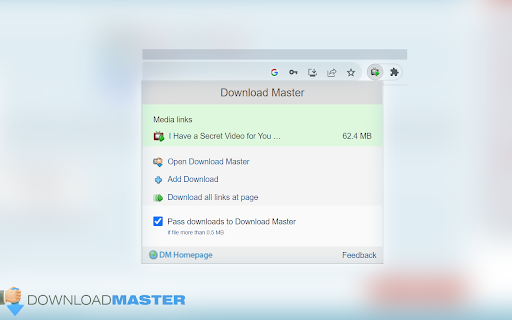
Download with Download Master* by clicking on the any file link. Enable or disable browser integration from the extension menu, set the minimum file size from the extension options.
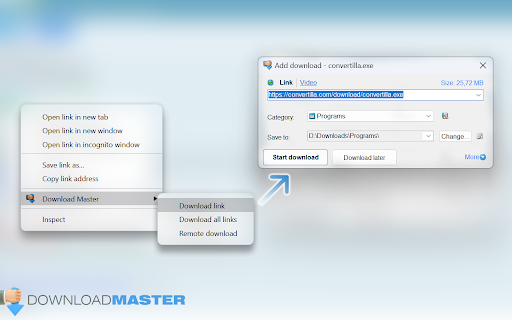
Extension adds the ability to download using Download Master* specified file or group of files from the browser's context menu. After installing the plug-in a new section with items "Download link", "Download all links" and "Download remotely" is added the context menu of Chrome.
Right-clicking on the link (example link) you will see a menu with 3 new items added:
- Select "Download link" if you want to download the selected file;
- Select "Download ALL links" if you want to download multiple files located on this page;
- Select "Download remotely" if you want to download a file via a remote download service.

When entering the page with the video clip, if the video service is supported, extension button will be changed. Click on it and select “Download video”, you transfer the movie for download using Download Master*.

If you highlight text on a page, right-click and choose "Find selection on ...". You will go directly to the page with the search results where you can download your files.

* The plug-in must be installed on the PC together with Download Master.
Technical
- Version
- 4.1.0
- Manifest
- V3
- Size
- 162KiB
- Min Chrome
- 88
- Languages
- 3
- Featured
- No
Metadata
- ID
- dljdacfojgikogldjffnkdcielnklkce
- Developer ID
- ua0f50eb9436ee044543db23203f1105c
- Developer Email
- [email protected]
- Created
- Jun 26, 2014
- Last Updated (Store)
- May 1, 2024
- Last Scraped
- May 28, 2026
- Website
- http://westbyte.com/
- Support URL
- https://downloadmaster.com/contacts/
- Privacy Policy
- —
Similar extensions
Alternatives to Download Master, ranked by description similarity.

Internet Download Accelerator
Intercept downloads for Internet Download Accelerator, download a file or a group of files from the context menu.
50.0K
★ 3.3

video downloader - CocoCut
Best video downloader Chrome extension, this video downloader for Chrome can download video,music free,safe in one click.
900.0K
★ 4.8

Easy Bulk Media Downloader - by Bliink
Detect and download images, GIFs, videos, SVGs & documents from any website. Bulk download, filter by size, dark mode & more.
463
★ 3.4

NeatDownloadManager Extension
Sends Download Links to Neat Download Manager
600.0K
★ 4.0

Video Downloader – Save Videos from Any Website
Video Downloader helps you detect and download videos from almost any website with a sleek, user-friendly interface.
2.0K
★ 1.6

Video Downloader
Download videos from the web.
828
★ 5.0

Quick Media Downloader
Displays all images and videos on the page with download buttons
336
★ 5.0

GoFile Downloader
Extract video links from a webpage and download them.
1.0K
★ 1.0
Data sourced from the Chrome Web Store · last verified May 28, 2026.