
Amie
Your private on-device AI assistant powered by Gemini Nano
As of June 2026, Amie has — users in the Productivity category.
Usersno change0%
—
—
Ratingno change0%
—
— reviews
Reviewsno change0%
—
Version
3.0.0
Manifest V3
90-day change · In the last 90 days this extension 4 version updates.
History
10 snapshotsTracking since Apr 1, 2026.
View as table
| Date | Users | Rating | Reviews | Version |
|---|---|---|---|---|
| Apr 1, 2026 | 4 | — | — | 1.2.2 |
| Apr 20, 2026 | 4 | — | — | 2.0.0 |
| Apr 25, 2026 | 5 | — | — | 2.0.0 |
| May 2, 2026 | 6 | — | — | 2.0.1 |
| May 9, 2026 | 7 | — | — | 2.0.1 |
| May 13, 2026 | 6 | — | — | 2.0.1 |
| May 19, 2026 | 6 | — | — | 2.1.0 |
| May 26, 2026 | 8 | — | — | 2.1.0 |
| Jun 2, 2026 | 6 | — | — | 3.0.0 |
| Jun 8, 2026 | 14 | — | — | 3.0.0 |
| Now | — | — | — | 3.0.0 |
Changelog
- May 26, 2026description
Meet Amie — your private AI assistant, built directly into Chrome.
Amie runs on Gemini Nano, Chrome's built-in AI model. Everything happens on your device.
✅ No cloud.
✅ No account.
✅ No data ever leaves your browser.

🔒 100% Private & On-Device
All AI processing happens locally using Chrome's built-in Gemini Nano. Amie's manifest blocks network access at the browser level — your conversations physically cannot be sent anywhere.

💬 Natural AI Chat
Open the side panel and chat with Amie about anything. Ask questions, get explanations, brainstorm ideas — all without leaving your browser. Conversation starters help you begin, and follow-up suggestions appear after each reply to keep things flowing. In longer chats, Amie automatically offers a "TLDR" chip so you can get a clean recap on demand. Each chat is automatically titled based on what you discussed.

🗂️ Multiple Chats
Keep separate conversations for separate topics. Star important chats to keep them at the top of your list, switch between them from the header, and rename or delete chats as you go.

🔎 Search Your Past Chats
Find any message you've sent or any reply you've received. Open the chat switcher, type what you're looking for, and Amie shows the matching exchanges with the term highlighted. Click a result to open that chat with the message scrolled into view and gently highlighted.

🧠 Memories That Stick
Found a reply worth remembering? Tap the bookmark icon to pin it. Amie carries pinned memories into every future chat, so she can build on what you've already discussed. Manage them anytime in Settings — keep up to 25 active at once, with extras stored as inactive.

📜 Long Chats Without Forgetting
When a conversation gets long, Amie quietly summarises older turns to stay within the model's memory while preserving the gist. A small "memory checkpoint" pill shows when this happens, and the original messages remain searchable from the chat switcher.

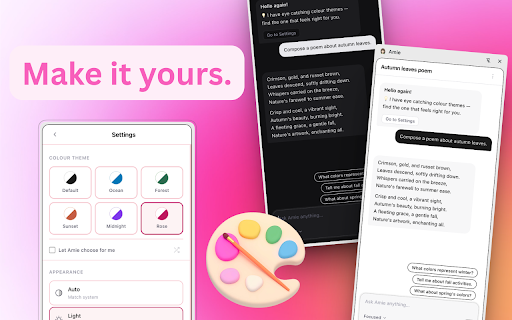
🎨 Eight Colour Themes
Slate, Ocean, Forest, Amber, Sunset, Rose, Midnight, and a High Contrast accessibility theme. Hit the ✨ Surprise me button to let Amie pick. Switch between light, dark, or system-matched appearance at any time.

🎭 Response Styles
Tailor how Amie responds. Pick Focused (direct and concise), Balanced (thoughtful and clear), or Creative (expressive and imaginative).

🎙️ Voice You Control
Choose from your device's on-device voices — network-backed voices are excluded for privacy — and fine-tune Volume, Speed, and Pitch with live preview as you adjust. Enable "Always speak responses" to have Amie read every reply aloud automatically.

📄 Page Summarisation
Right-click any page and ask Amie to summarise the article in seconds.

✍️ Right-Click Text Tools
Highlight any text on any page and right-click to:
→ Summarise the selection
→ Explain in simple terms
→ Fix grammar and clarity

💾 Export Your Conversations
Download any chat as a .txt or .md file from Settings → Storage. Need a full backup? Grab all your chats in one combined file with a single click.

🌍 Multilingual Aware
Amie uses Chrome's on-device Language Detector to identify the language of your first message in each chat and tunes its replies to match where supported.

♿ Accessibility
Includes a dedicated High Contrast theme, full keyboard navigation, descriptive labels on every control for screen readers, and respects your system's reduced-motion preference.

⌨️ Keyboard Shortcut
Press Ctrl+Shift+K (Cmd+Shift+K on Mac) to open Amie instantly from anywhere in Chrome.

⚡ Works Offline
Once Gemini Nano is set up, Amie works without an internet connection.

📋 Requirements
Chrome 138 or later
Windows 10 or 11; macOS 13+ (Ventura and onwards); Linux; or ChromeOS (from Platform 16389.0.0 and onwards) on Chromebook Plus devices.
Requires more than 4 GB of VRAM (GPU) or 16 GB of RAM or more and 4 CPU cores or more.
First use requires a one-time Gemini Nano model download (~4.30 GB).

Amie is ideal for professionals, students, researchers, and anyone who wants AI assistance without giving up their privacy.
Meet Amie — your private AI assistant, built directly into Chrome.
Amie runs on Gemini Nano, Chrome's built-in AI model. Everything happens on your device.
✅ No cloud.
✅ No account.
✅ No data ever leaves your browser.

🔒 100% Private & On-Device
All AI processing happens locally using Chrome's built-in Gemini Nano. Amie's manifest blocks network access at the browser level — your conversations and images physically cannot be sent anywhere.

💬 Natural AI Chat
Open the side panel and chat with Amie about anything. Ask questions, get explanations, brainstorm ideas — all without leaving your browser. Conversation starters help you begin, and follow-up suggestions appear after each reply to keep things flowing. In longer chats, Amie automatically offers a "TLDR" chip so you can get a clean recap on demand. Each chat is automatically titled based on what you discussed.

🖼️ Image Input
Ask Amie about screenshots, photos, diagrams, receipts, and more — entirely on-device. Attach up to 4 images per message using the paperclip, by pasting from the clipboard, or by dragging and dropping straight into the composer. Thumbnails appear in your chat history and persist across reloads — click any thumbnail to open it full-size, or use the re-attach button to drop a past image back into the composer for a follow-up question. Images are compressed and stored locally; nothing is uploaded.

🗂️ Multiple Chats
Keep separate conversations for separate topics. Star important chats to keep them at the top of your list, switch between them from the header, and rename or delete chats as you go.

🔎 Search Your Past Chats
Find any message you've sent or any reply you've received. Open the chat switcher, type what you're looking for, and Amie shows the matching exchanges with the term highlighted. Click a result to open that chat with the message scrolled into view and gently highlighted.

🧠 Memories That Stick
Found a reply worth remembering? Tap the bookmark icon to pin it. Amie carries pinned memories into every future chat, so she can build on what you've already discussed. Manage them anytime in Settings — keep up to 25 active at once, with extras stored as inactive.

📜 Long Chats Without Forgetting
When a conversation gets long, Amie quietly summarises older turns to stay within the model's memory while preserving the gist. A small "memory checkpoint" pill shows when this happens, and the original messages remain searchable from the chat switcher.

🎨 Eight Colour Themes
Slate, Ocean, Forest, Amber, Sunset, Rose, Midnight, and a High Contrast accessibility theme. Hit the ✨ Surprise me button to let Amie pick. Switch between light, dark, or system-matched appearance at any time.

🎭 Response Styles
Tailor how Amie responds. Pick Focused (direct and concise), Balanced (thoughtful and clear), or Creative (expressive and imaginative).

🎙️ Voice You Control
Choose from your device's on-device voices — network-backed voices are excluded for privacy — and fine-tune Volume, Speed, and Pitch with live preview as you adjust. Enable "Always speak responses" to have Amie read every reply aloud automatically.

📄 Page Summarisation
Right-click any page and ask Amie to summarise the article in seconds.

✍️ Right-Click Text Tools
Highlight any text on any page and right-click to:
→ Summarise the selection
→ Explain in simple terms
→ Fix grammar and clarity

💾 Export Your Conversations
Download any chat as a .txt or .md file from Settings → Storage. Messages that included image attachments are marked in the export. Need a full backup? Grab all your chats in one combined file with a single click.

🌍 Multilingual Aware
Amie uses Chrome's on-device Language Detector to identify the language of your first message in each chat and tunes its replies to match where supported.

♿ Accessibility
Includes a dedicated High Contrast theme, full keyboard navigation, descriptive labels on every control for screen readers, and respects your system's reduced-motion preference.

⌨️ Keyboard Shortcut
Press Ctrl+Shift+K (Cmd+Shift+K on Mac) to open Amie instantly from anywhere in Chrome.

⚡ Works Offline
Once Gemini Nano is set up, Amie works without an internet connection.

📋 Requirements
Chrome 138 or later (Chrome 148+ recommended for image input).
Windows 10 or 11; macOS 13+ (Ventura and onwards); Linux; or ChromeOS (from Platform 16389.0.0 and onwards) on Chromebook Plus devices.
Requires more than 4 GB of VRAM (GPU) or 16 GB of RAM or more and 4 CPU cores or more.
First use requires a one-time Gemini Nano model download (~4.30 GB).

Amie is ideal for professionals, students, researchers, and anyone who wants AI assistance without giving up their privacy.
- May 13, 2026description
Meet Amie — your private AI assistant, built directly into Chrome.
Amie runs on Gemini Nano, Chrome's built-in AI model. Everything happens on your device.
✅ No cloud.
✅ No account.
✅ No data ever leaves your browser.

🔒 100% Private & On-Device
All AI processing happens locally using Chrome's built-in Gemini Nano. Nothing is sent to any server — ever.

💬 Natural AI Chat
Open the side panel and chat with Amie about anything. Ask questions, get explanations, brainstorm ideas — all without leaving your browser.
AI-generated conversation starters help you begin, and after each reply Amie suggests relevant follow-up questions to keep the conversation flowing.
Each chat is automatically given a title based on what you discussed.

🗂️ Multiple Chats
Keep separate conversations for separate topics. Amie now supports multiple persistent chats — switch between them from the header, start a new one at any time, and rename or delete chats as you go.
Everything is stored privately on your device, just like the rest of Amie.

📝 Summarise Your Conversation
Use the menu to ask Amie to summarise your current chat — useful for recapping a long session or pulling out the key points before you export.

🎨 Themes & Appearance
Choose from six colour themes — Default, Ocean, Forest, Sunset, Midnight, and Rose — or let Amie pick one for you.
Switch between light, dark, or system-matched appearance at any time.

🎭 Response Styles
Tailor how Amie responds. Pick from Focused (direct and concise), Balanced (thoughtful and clear), or Creative (expressive and imaginative) to match your mood and task.

💾 Export Your Conversations
Save any conversation as a .txt or .md file to keep a record, share with others, or use in your own notes and documents.

📄 Page Summarisation
Reading a long article? Right-click and ask Amie to summarise the current page in seconds and get straight to the key points.

✍️ Right-Click Text Tools
Select any text on any page and right-click to:
→ Summarise selected text
→ Explain in simple terms
→ Fix grammar and clarity

🗣️ Read Responses Aloud
Choose your preferred voice in settings and preview it before use.
Enable "Always speak responses" to have Amie read every reply aloud automatically.

⌨️ Keyboard Shortcut
Press Ctrl+Shift+K (Cmd+Shift+K on Mac) to open Amie instantly from anywhere in Chrome.

⚡ Works Offline
Once Gemini Nano is set up, Amie works without an internet connection.

📋 Requirements
Chrome 138 or later
Windows 10 or 11; macOS 13+ (Ventura and onwards); Linux; or ChromeOS (from Platform 16389.0.0 and onwards) on Chromebook Plus devices.
Requires more than 4 GB of VRAM (GPU) or requires 16 GB of RAM or more and 4 CPU cores or more.
First use requires a one-time Gemini Nano model download (~4.30 GB)

Amie is ideal for professionals, students, researchers, and anyone who wants AI assistance without giving up their privacy.
Meet Amie — your private AI assistant, built directly into Chrome.
Amie runs on Gemini Nano, Chrome's built-in AI model. Everything happens on your device.
✅ No cloud.
✅ No account.
✅ No data ever leaves your browser.

🔒 100% Private & On-Device
All AI processing happens locally using Chrome's built-in Gemini Nano. Amie's manifest blocks network access at the browser level — your conversations physically cannot be sent anywhere.

💬 Natural AI Chat
Open the side panel and chat with Amie about anything. Ask questions, get explanations, brainstorm ideas — all without leaving your browser. Conversation starters help you begin, and follow-up suggestions appear after each reply to keep things flowing. In longer chats, Amie automatically offers a "TLDR" chip so you can get a clean recap on demand. Each chat is automatically titled based on what you discussed.

🗂️ Multiple Chats
Keep separate conversations for separate topics. Star important chats to keep them at the top of your list, switch between them from the header, and rename or delete chats as you go.

🔎 Search Your Past Chats
Find any message you've sent or any reply you've received. Open the chat switcher, type what you're looking for, and Amie shows the matching exchanges with the term highlighted. Click a result to open that chat with the message scrolled into view and gently highlighted.

🧠 Memories That Stick
Found a reply worth remembering? Tap the bookmark icon to pin it. Amie carries pinned memories into every future chat, so she can build on what you've already discussed. Manage them anytime in Settings — keep up to 25 active at once, with extras stored as inactive.

📜 Long Chats Without Forgetting
When a conversation gets long, Amie quietly summarises older turns to stay within the model's memory while preserving the gist. A small "memory checkpoint" pill shows when this happens, and the original messages remain searchable from the chat switcher.

🎨 Eight Colour Themes
Slate, Ocean, Forest, Amber, Sunset, Rose, Midnight, and a High Contrast accessibility theme. Hit the ✨ Surprise me button to let Amie pick. Switch between light, dark, or system-matched appearance at any time.

🎭 Response Styles
Tailor how Amie responds. Pick Focused (direct and concise), Balanced (thoughtful and clear), or Creative (expressive and imaginative).

🎙️ Voice You Control
Choose from your device's on-device voices — network-backed voices are excluded for privacy — and fine-tune Volume, Speed, and Pitch with live preview as you adjust. Enable "Always speak responses" to have Amie read every reply aloud automatically.

📄 Page Summarisation
Right-click any page and ask Amie to summarise the article in seconds.

✍️ Right-Click Text Tools
Highlight any text on any page and right-click to:
→ Summarise the selection
→ Explain in simple terms
→ Fix grammar and clarity

💾 Export Your Conversations
Download any chat as a .txt or .md file from Settings → Storage. Need a full backup? Grab all your chats in one combined file with a single click.

🌍 Multilingual Aware
Amie uses Chrome's on-device Language Detector to identify the language of your first message in each chat and tunes its replies to match where supported.

♿ Accessibility
Includes a dedicated High Contrast theme, full keyboard navigation, descriptive labels on every control for screen readers, and respects your system's reduced-motion preference.

⌨️ Keyboard Shortcut
Press Ctrl+Shift+K (Cmd+Shift+K on Mac) to open Amie instantly from anywhere in Chrome.

⚡ Works Offline
Once Gemini Nano is set up, Amie works without an internet connection.

📋 Requirements
Chrome 138 or later
Windows 10 or 11; macOS 13+ (Ventura and onwards); Linux; or ChromeOS (from Platform 16389.0.0 and onwards) on Chromebook Plus devices.
Requires more than 4 GB of VRAM (GPU) or 16 GB of RAM or more and 4 CPU cores or more.
First use requires a one-time Gemini Nano model download (~4.30 GB).

Amie is ideal for professionals, students, researchers, and anyone who wants AI assistance without giving up their privacy.
- Apr 1, 2026description
Meet Amie — your private AI assistant, built directly into Chrome.

Amie runs on Gemini Nano, Chrome's built-in AI model. Everything happens on your device.

✅ No cloud.
✅ No account.
✅ No data ever leaves your browser.

🔒 100% Private & On-Device

All AI processing happens locally using Chrome's built-in Gemini Nano. Nothing is sent to any server — ever.

💬 Natural AI Chat

Open the side panel and chat with Amie about anything. Ask questions, get explanations, brainstorm ideas — all without leaving your browser.

AI-generated conversation starters help you begin, and after each reply Amie suggests relevant follow-up questions to keep the conversation flowing.

Each chat is automatically given a title based on what you discussed.

📝 Summarise Your Conversation

Use the menu to ask Amie to summarise your current chat — useful for recapping a long session or pulling out the key points before you export.

🎨 Themes & Appearance

Choose from six colour themes — Default, Ocean, Forest, Sunset, Midnight, and Rose — or let Amie pick one for you.

Switch between light, dark, or system-matched appearance at any time.

🎭 Response Styles

Tailor how Amie responds. Pick from Focused (direct and concise), Balanced (thoughtful and clear), or Creative (expressive and imaginative) to match your mood and task.

💾 Export Your Conversations

Save any conversation as a .txt or .md file to keep a record, share with others, or use in your own notes and documents.

📄 Page Summarisation

Reading a long article? Right-click and ask Amie to summarise the current page in seconds and get straight to the key points.

✍️ Right-Click Text Tools

Select any text on any page and right-click to:
→ Summarise selected text
→ Explain in simple terms
→ Fix grammar and clarity

🗣️ Read Responses Aloud

Choose your preferred voice in settings and preview it before use.

Enable "Always speak responses" to have Amie read every reply aloud automatically.

⌨️ Keyboard Shortcut

Press Ctrl+Shift+K (Cmd+Shift+K on Mac) to open Amie instantly from anywhere in Chrome.

⚡ Works Offline

Once Gemini Nano is set up, Amie works without an internet connection.

📋 Requirements

Chrome 138 or later
Windows 10 or 11; macOS 13+ (Ventura and onwards); Linux; or ChromeOS (from Platform 16389.0.0 and onwards) on Chromebook Plus devices.
Requires more than 4 GB of VRAM (GPU) or requires 16 GB of RAM or more and 4 CPU cores or more.
First use requires a one-time Gemini Nano model download (~4.30 GB)

Amie is ideal for professionals, students, researchers, and anyone who wants AI assistance without giving up their privacy.
Meet Amie — your private AI assistant, built directly into Chrome.
Amie runs on Gemini Nano, Chrome's built-in AI model. Everything happens on your device.
✅ No cloud.
✅ No account.
✅ No data ever leaves your browser.

🔒 100% Private & On-Device
All AI processing happens locally using Chrome's built-in Gemini Nano. Nothing is sent to any server — ever.

💬 Natural AI Chat
Open the side panel and chat with Amie about anything. Ask questions, get explanations, brainstorm ideas — all without leaving your browser.
AI-generated conversation starters help you begin, and after each reply Amie suggests relevant follow-up questions to keep the conversation flowing.
Each chat is automatically given a title based on what you discussed.

🗂️ Multiple Chats
Keep separate conversations for separate topics. Amie now supports multiple persistent chats — switch between them from the header, start a new one at any time, and rename or delete chats as you go.
Everything is stored privately on your device, just like the rest of Amie.

📝 Summarise Your Conversation
Use the menu to ask Amie to summarise your current chat — useful for recapping a long session or pulling out the key points before you export.

🎨 Themes & Appearance
Choose from six colour themes — Default, Ocean, Forest, Sunset, Midnight, and Rose — or let Amie pick one for you.
Switch between light, dark, or system-matched appearance at any time.

🎭 Response Styles
Tailor how Amie responds. Pick from Focused (direct and concise), Balanced (thoughtful and clear), or Creative (expressive and imaginative) to match your mood and task.

💾 Export Your Conversations
Save any conversation as a .txt or .md file to keep a record, share with others, or use in your own notes and documents.

📄 Page Summarisation
Reading a long article? Right-click and ask Amie to summarise the current page in seconds and get straight to the key points.

✍️ Right-Click Text Tools
Select any text on any page and right-click to:
→ Summarise selected text
→ Explain in simple terms
→ Fix grammar and clarity

🗣️ Read Responses Aloud
Choose your preferred voice in settings and preview it before use.
Enable "Always speak responses" to have Amie read every reply aloud automatically.

⌨️ Keyboard Shortcut
Press Ctrl+Shift+K (Cmd+Shift+K on Mac) to open Amie instantly from anywhere in Chrome.

⚡ Works Offline
Once Gemini Nano is set up, Amie works without an internet connection.

📋 Requirements
Chrome 138 or later
Windows 10 or 11; macOS 13+ (Ventura and onwards); Linux; or ChromeOS (from Platform 16389.0.0 and onwards) on Chromebook Plus devices.
Requires more than 4 GB of VRAM (GPU) or requires 16 GB of RAM or more and 4 CPU cores or more.
First use requires a one-time Gemini Nano model download (~4.30 GB)

Amie is ideal for professionals, students, researchers, and anyone who wants AI assistance without giving up their privacy.
Permissions & access
- Permissions
- sidePanelstoragescriptingcontextMenusactiveTab
- Host access
- None declared
Screenshots


About
Meet Amie — your private AI assistant, built directly into Chrome.
Amie runs on Gemini Nano, Chrome's built-in AI model. Everything happens on your device.
✅ No cloud.
✅ No account.
✅ No data ever leaves your browser.

🔒 100% Private & On-Device
All AI processing happens locally using Chrome's built-in Gemini Nano. Amie's manifest blocks network access at the browser level — your conversations and images physically cannot be sent anywhere.

💬 Natural AI Chat
Open the side panel and chat with Amie about anything. Ask questions, get explanations, brainstorm ideas — all without leaving your browser. Conversation starters help you begin, and follow-up suggestions appear after each reply to keep things flowing. In longer chats, Amie automatically offers a "TLDR" chip so you can get a clean recap on demand. Each chat is automatically titled based on what you discussed.

🖼️ Image Input
Ask Amie about screenshots, photos, diagrams, receipts, and more — entirely on-device. Attach up to 4 images per message using the paperclip, by pasting from the clipboard, or by dragging and dropping straight into the composer. Thumbnails appear in your chat history and persist across reloads — click any thumbnail to open it full-size, or use the re-attach button to drop a past image back into the composer for a follow-up question. Images are compressed and stored locally; nothing is uploaded.

🗂️ Multiple Chats
Keep separate conversations for separate topics. Star important chats to keep them at the top of your list, switch between them from the header, and rename or delete chats as you go.

🔎 Search Your Past Chats
Find any message you've sent or any reply you've received. Open the chat switcher, type what you're looking for, and Amie shows the matching exchanges with the term highlighted. Click a result to open that chat with the message scrolled into view and gently highlighted.

🧠 Memories That Stick
Found a reply worth remembering? Tap the bookmark icon to pin it. Amie carries pinned memories into every future chat, so she can build on what you've already discussed. Manage them anytime in Settings — keep up to 25 active at once, with extras stored as inactive.

📜 Long Chats Without Forgetting
When a conversation gets long, Amie quietly summarises older turns to stay within the model's memory while preserving the gist. A small "memory checkpoint" pill shows when this happens, and the original messages remain searchable from the chat switcher.

🎨 Eight Colour Themes
Slate, Ocean, Forest, Amber, Sunset, Rose, Midnight, and a High Contrast accessibility theme. Hit the ✨ Surprise me button to let Amie pick. Switch between light, dark, or system-matched appearance at any time.

🎭 Response Styles
Tailor how Amie responds. Pick Focused (direct and concise), Balanced (thoughtful and clear), or Creative (expressive and imaginative).

🎙️ Voice You Control
Choose from your device's on-device voices — network-backed voices are excluded for privacy — and fine-tune Volume, Speed, and Pitch with live preview as you adjust. Enable "Always speak responses" to have Amie read every reply aloud automatically.

📄 Page Summarisation
Right-click any page and ask Amie to summarise the article in seconds.

✍️ Right-Click Text Tools
Highlight any text on any page and right-click to:
→ Summarise the selection
→ Explain in simple terms
→ Fix grammar and clarity

💾 Export Your Conversations
Download any chat as a .txt or .md file from Settings → Storage. Messages that included image attachments are marked in the export. Need a full backup? Grab all your chats in one combined file with a single click.

🌍 Multilingual Aware
Amie uses Chrome's on-device Language Detector to identify the language of your first message in each chat and tunes its replies to match where supported.

♿ Accessibility
Includes a dedicated High Contrast theme, full keyboard navigation, descriptive labels on every control for screen readers, and respects your system's reduced-motion preference.

⌨️ Keyboard Shortcut
Press Ctrl+Shift+K (Cmd+Shift+K on Mac) to open Amie instantly from anywhere in Chrome.

⚡ Works Offline
Once Gemini Nano is set up, Amie works without an internet connection.

📋 Requirements
Chrome 138 or later (Chrome 148+ recommended for image input).
Windows 10 or 11; macOS 13+ (Ventura and onwards); Linux; or ChromeOS (from Platform 16389.0.0 and onwards) on Chromebook Plus devices.
Requires more than 4 GB of VRAM (GPU) or 16 GB of RAM or more and 4 CPU cores or more.
First use requires a one-time Gemini Nano model download (~4.30 GB).

Amie is ideal for professionals, students, researchers, and anyone who wants AI assistance without giving up their privacy.
Technical
- Version
- 3.0.0
- Manifest
- V3
- Size
- 184KiB
- Min Chrome
- 138
- Languages
- 1
- Featured
- No
Metadata
- ID
- dlipaeciaoklebcpndhhjghciiiodkbl
- Developer ID
- ucd169dcbabc1e005f4b77b6551e7bc1e
- Developer Email
- [email protected]
- Created
- Mar 3, 2026
- Last Updated (Store)
- May 23, 2026
- Last Scraped
- Jun 8, 2026
- Website
- —
- Support URL
- —
- Privacy Policy
- https://madebydulanjaya.github.io/amie/
Similar extensions
Alternatives to Amie, ranked by description similarity.

ZeroCloud AI — Private AI Assistant
Summarize, write, translate, check tone and more — 100% on-device, 100% private. Powered by Gemini Nano.
25

Notabilia AI - Local AI Assistant
100% local AI assistant powered by Gemma 3n. Zero cost, runs entirely in your browser, maximum privacy.
15

Geminator
Tired of slow AI assistants and privacy concerns? Meet Geminator.
Geminator is the first "Privacy-First" browser extension that…
18

AI Agent
Use AI Agent for instant solutions. Converse with AI Agent assistant, craft content and generate images via smart chatbot.
20.0K
★ 3.8

NanoChat: On-device AI Assistant
Private local AI assistant & browser agent powered by Chrome Gemini Nano. Chat with webpages, summarize text & automate tasks.
22
★ 5.0

Prompt Enhancer
Enhance and craft AI prompts with Gemini Nano — chat, edit, and copy on ChatGPT, Gemini, Claude, and Perplexity
32
★ 5.0

AI Browsing Assistant ✨
Side-panel AI Browsing Assistant
291
★ 5.0

Intelligent Chrome (iChrome) Assistant
AI-powered browser assistant with history, bookmarks, and downloads can act intelligently
24
Data sourced from the Chrome Web Store · last verified Jun 8, 2026.