
Live Slides Timer
Add or insert a live countdown timer into your slides — visible to the audience during presentation. Works instantly.
As of June 2026, Live Slides Timer has 23 users in the Productivity category.
Usersno change0%
23
23
Ratingno change0%
—
— reviews
Reviewsno change0%
—
Version
1.0.1
Manifest V3
History
7 snapshotsTracking since Apr 30, 2026.
View as table
| Date | Users | Rating | Reviews | Version |
|---|---|---|---|---|
| Apr 30, 2026 | — | — | — | 1.0.1 |
| May 7, 2026 | — | — | — | 1.0.1 |
| May 11, 2026 | 6 | — | — | 1.0.1 |
| May 17, 2026 | 8 | — | — | 1.0.1 |
| May 23, 2026 | 15 | — | — | 1.0.1 |
| May 30, 2026 | 19 | — | — | 1.0.1 |
| Jun 5, 2026 | 17 | — | — | 1.0.1 |
| Now | 23 | — | — | 1.0.1 |
Permissions & access
- Permissions
- storagetabs
- Host access
- None declared
Screenshots

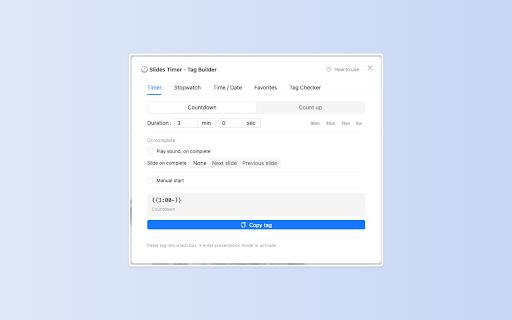
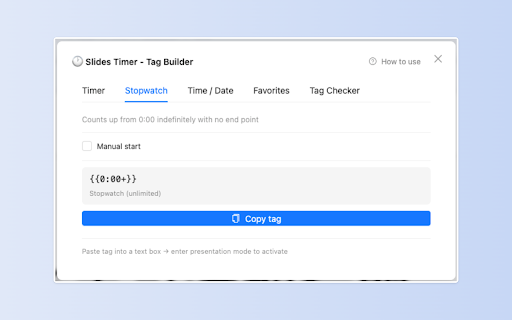

About
Add a live countdown timer, count-up timer, stopwatch, or clock directly into your slides — visible to your audience the moment you present. No embedded videos. No second screen. No restart needed.

Just type a tag into any slide text box. When you start the presentation, the tag becomes a live, ticking timer right on the slide.

──────────────────────────────────────
✅ WORKS INSTANTLY AFTER INSTALL
──────────────────────────────────────

Open any slide and start using it immediately. No need to close tabs, restart Chrome, or refresh the page.

──────────────────────────────────────
HOW TO INSERT A TIMER
──────────────────────────────────────

Type any of these into a slide text box:

  <<5:00->>            Countdown from 5 minutes
  <<5:00+>>            Count up to 5 minutes
  <<0:00+>>            Stopwatch (no upper limit)
  <<now>>              Live clock  (HH:mm:ss)
  <<now|%HH:mm>>       Live clock  (HH:mm, no seconds)

Add actions that trigger when the timer ends:

  <<5:00-|@>>          Play a built-in bell sound
  <<5:00-|]>>          Auto-advance to the next slide
  <<5:00-|@|]>>        Bell + auto-advance

──────────────────────────────────────
KEY FEATURES
──────────────────────────────────────

⏱ Countdown & Count-up Timers
Insert a live countdown or count-up timer into any slide. The timer is embedded in the slide content — your audience sees it exactly as you do.

⏹ Stopwatch
Start from zero with no upper limit. Great for open-ended activities or Q&A sessions.

🕐 Live Clock & Date
Show the current time directly on your slide. Choose between full format (HH:mm:ss) or a clean minutes-only display (HH:mm).

🔔 Built-in Bell Sound
Add |@ to play a built-in chime when the timer ends. No audio file to insert — the sound is built in.

▶ Auto-Advance to Next Slide
Add |] to automatically move to the next slide when the countdown hits zero. Perfect for timed lesson plans and structured agendas.

⌨ Customizable Keyboard Shortcuts
Press Y to start/pause, R to reset — during presentation. Both keys are fully customizable, so they never conflict with your existing slide controls.

🧰 Visual Tag Builder
Not sure about syntax? Click the floating button on the editor page to open the tag builder. Pick your settings, preview the result, and copy with one click — no syntax knowledge needed.

📋 Slide Overview
Scan every timer tag across all slides at once. See what each tag does, spot any errors, and jump directly to the slide to fix it — all before you present.

──────────────────────────────────────
COMMON QUESTIONS
──────────────────────────────────────

❓ Does it work right after installing?
Yes. Unlike other timer extensions, Live Slides Timer activates automatically. No need to close or refresh your slides.

❓ Is the timer visible to the audience?
Yes. The timer is embedded inside the slide itself — not a floating overlay — so your audience sees it on the projected screen too.

❓ Can I hide the seconds on the clock?
Yes. Use <<now|%HH:mm>> to show only hours and minutes.

❓ Can I start the timer manually instead of auto-starting?
Yes. Enable "Manual start" in the tag builder. The timer will wait until you press Y (or your custom key) during the presentation.

❓ Can it play a sound when time runs out?
Yes. Add |@ to any timer tag. A built-in bell chime plays at zero — no audio files or YouTube embeds needed.

❓ Does it work on shared or published presentation links?
No. The extension runs in presentation mode only. Viewers must have the extension installed; it does not work on "Publish to the web" links.

❓ What permissions does it use?
Only storage (to save your settings) and tabs (to detect the active slide tab). It does not read your browsing history.

──────────────────────────────────────
100% FREE — NO PAYWALLS ON CORE FEATURES
──────────────────────────────────────

All features above are permanently free. We will never move existing free features behind a paywall.

──────────────────────────────────────
BUILT FOR
──────────────────────────────────────

• Teachers timing classroom activities and transitions
• Trainers running timed workshops and breakout sessions
• Speakers managing presentation pacing
• Anyone who needs a live, embedded countdown on their slides

──────────────────────────────────────
SUPPORTED LANGUAGES
──────────────────────────────────────

English · Deutsch · Español · Français · Italiano · 日本語 · Nederlands · Português
Technical
- Version
- 1.0.1
- Manifest
- V3
- Size
- 1.09MiB
- Min Chrome
- 88
- Languages
- 7
- Featured
- No
Metadata
- ID
- dlhbmoonnaipppbcdechfbkooljfopcn
- Developer ID
- u16a18ee383d35e859824953aaa064529
- Developer Email
- [email protected]
- Created
- Apr 29, 2026
- Last Updated (Store)
- Apr 29, 2026
- Last Scraped
- Jun 14, 2026
- Website
- —
- Support URL
- —
Data sourced from the Chrome Web Store · last verified Jun 14, 2026.