
Markdown Chrome
View, edit, and save local Markdown files with Mermaid preview.
As of June 2026, Markdown Chrome has 3 users and a 5.00/5 rating from 1 reviews in the Productivity category.
Usersno change0%
3
3
Ratingno change0%
5.00
1 reviews
Reviewsno change0%
1
Version
0.1.1
Manifest V3
90-day change · In the last 90 days this extension 1 version update.
History
2 snapshotsTracking since Jun 6, 2026.
Not enough history yet for this metric — the chart fills in as we collect more snapshots.
View as table
| Date | Users | Rating | Reviews | Version |
|---|---|---|---|---|
| Jun 6, 2026 | — | — | — | 0.1.0 |
| Jun 16, 2026 | — | — | — | 0.1.0 |
| Now | 3 | 5.00 | 1 | 0.1.1 |
Permissions & access
- Permissions
- None declared
- Host access
- file:///*
Screenshots



About
Name: Markdown Chrome

Short description:
Open, edit, preview, and export local Markdown files with Mermaid support.

Category: Productivity

Language: English

Support email: [email protected]

Detailed Description
Markdown Chrome is a local-first Markdown viewer and editor for Chrome.

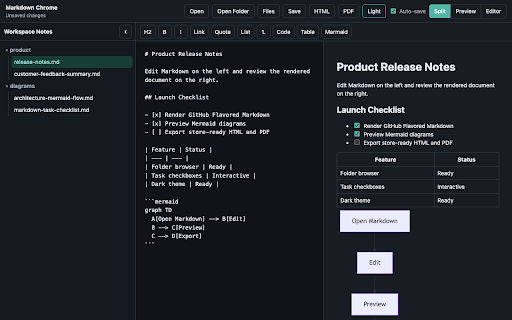
Open Markdown files from your computer, preview them in Chrome, edit them side by side, render Mermaid diagrams, check task-list items directly in the preview, and export the rendered document as HTML or PDF.

Key features:

Open .md and .markdown files with a native file picker.
Open folders and browse Markdown files in a collapsible file tree.
Use split view, fullscreen preview, or fullscreen editor mode.
Insert common Markdown syntax with a beginner-friendly toolbar.
Render GitHub Flavored Markdown, tables, task lists, and Mermaid diagrams.
Click rendered task-list checkboxes to update the source Markdown.
Save and auto-save after granting Chrome file write access.
Export rendered Markdown as standalone HTML.
Export to PDF through Chrome's print dialog.
Switch between light and dark themes.
Markdown Chrome does not upload files, does not include analytics, and does not track browsing behavior. File access is used only for the user-facing Markdown editing workflow.

Permission Justification
Host permission: file:///*

Required so the extension can detect local Markdown files opened in Chrome and redirect them to the Markdown Chrome viewer. The extension uses this access only for local Markdown file viewing and editing. Users must enable Chrome's Allow access to file URLs setting for this behavior.

File System Access API

Used through Chrome's user-initiated file and directory pickers. The extension can save a file only after the user grants access to that file or folder.

Data Use Summary
No remote file upload.
No analytics.
No advertising.
No sale of user data.
No account system.
No external JavaScript loaded at runtime.
Markdown content is processed locally in the browser.
Screenshot Checklist
Prepare screenshots that show real product functionality:

Split view with Markdown editor and rendered preview.
Mermaid diagram rendered as SVG.
Folder tree with Markdown files.
Rendered task-list checkbox being used.
Export controls for HTML and PDF.
Dark theme view.
Technical
- Version
- 0.1.1
- Manifest
- V3
- Size
- 1.83MiB
- Min Chrome
- 88
- Languages
- 1
- Featured
- No
Metadata
- ID
- dkimnacnkjidlkihibckidekfnkdlgfj
- Developer ID
- u1f629f390286c5fc501345a225cc598f
- Developer Email
- [email protected]
- Created
- Jun 5, 2026
- Last Updated (Store)
- Jun 11, 2026
- Last Scraped
- Jun 16, 2026
- Website
- —
- Support URL
- —
Data sourced from the Chrome Web Store · last verified Jun 16, 2026.