
TabContentFusion
Merge and fuse content from multiple browser tabs into unified, exportable documents.
As of June 2026, TabContentFusion has 5 users and a 5.00/5 rating from 3 reviews in the Productivity category.
Usersno change0%
5
5
Ratingno change0%
5.00
3 reviews
Reviewsno change0%
3
Version
1.0.0
Manifest V3
History
5 snapshotsTracking since Apr 16, 2026.
View as table
| Date | Users | Rating | Reviews | Version |
|---|---|---|---|---|
| Apr 16, 2026 | — | — | — | 1.0.0 |
| Apr 26, 2026 | — | — | — | 1.0.0 |
| May 9, 2026 | 4 | 5.00 | 3 | 1.0.0 |
| May 14, 2026 | 5 | 5.00 | 3 | 1.0.0 |
| May 21, 2026 | 4 | 5.00 | 3 | 1.0.0 |
| Now | 5 | 5.00 | 3 | 1.0.0 |
Permissions & access
- Permissions
- activeTabtabsstoragescriptingclipboardWritesidePanelnotificationsalarms
- Host access
- <all_urls>
Screenshots




About
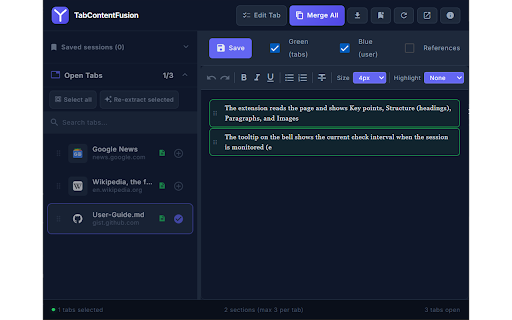
TabContentFusion helps you turn scattered content across browser tabs into one clean, editable document.

What you can do

· Pull content from multiple tabs and combine it in a merge workspace.
· Select sections, refine structure, and edit with a document-style editor.
· Export to Markdown, plain text, PDF, or copy to the clipboard.
· Save and restore sessions so you can continue later.
· Optional tools for references and page monitoring (when enabled).

Privacy

This extension is designed to work locally in your browser for typical workflows. If your listing requires a privacy policy link, host a short page that matches what the extension actually does (permissions, storage, and any network use).
Technical
- Version
- 1.0.0
- Manifest
- V3
- Size
- 226KiB
- Min Chrome
- 88
- Languages
- 1
- Featured
- No
Metadata
- ID
- dkcpkbfgcfingfmcogggipjiagoigceg
- Developer ID
- u42e2d9893b57c7f6d0d89261d9b68dda
- Developer Email
- [email protected]
- Created
- Apr 14, 2026
- Last Updated (Store)
- Apr 14, 2026
- Last Scraped
- Jun 9, 2026
- Website
- —
Data sourced from the Chrome Web Store · last verified Jun 9, 2026.