
ColorPickr — Color Picker & Eyedropper
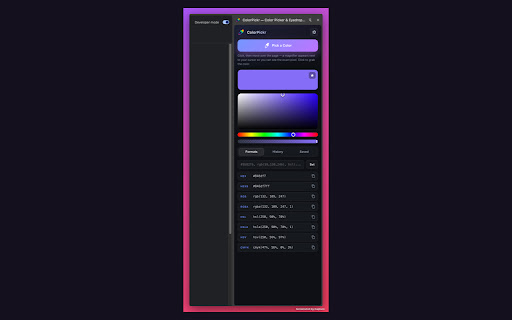
A modern color picker: native eyedropper with magnifier, every color format (HEX/RGB/HSL/HSV/CMYK), copy, and persistent history.
As of June 2026, ColorPickr — Color Picker & Eyedropper has — users in the Developer Tools category.
Usersno change0%
—
—
Ratingno change0%
—
— reviews
Reviewsno change0%
—
Version
1.0.0
Manifest V3
History
1 snapshotsTracking since Jun 26, 2026.
Not enough history yet for this metric — the chart fills in as we collect more snapshots.
View as table
| Date | Users | Rating | Reviews | Version |
|---|---|---|---|---|
| Jun 26, 2026 | — | — | — | 1.0.0 |
| Now | — | — | — | 1.0.0 |
Permissions & access
- Permissions
- storagesidePanelscriptingtabsactiveTab
- Host access
- None declared
Screenshots


About
ColorPickr is a fast, modern color picker and eyedropper for designers, developers, and anyone who works with color.

Click the toolbar icon, hit "Pick a Color," and a precision magnifier appears right next to your cursor so you can see the exact pixel before you grab it — no more guessing. The color instantly opens in a full editor with every format you need, ready to copy with one click.

★ KEY FEATURES

• Magnifier eyedropper — A zoomed loupe with a crosshair sits beside your cursor (never hiding it), so you pick the precise pixel every time.
• Every color format — HEX, HEX8, RGB, RGBA, HSL, HSLA, HSV and CMYK, all generated automatically.
• One-click copy — Tap any value to copy it to your clipboard.
• Interactive picker — Fine-tune any color with a saturation/value field plus hue and alpha sliders.
• Persistent history — Every color you pick is saved automatically with its HEX and RGB codes, so you can come back and reuse it anytime.
• Saved palette — Star the colors you love to build your own reusable palette.
• Modern design — A clean, glassmorphism dark UI with smooth animations, built to stay out of your way.
• Side panel — Lives in Chrome's side panel so it stays open while you work and pick across the page.

★ PRIVACY FIRST

ColorPickr does not collect, transmit, or sell any data. Your color history and saved palette are stored locally on your device using Chrome storage and never leave your browser.

Pick a color. Copy it. Keep it. That's ColorPickr.
Technical
- Version
- 1.0.0
- Manifest
- V3
- Size
- 33.15KiB
- Min Chrome
- 88
- Languages
- 1
- Featured
- No
Metadata
- ID
- dkcahgkdddhfkpglhfpdhekhnmnnhpph
- Developer ID
- u7f10d26cf7fb539dc8bf1f9f829d382d
- Developer Email
- [email protected]
- Created
- Jun 25, 2026
- Last Updated (Store)
- Jun 25, 2026
- Last Scraped
- Jun 26, 2026
- Website
- http://tulz.org/
- Support URL
- —
Data sourced from the Chrome Web Store · last verified Jun 26, 2026.