
Google Meet Chat to Clipboard
Save Google Meet chat to clipboard. Optimized for personal Google accounts. Features 1-click copy and auto-save.
As of June 2026, Google Meet Chat to Clipboard has 679 users in the Productivity category.
Usersup 5.8 percent+5.8%
679
679
Ratingno change0%
—
— reviews
Reviewsno change0%
—
Version
5.2.0
Manifest V3
90-day change · In the last 90 days this extension 1 version update.
History
9 snapshotsTracking since Apr 1, 2026.
View as table
| Date | Users | Rating | Reviews | Version |
|---|---|---|---|---|
| Apr 1, 2026 | 642 | — | — | 5.1.0 |
| Apr 21, 2026 | 662 | — | — | 5.1.0 |
| May 6, 2026 | 693 | — | — | 5.1.0 |
| May 11, 2026 | 652 | — | — | 5.2.0 |
| May 17, 2026 | 654 | — | — | 5.2.0 |
| May 23, 2026 | 698 | — | — | 5.2.0 |
| May 30, 2026 | 687 | — | — | 5.2.0 |
| Jun 5, 2026 | 697 | — | — | 5.2.0 |
| Jun 13, 2026 | 682 | — | — | 5.2.0 |
| Now | 679 | — | — | 5.2.0 |
Changelog
- May 6, 2026description
Google Meet Chat to Clipboard is a Chrome extension that adds the ability to save Google Meet chat content to your clipboard.

Key Features:

- One-click chat copy button - Added directly to the chat sidebar
- Auto-save on meeting exit - Automatically copies chat content when leaving
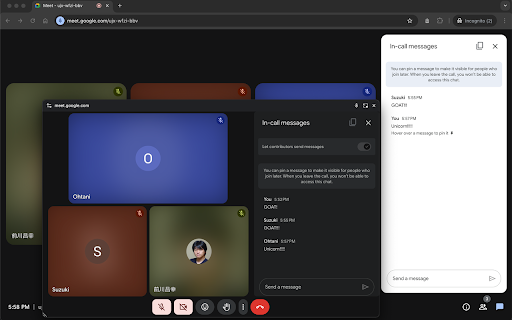
- Picture-in-Picture support - Works seamlessly in PinP mode
- Tab close protection - Shows dialog if chat messages exist when closing
- Complete chat history - Saves all messages as a single text
- Easy access - Simple copy and paste workflow

How to Use:

1. Install the extension
2. Join a Google Meet call
3. Use the copy button in chat or exit the meeting
4. Paste the chat content wherever you need it

Make your Google Meet communication more convenient and efficient!

Privacy & Security:

- Local processing only - Chat content is only copied to your clipboard
- No data storage - Nothing is saved or transmitted elsewhere
- Chrome only - Works exclusively with Chrome browser
- Internet required - Needs active connection to function

Note:

This extension may stop working due to Google Meet specification changes. Updates are provided regularly to maintain compatibility.

Trusted by users worldwide | Actively maintained | Simple and focused

Tags/Keywords

- google meet
- chat
- clipboard
- copy
- meeting
- productivity
- picture-in-picture
- communication
Google Meet Chat to Clipboard is a Chrome extension designed for personal Google accounts that allows you to easily save Google Meet chat content to your clipboard.

Key Features:
- One-click copy button: Integrated directly into the chat sidebar for quick access.
- Auto-save on meeting exit: Automatically copies chat history to your clipboard when you leave the call.
- Picture-in-Picture support: Works seamlessly even when using Meet in PinP mode.
- Tab close protection: Prevents accidental data loss by showing a dialog if unsaved chat messages exist when closing the tab.
- Complete chat history: Consolidates all messages into a single, structured text block.
- Optimized workflow: Simple copy-and-paste process to improve your meeting productivity.

How to Use:
1. Install the extension from the Chrome Web Store.
2. Join a Google Meet call using a personal Google account.
3. Use the integrated copy button or simply leave the meeting to trigger the auto-save.
4. Paste the content wherever you need it.

Privacy & Security:
- Local processing only: Chat content is processed exclusively within your browser and copied to your clipboard.
- No data storage: Nothing is saved, tracked, or transmitted to external servers.
- Exclusively for Chrome: Designed to work optimally with the Google Chrome browser.

Compatibility Notes:
- Account Type: This extension is optimized for personal Google accounts (@gmail.com).
- Google Workspace: Functionality in Google Workspace environments is not guaranteed. Due to domain-specific settings and native Google Chat integration, this extension may not work as expected in Workspace accounts.
- Maintenance: This extension may require updates due to changes in Google Meet’s technical specifications. Regular updates are provided to maintain compatibility.
- May 6, 2026short_description
Save Google Meet chat messages to clipboard with one click. Supports Picture-in-Picture mode.
Save Google Meet chat to clipboard. Optimized for personal Google accounts. Features 1-click copy and auto-save.
Permissions & access
- Permissions
- clipboardWrite
- Host access
- None declared
Screenshots
About
Google Meet Chat to Clipboard is a Chrome extension designed for personal Google accounts that allows you to easily save Google Meet chat content to your clipboard.

Key Features:
- One-click copy button: Integrated directly into the chat sidebar for quick access.
- Auto-save on meeting exit: Automatically copies chat history to your clipboard when you leave the call.
- Picture-in-Picture support: Works seamlessly even when using Meet in PinP mode.
- Tab close protection: Prevents accidental data loss by showing a dialog if unsaved chat messages exist when closing the tab.
- Complete chat history: Consolidates all messages into a single, structured text block.
- Optimized workflow: Simple copy-and-paste process to improve your meeting productivity.

How to Use:
1. Install the extension from the Chrome Web Store.
2. Join a Google Meet call using a personal Google account.
3. Use the integrated copy button or simply leave the meeting to trigger the auto-save.
4. Paste the content wherever you need it.

Privacy & Security:
- Local processing only: Chat content is processed exclusively within your browser and copied to your clipboard.
- No data storage: Nothing is saved, tracked, or transmitted to external servers.
- Exclusively for Chrome: Designed to work optimally with the Google Chrome browser.

Compatibility Notes:
- Account Type: This extension is optimized for personal Google accounts (@gmail.com).
- Google Workspace: Functionality in Google Workspace environments is not guaranteed. Due to domain-specific settings and native Google Chat integration, this extension may not work as expected in Workspace accounts.
- Maintenance: This extension may require updates due to changes in Google Meet’s technical specifications. Regular updates are provided to maintain compatibility.
Technical
- Version
- 5.2.0
- Manifest
- V3
- Size
- 25.38KiB
- Min Chrome
- 88
- Languages
- 4
- Featured
- No
Metadata
- ID
- djoaekihkgkgcgckfjakaekoiplcpoec
- Developer ID
- u3a823364873e7484334c2b94bf7b5166
- Developer Email
- [email protected]
- Created
- Jul 20, 2023
- Last Updated (Store)
- Apr 27, 2026
- Last Scraped
- Jun 13, 2026
- Website
- maepon.com
- Support URL
- —
Similar extensions
Alternatives to Google Meet Chat to Clipboard, ranked by description similarity.

Quick Meet
Create an instant Google Meet meeting and copy the link to the clipboard with just one click.
9
★ 5.0

Smart Clipboard
Ultimate productivity tool: Auto-copy selections, quick-paste (Alt+Click), and access clipboard history seamlessly on any site.
10
★ 5.0

Gmeet kit: Auto-mute, Disable-camera, Save recent meetings & much more
Enhance Your Google Meet Experience
160
★ 5.0

Meetez
Effortless meeting transcripts with privacy-first design.
63
★ 5.0

JRVS ChatGPT
ChatGPT Messages
7

Copy Paste History
Use copy paste history tool to track clipboard history, manage copied text with clipboard manager and access it anytime fast
74
★ 5.0

Paperclip — Meeting Bookmarks
Manual meeting bookmarks for Google Meet, Zoom, and Teams. Drop notes with Alt+Shift+B. Copy Markdown or MoM.
2

Copy Text from Videos
The ultimate OCR tool for copying text from Videos, Images and Live Meetings. Support for 100 languages.
101
Data sourced from the Chrome Web Store · last verified Jun 13, 2026.