
blog-ext
NAVER-Cafe Blog Reservation Tool
As of June 2026, blog-ext has 4 users in the Productivity category.
Usersdown 33.3 percent−33.3%
4
4
Ratingno change0%
—
— reviews
Reviewsno change0%
—
Version
1.2.1
Manifest V3
History
4 snapshotsTracking since Apr 1, 2026.
View as table
| Date | Users | Rating | Reviews | Version |
|---|---|---|---|---|
| Apr 1, 2026 | 6 | — | — | 1.2.1 |
| Apr 21, 2026 | 4 | — | — | 1.2.1 |
| May 6, 2026 | 4 | — | — | 1.2.1 |
| Jun 4, 2026 | 5 | — | — | 1.2.1 |
| Now | 4 | — | — | 1.2.1 |
Permissions & access
- Permissions
- scriptingtabsactiveTabstoragedownloads
- Host access
- https://cafe.naver.com/*, https://blog-api.jp.ngrok.io/*
Screenshots

About
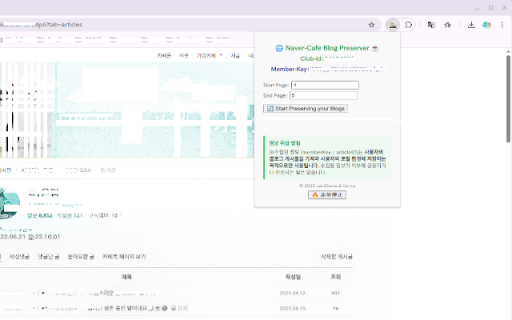
Many users who decide to leave a Naver Cafe (a popular Korean online community platform) often want to preserve their personal blog history before doing so. While there are existing Chrome extensions that allow users to save web pages locally, these tools typically operate on a single-page basis.

However, user-generated blog content in a Naver Cafe often spans hundreds or even thousands of posts over several years. Manually visiting and saving each blog page one by one is time-consuming and virtually impractical for the average user.

This extension — blog-ext — is designed specifically to address this need. When a user is logged into their Naver Cafe account, the extension automates the following process:

    Collects all blog post URLs from the user’s member page

    Visits each blog page one by one in the background

    Extracts and saves each article’s content and images

    Compiles all collected data into a downloadable ZIP archive

It is intended as a time-saving and user-friendly automation tool, not for bulk scraping or unauthorized access. All actions occur only during the user’s own login session, and only for blog articles the user has access to as a member.

Recent Update Summary (April 2025):

    ・ Improved loading checks to ensure full page and iframe content is ready before scraping.
    ・ Enhanced article ID detection for stability during fast or slow navigation.
    ・ More accurate image collection by filtering fully loaded image URLs only.
    ・ Added emergency stop button in the popup UI for user control during batch operations.

Recent Update Summary for v1.2.1 (May 2025):

    ・ Improved error handling and retry logic for better resilience during unstable network conditions.
    ・ Enhanced user feedback through popup status messages during download, retry, or emergency stop events.
    ・ No changes in permissions or core functionalities — the update is focused purely on stability and usability improvements.

These updates increase reliability when saving large volumes of blog content.
Technical
- Version
- 1.2.1
- Manifest
- V3
- Size
- 55.45KiB
- Min Chrome
- 88
- Languages
- 1
- Featured
- No
Metadata
- ID
- djhaeenkkljkgiahepldaiefbhdnbjaj
- Developer ID
- u64de3fcb463b99d5d30f818060b51b10
- Developer Email
- [email protected]
- Created
- Apr 28, 2025
- Last Updated (Store)
- May 6, 2025
- Last Scraped
- Jun 4, 2026
- Website
- —
- Support URL
- —
- Privacy Policy
- https://blog.jp.ngrok.io/privacy-policy
Similar extensions
Alternatives to blog-ext, ranked by description similarity.

Blog to EPUB
Export blog articles to EPUB files
175
★ 1.0

T-Blogs Scraper: Export Posts, Communities, Reblogs & More
Tumblr Scraper: Collect replies, likes, members & community details from Tumblr. Export to CSV, JSON, XLSX.
101
★ 3.0

Tumblr Exporter - Backup Posts, Likes & Blogs
One-click export for Tumblr. Save posts, reblogs, and likes to CSV, Excel or JSON. Your blog, your backup.
46
★ 1.0

I-Social Scraper: Export Posts, Profiles, Reels & More
Instagram Scraper: Extract Instagram comments, stories, followers & more. Export to CSV, JSON, XLSX with ease.
1.0K
★ 4.0

Comment Keyword Scraper
Comment Keyword Scraper – Extract Keywords from Blog Comments
—

FB post Scraper - Facebook Posts Scraper
Extract and export Fb posts from accounts, groups or pages for analysis and growth. facebook posts scraper
184
★ 4.0

Blog Comfortable view
Feel free to read Blog articles
8
★ 5.0

ReadingNotes.ai - Save Content
Save articles, tweets, and LinkedIn posts to ReadingNotes.ai with one click
6
Data sourced from the Chrome Web Store · last verified Jun 4, 2026.