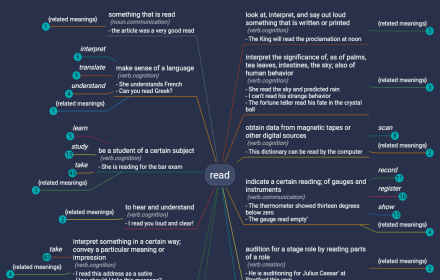
WordMapDictionary | A visual dictionary
It is a visual dictionary/thesaurus. It uses a mindmap like interface to show relationships between words and definitions.
As of May 2026, WordMapDictionary | A visual dictionary has 367 users and a 1.67/5 rating from 3 reviews in the Workflow & Planning category.
Usersup 0.5 percent+0.5%
367
367
Ratingno change0%
1.67
3 reviews
Reviewsno change0%
3
Version
1.0.0
Manifest V3
History
3 snapshotsTracking since Apr 1, 2026.
View as table
| Date | Users | Rating | Reviews | Version |
|---|---|---|---|---|
| Apr 1, 2026 | 365 | 1.67 | 3 | 1.0.0 |
| May 1, 2026 | 360 | 1.67 | 3 | 1.0.0 |
| May 30, 2026 | 369 | 1.67 | 3 | 1.0.0 |
| Now | 367 | 1.67 | 3 | 1.0.0 |
Permissions & access
- Permissions
- contextMenusstorage
- Host access
- None declared
Screenshots
About
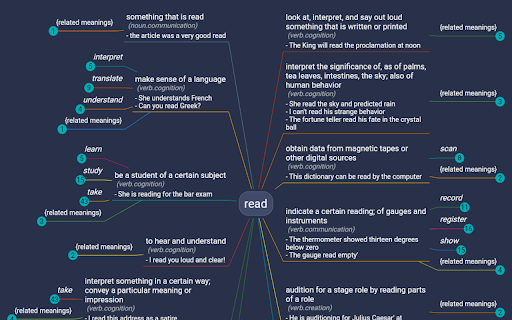
WordMapDictionary is a visual dictionary-cum-thesaurus. It uses a mindmap like interface to show relationships between words, definitions and other definitions.

What makes this app different:

- It uses a unique mind-map style visual interface
- While normal dictionaries show definitions of words in isolation. This app presents you with a holistic mindmap around the word. It shows meanings, and how those meanings relate to each other. It allows you to go deep, or broad, or sideways, to see things in different angles.

## Usage

See video for usage:  https://www.youtube.com/watch?v=55RTcGoKqtE

### How to open dictionary

- Select a word on any page, right click, from the dropdown, click on "Open WM Dictionary". ("Open WM Dictionary" button is only shown if you actually selected the text).
- This will open dictionary view on the side.
- If dictionary view is already open, you can also select any word (and it will update dictionary view with newly selected word).

### Dictionary View

- To disable/enable dark mode:
  - Open sidebar drawer.
  - Toggle "Dark Mode"
- To report an issue:

  - Open sidebar drawer
  - Click on "Report an issue"

- To export current word definition map as png:
  - From app bar, click on export icon.
- To share current word definition url:
  - From app bar, click on share icon.
- To search for a word:

  - From app bar, click on search icon.

- To zoom in/out
  - From bottom button bar, click on zoom in/out icon buttons.
- To center current word
  - From bottom button bar, click on home icon button.

## Extension Options

From options page, you can configure:

- size of dictionary view (in percent width of the page)
- side, whether dictionary view is shown on the left or the right side.
Technical
- Version
- 1.0.0
- Manifest
- V3
- Size
- 34.88KiB
- Min Chrome
- 88
- Languages
- 1
- Featured
- No
Metadata
- ID
- djfpglmdpdpjmkmdgeldibbfaildlkgh
- Developer ID
- u5f61ee034e5080dcd180c23c2a2026e8
- Developer Email
- [email protected]
- Created
- Aug 31, 2021
- Last Updated (Store)
- Sep 7, 2021
- Last Scraped
- May 30, 2026
- Website
- wordmapdictionary.com
- Support URL
- https://wordmapdictionary.com/
- Privacy Policy
- —
Similar extensions
Alternatives to WordMapDictionary | A visual dictionary, ranked by description similarity.

Definio - Multi-Source Definitions
A better alternative to Google Definitions. 450K+ words from Definio, Oxford & Wikipedia with pronunciation and search history.
28
★ 5.0

Word Discoverer (Maintained Fork): Expand your vocabulary
Highlights rare English words and idioms. Actively maintained fork with new features and improvements.
73
★ 4.7

Wordle - Dictionary extension
Think of this Chrome extension as your handy dictionary when playing Wordle.
55

Wordentifier: Improve Your Vocabulary
Improve vocabulary by automatically highlighting every word on your vocabulary list every time it appears on the website you visit.
368
★ 4.4

ownDictionary
Word and its meaning saver
19
★ 5.0

Custom Dictionary
Store words and their definitions, and highlight them on websites
179
★ 5.0

Word Bay
Store a list of words and definitions.
5

iHeart Dictionary
A dictionary helps you to remember new words and getting results from most well-known dictionaries.
10
★ 5.0
Data sourced from the Chrome Web Store · last verified May 30, 2026.