High Contrast
Change or invert the color scheme to make webpages easier to read.
As of June 2026, High Contrast has 300,000 users and a 3.47/5 rating from 5,874 reviews in the Functionality & UI category.
Usersno change0%
300.0K
300,000
Ratingno change0%
3.47
5.9K reviews
Reviewsdown 0.2 percent−0.2%
5.9K
Version
1.0.0
Manifest V3
History
7 snapshotsTracking since Apr 1, 2026.
View as table
| Date | Users | Rating | Reviews | Version |
|---|---|---|---|---|
| Apr 1, 2026 | 300.0K | 3.47 | 5.9K | 1.0.0 |
| Apr 19, 2026 | 300.0K | 3.47 | 5.9K | 1.0.0 |
| Apr 28, 2026 | 300.0K | 3.47 | 5.9K | 1.0.0 |
| May 8, 2026 | 300.0K | 3.47 | 5.9K | 1.0.0 |
| May 16, 2026 | 300.0K | 3.47 | 5.9K | 1.0.0 |
| May 25, 2026 | 300.0K | 3.47 | 5.9K | 1.0.0 |
| Jun 4, 2026 | 300.0K | 3.47 | 5.9K | 1.0.0 |
| Now | 300.0K | 3.47 | 5.9K | 1.0.0 |
Permissions & access
- Permissions
- scriptingstoragetabs
- Host access
- <all_urls>
Screenshots

About
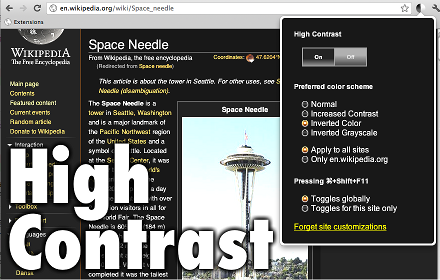
High Contrast lets you browse the web with your choice of several high-contrast color filters designed to make it easier to read text.

When you install this extension, all pages are "inverted", so black becomes white and white becomes black. Press the "browser action" icon in the toolbar to toggle it on and off, or customize your settings on a per-site basis. Use a convenient keyboard shortcut to quickly change your settings while you browse.

Other extensions try to change the default colors, but this ends up breaking many popular websites. Only this extension applies filters to your page that invert almost everything - the only exception is photos, which are left alone.

Also note that the Chrome web store and other built-in pages like the New Tab page and Settings pages are unaffected - extensions like this one are not allowed to modify them, by design.
Technical
- Version
- 1.0.0
- Manifest
- V3
- Size
- 159KiB
- Min Chrome
- 88
- Languages
- 53
- Featured
- No
Metadata
- ID
- djcfdncoelnlbldjfhinnjlhdjlikmph
- Developer ID
- u140e05c7d1bb2028f3726d1a8c4e0f0d
- Developer Email
- [email protected]
- Created
- May 2, 2012
- Last Updated (Store)
- Dec 8, 2025
- Last Scraped
- Jun 4, 2026
- Website
- —
- Support URL
- —
- Privacy Policy
- https://policies.google.com/privacy?hl=en
Similar extensions
Alternatives to High Contrast, ranked by description similarity.

High Contrast V3
Change or invert the color scheme to make webpages easier to read.
1.0K
★ 4.2

Dark theme simulator
Dark theme for the sites that don't provide one
131
★ 5.0

Page Color Inverter
Invert the colors of any webpage for a darker browsing experience.
4.0K
★ 3.5

NinjaDark
Dark mode for NinjaRMM with inverted colors
3

Grayscale Webpages
Applies a grayscale filter to all webpages. Use Alt+G to toggle.
74

DarkModeExtension
Chrome extension for instant dark mode/light mode switching on websites!
46
★ 5.0

Simple Background Color Changer
Change the background color of the current website to a color you choose.
3

ColorShift Pro - Web Page Colorizer
A simple extension to change the background color of web pages
3
Data sourced from the Chrome Web Store · last verified Jun 4, 2026.