
Rumble Routine
Create an autoplay schedule of your favorite Rumble live streams
As of May 2026, Rumble Routine has 8 users in the Entertainment category.
Usersdown 11.1 percent−11.1%
8
8
Ratingno change0%
—
— reviews
Reviewsno change0%
—
Version
1.1
Manifest V3
History
3 snapshotsTracking since Apr 1, 2026.
View as table
| Date | Users | Rating | Reviews | Version |
|---|---|---|---|---|
| Apr 1, 2026 | 9 | — | — | 1.1 |
| May 1, 2026 | 8 | — | — | 1.1 |
| May 30, 2026 | 9 | — | — | 1.1 |
| Now | 8 | — | — | 1.1 |
Permissions & access
- Permissions
- activeTabalarmsscriptingstoragetabswebNavigation
- Host access
- None declared
Screenshots

About
Add your favorite Rumble livestreams to a schedule and they will automatically open and play at their regularly scheduled time.

A huge convenience if you:
- Have several Rumble streams (or even just one!) that you like to watch or listen to regularly
- Want the streams to load/switch/play automatically, even if your hands may not be near the computer
- You want to watch or listen to a stream regularly but you hate the phone alerts and you don't want to be troubled with finding the right browser tab or clicking through the interface to find the one you're looking for

How it works:
- Navigate to the channel of the streamer, or to the stream itself
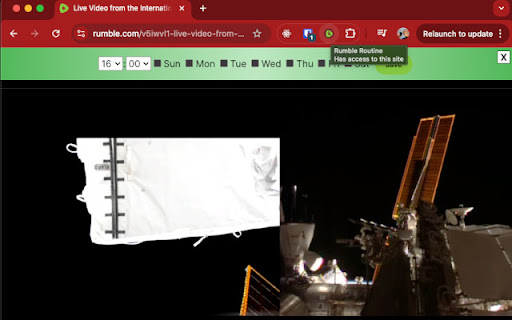
- Click on the Rumble Routine extension to add a schedule UI at the top of the page
- Select the time to start and the days to apply it to
- Click the "Add" button!
Technical
- Version
- 1.1
- Manifest
- V3
- Size
- 61.88KiB
- Min Chrome
- 92
- Languages
- 1
- Featured
- No
Metadata
- ID
- djaaljlanegcfhbnmgcneaijiafgcccc
- Developer ID
- u3b778f4a1a945a5269c1b61154251201
- Developer Email
- [email protected]
- Created
- Oct 17, 2024
- Last Updated (Store)
- Nov 12, 2024
- Last Scraped
- May 30, 2026
- Website
- —
- Support URL
- —
- Privacy Policy
- —
Similar extensions
Alternatives to Rumble Routine, ranked by description similarity.

Twitch Auto Open
It notifies you and automatically opens when your favorite Twitch channels are live
107
★ 4.5

Kick Auto Open
Automatically notify and open when any of your favorite Kick channels go live
19

Streamer Watcher
Get notified when your favorite streamers go live.
6
★ 5.0

My Favorite Streamers
Automatically tune into the live streams of your favorite streamers on Twitch and Kick.
85
★ 5.0

Rumi: Join the Watch Network
Run in-browser AI using your GPU to validate media watched.
2.0K
★ 4.9

Twitch Notification(Now Streaming Notifier)
Get instant notifications when your favorite twitch streamers come online!
723
★ 4.1

TwitchBuddy
TwitchBuddy lets you see who’s live and notifies you when your favorite streamers go live. Never miss a stream again!
1
★ 5.0

Twitch GO
Using the Twitch API for a more Compact and Quick view of your Following, Top Streams/Games.
222
★ 4.5
Data sourced from the Chrome Web Store · last verified May 30, 2026.