
Download & Save Images From Google Docs Fast
Easily Download and Save images from Google Docs in a Click with ZeusApps' QuickSave Tool. Streamline Tasks and Boost Productivity.
As of May 2026, Download & Save Images From Google Docs Fast has 3,000 users and a 2.00/5 rating from 5 reviews in the Productivity category.
Usersdown 50.0 percent−50.0%
3.0K
3,000
Ratingdown 11.1 percent−11.1%
2.00
5 reviews
Reviewsup 25.0 percent+25.0%
5
Version
1.0.7
Manifest V3
90-day change · In the last 90 days this extension lost 3.0K users.
History
2 snapshotsTracking since May 1, 2026.
View as table
| Date | Users | Rating | Reviews | Version |
|---|---|---|---|---|
| May 1, 2026 | 6.0K | 2.25 | 4 | 1.0.7 |
| May 30, 2026 | 3.0K | 2.25 | 4 | 1.0.7 |
| Now | 3.0K | 2.00 | 5 | 1.0.7 |
Permissions & access
- Permissions
- storagedownloads
- Host access
- *://docs.google.com/*, *://*.googleusercontent.com/*
Screenshots


About
💡 Have you ever questioned 'how to save images from Google Docs' directly? The inability to right-click and save images is a significant pain point disrupting the workflow of Google Docs users.

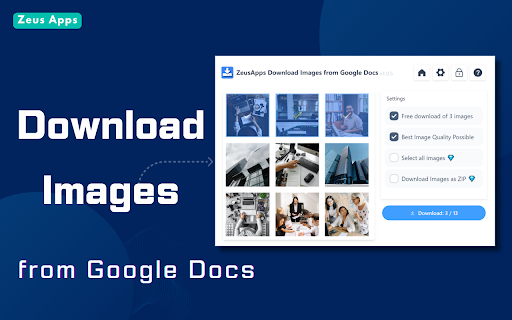
Our Chrome extension provides a straightforward solution: a simple click on the 'Download' button lets you easily download and save images from any Google Docs.

Why Choose ZeusApps' Images QuickSave Tool:
●One-click downloads
●Saves images from Google Doc in high resolution
●Streamlines your workflow

How To Use It: A Step-by-Step Guide
1.Install from the Chrome Web Store with one click.
2.Open any Google Docs document.
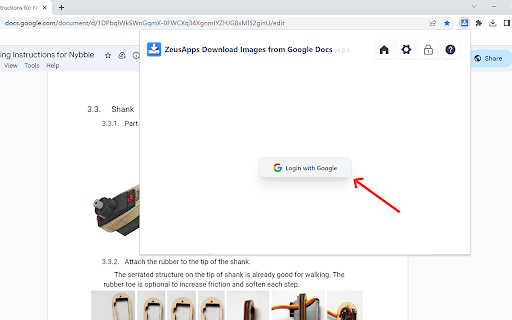
3.Click the QuickSave extension icon.
4.Download images instantly.


Key Features of The Images QuickSave Extension:

1. One-Click Downloads: With QuickSave, you can save images from any Google Doc with just a single click. It’s that easy - no more cumbersome process.

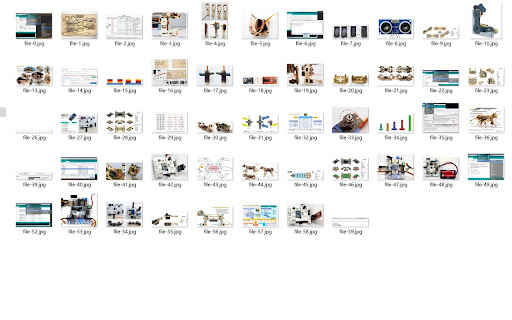
2. Batch Image Saving: Select multiple images within a document and download them all at once, saving you valuable time and clicks.

3. High-Resolution Support: QuickSave preserves the original image quality, ensuring that your downloads are crystal clear and free of compression artifacts.

4. Fast and Efficient: Designed to be lightweight and fast, QuickSave won’t slow down your browser or Google Docs, offering a smooth user experience.

5. Easy Access: The extension icon sits neatly in your Chrome toolbar, giving you quick access to its features whenever you're working in Google Docs.

6. Secure and Private: We respect your privacy. QuickSave doesn’t store or access any of your personal data beyond the images you choose to download.

7. Regular Updates: The ZeusApps team is committed to improving QuickSave. We regularly release updates to enhance functionality and user experience.

Experience the best way to download and save images from Google Docs with ZeusApps’ QuickSave extension – your productivity partner.


FAQs For ZeusApps' Images QuickSave Extension

Q: How does the ZeusApps extension make downloading images from Google Docs easier?
A: ZeusApps simplifies the process by allowing users to download images directly from Google Docs with a single click, eliminating the need for complex workarounds.

Q: Can I save multiple images at once from a Google Doc using ZeusApps?
A: Absolutely! Our extension supports batch downloads, enabling you to save time by downloading all needed images from a document in one go.

Q: Will the image quality be preserved when I download using the ZeusApps extension?
A: Yes, the ZeusApps Google Docs Image Downloader retains the original quality and resolution of your images, ensuring crisp and clear visuals.

Q: Is the ZeusApps extension secure to use?
A: We strictly adhere to the Privacy Policy and Secure Handling Requirements of the Google Chrome Web Store. The ZeusApps extension only accesses your Google Docs documents to retrieve the images for download. No personal or sensitive data is stored or transmitted by the extension.

Q: Do I need to pay to use the ZeusApps Google Docs Image Downloader?
A: Our extension offers both free and premium features. The basic image downloading functionality is available at no cost, while advanced features can be accessed with a subscription.

Q: How often is the ZeusApps extension updated?
A: We regularly update the extension to introduce new features, enhance existing ones, and ensure compatibility with the latest versions of Google Docs and Chrome.

Q: What makes ZeusApps different from other image downloading tools for Google Docs?
A: Our tool stands out due to its ease of use, high-quality image downloads, commitment to security, and responsive customer support.
Technical
- Version
- 1.0.7
- Manifest
- V3
- Size
- 904KiB
- Min Chrome
- 88
- Languages
- 16
- Featured
- No
Metadata
- ID
- dimcpmdmlbolakiebpoopiomopgabdga
- Developer ID
- u1a842ba35a85efa5a2d7d2274ee352ba
- Developer Email
- [email protected]
- Created
- Aug 5, 2022
- Last Updated (Store)
- Oct 28, 2024
- Last Scraped
- May 30, 2026
- Website
- https://zeus-apps.com/
- Support URL
- https://zeus-apps.com/contact-us
- Privacy Policy
- —
Similar extensions
Alternatives to Download & Save Images From Google Docs Fast, ranked by description similarity.

Save images from Google Docs
A browser extension to easily save images from Google Docs
539
★ 4.7

Google Docs Image Download and Save Tool
Download, save and export all images in Google Docs files with one click
547
★ 4.5

ImageSnatch
Instantly extract and download all images from Google Docs
219
★ 5.0
Google Docs Image Zoom
Docs Image Zoom is a Chrome extension that enables image zoom in Google Docs
8.0K
★ 4.7

Image Downloader 4 You
Download all images from any webpage with ease
4

Fast Chrome Screen Capture
Chrome screen capture made easy: a fast snipping tool to copy selected area and page URL to clipboard. No files, direct to buffer!
843

Google Photos Album Batch Downloader
Batch download Google Photos albums, including all photos and videos in the album.
344
★ 5.0

Quick Image Saving via CSS Selector
This Chrome extension is designed to facilitate the quick and efficient saving of images from web pages using CSS selectors.
142
★ 5.0
Data sourced from the Chrome Web Store · last verified May 30, 2026.