
Video Playback Extension
A full-featured video and audio player extension. Control playback speed, skipping, rewinding and more.
As of June 2026, Video Playback Extension has 990 users and a 4.55/5 rating from 11 reviews in the Workflow & Planning category.
Usersup 3.8 percent+3.8%
990
990
Ratingno change0%
4.55
11 reviews
Reviewsno change0%
11
Version
1.0.7
Manifest V3
History
7 snapshotsTracking since Apr 1, 2026.
View as table
| Date | Users | Rating | Reviews | Version |
|---|---|---|---|---|
| Apr 1, 2026 | 954 | 4.55 | 11 | 1.0.7 |
| Apr 19, 2026 | 976 | 4.55 | 11 | 1.0.7 |
| Apr 28, 2026 | 995 | 4.55 | 11 | 1.0.7 |
| May 8, 2026 | 979 | 4.55 | 11 | 1.0.7 |
| May 16, 2026 | 1.0K | 4.55 | 11 | 1.0.7 |
| May 25, 2026 | 984 | 4.55 | 11 | 1.0.7 |
| Jun 4, 2026 | 982 | 4.55 | 11 | 1.0.7 |
| Now | 990 | 4.55 | 11 | 1.0.7 |
Permissions & access
- Permissions
- storage
- Host access
- http://*/*, https://*/*
Screenshots

About
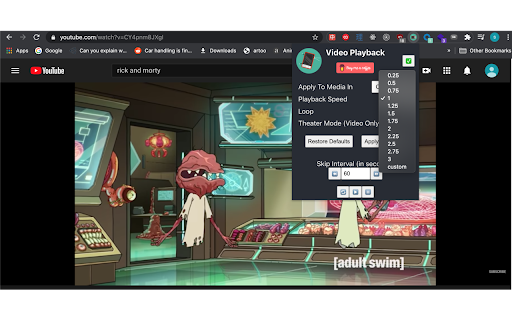
Speed up, slow down, advance and rewind HTML5 audio/video elements either with shortcuts or using a clean, elegant interface.

Optimize your media experience by:

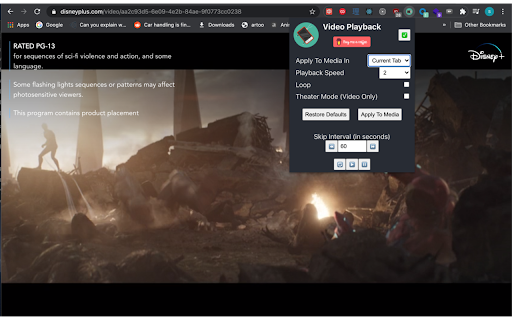
- controlling media on just your current active or across all tabs in Chrome
- customizing playback speed
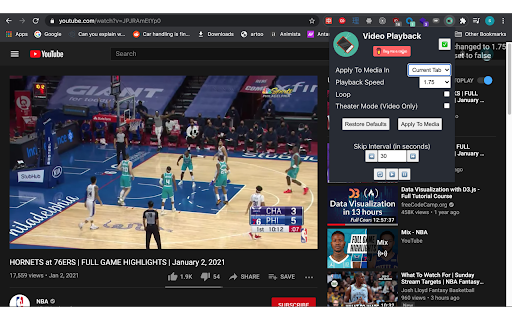
- skipping forward or backward by custom time intervals
- looping
- restarting media from the very beginning
- playing
- pausing
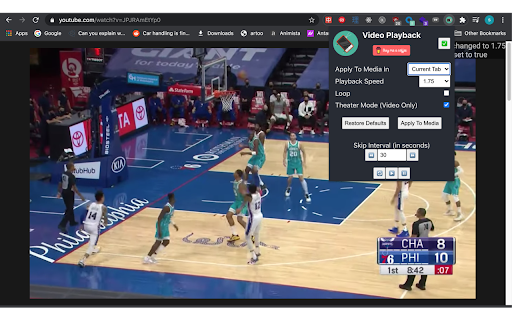
- an experimental Theater Mode (for video only)
- customizable one key shortcuts for all actions

Once the extension is installed, navigate to any page with an HTML5 video or audio element and click on the extension to bring down the Player User Interface. Any changes made will affect all audio/video elements on the page and you can optionally control media across all tabs in Chrome using the Player UI.

Default Shortcuts:

- `s` = Decrease playback speed by .25
- `w` = Increase playback speed by .25
- `l` = Loop
- `o` = Pause
- `p` = Play
- `e` = Reset playback speed
- `r` = Restart
- `a`= Skip backward by the Skip Interval set in the Player UI
- `d` = Skip forward by the Skip Interval set in the Player UI
- `t` = Theater Mode
Technical
- Version
- 1.0.7
- Manifest
- V3
- Size
- 68.38KiB
- Min Chrome
- 88
- Languages
- 1
- Featured
- No
Metadata
- ID
- dilncfnkialpgbnpcjmghnepnankdibk
- Developer ID
- udf8655fceade6c17cf7483934784d547
- Developer Email
- [email protected]
- Created
- Jan 9, 2021
- Last Updated (Store)
- Dec 11, 2025
- Last Scraped
- Jun 4, 2026
- Website
- —
- Support URL
- https://www.buymeacoffee.com/sunwhy
- Privacy Policy
- —
Similar extensions
Alternatives to Video Playback Extension, ranked by description similarity.

Super Video Speed Controller with Shortcuts
Speed up or slow down HTML5 videos with keyboard shortcuts
420
★ 4.5

Speedify
Control video playback speed with watch history tracking and resume functionality
4

Video Speed Controller
Extension to change video playback speed
93
★ 5.0

YouTube Controller
Control video playback and enhance focus on YouTube with keyboard shortcuts and on-screen controls
11
★ 5.0

HTML5 Video Speed Control
Speed up or slow down any HTML5 videos on any website.
40.0K
★ 4.5

Media Controller
Control video/audio in the webpage with keyboard shortcuts
488
★ 2.6

Simple Skip
Minimalist video speed controller with glassmorphism design.
1
★ 5.0

Lecture Speedrunner
Useful extension to speed up videos on websites. Won't help you learn any faster but hey atleast it'll be over quicker lol.
12
Data sourced from the Chrome Web Store · last verified Jun 4, 2026.