
Stockfish Chess Engine
Professional real-time Stockfish chess engine analysis with visual best move overlays for Chess.com
As of June 2026, Stockfish Chess Engine has 1,000 users and a 3.63/5 rating from 8 reviews in the Games category.
Usersup 127.8 percent+127.8%
1.0K
1,000
Ratingdown 27.4 percent−27.4%
3.63
8 reviews
Reviewsup 300.0 percent+300.0%
8
Version
1.1
Manifest V3
90-day change · In the last 90 days this extension 1 version update.
History
8 snapshotsTracking since Apr 1, 2026.
View as table
| Date | Users | Rating | Reviews | Version |
|---|---|---|---|---|
| Apr 1, 2026 | 439 | 5.00 | 2 | 1.0 |
| Apr 16, 2026 | 455 | 5.00 | 2 | 1.0 |
| Apr 23, 2026 | 663 | 2.80 | 5 | 1.1 |
| Apr 30, 2026 | 749 | 2.80 | 5 | 1.1 |
| May 7, 2026 | 805 | 2.80 | 5 | 1.1 |
| May 12, 2026 | 857 | 2.80 | 5 | 1.1 |
| May 17, 2026 | 913 | 3.17 | 6 | 1.1 |
| May 31, 2026 | 1.0K | 3.43 | 7 | 1.1 |
| Now | 1.0K | 3.63 | 8 | 1.1 |
Changelog
- Apr 16, 2026description
Elevate your chess game with real-time, Grandmaster-level analysis directly on your Chess.com board. This extension integrates the powerful Stockfish engine seamlessly into the Chess.com interface, providing you with instant visual feedback and deep positional understanding without leaving the page.
Take your Chess.com games to Grandmaster level instantly with the Stockfish Chess Engine Chrome extension: the lightweight, privacy-first tool that brings the world's strongest open-source chess engine directly onto your Chess.com board.

No tab switching. No external analyzers. No premium subscription needed. Just pure, lightning-fast Stockfish analysis with beautiful visual best-move overlays, fully customizable controls, and a detailed list of suggested moves that all run locally in your browser.

Powerful Features for Every Skill Level:
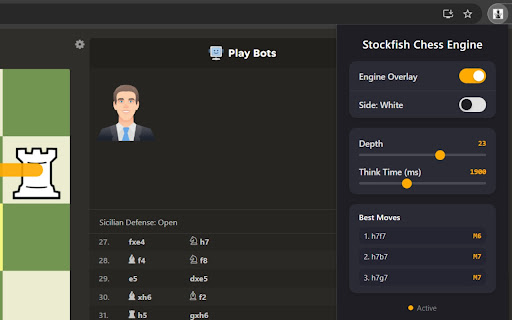
- Real-Time Visual Best Move Overlays: As soon as a move is played, Stockfish instantly highlights the strongest move with a clear arrow highlighted directly on the Chess.com board. Perfect for blitz, rapid, daily games, and any real-time move review.
- Choose Analysis Depth: Set the search depth (e.g., 10–30+ ply) where higher depth delivers more accurate evaluations and stronger move recommendations, while lower depths give faster results.
- Set Think Time: Adjust the time Stockfish spends calculating (in milliseconds) to balance speed vs. strength based on your hardware and game time control.
- Detailed List of Top Moves: The menu displays a ranked list of the best moves with centipawn evaluations, principal variations (multi-line PVs), and scores. Quickly compare alternatives, explore sidelines, and understand why one move outperforms another.
- Seamless Chess.com Integration: Works automatically on live games, analysis boards, puzzles, and reviews. Detects the current position via FEN and delivers instant feedback without cluttering the interface.

Why Chess Players Love This Stockfish Extension:
- Train Like the Pros: See Grandmaster-level insights in real time – improve tactical vision, opening preparation, middlegame planning, and endgame technique.
- Flexible & User-Controlled: Whether you want quick suggestions during a 3+0 blitz game or deep 20+ depth analysis during a long think, the menu gives you full control over time and depth for personalized results.
- Clean & Non-Intrusive: Visual arrows on the board + a powerful yet simple menu for the move list and settings. No side panels, no bloat – just the engine help you need.
- Privacy First & Lightweight: Runs entirely client-side with zero data collection, zero tracking, and minimal permissions. Your games and analysis stay completely private in-browser.
- Free & Optimized: Powered by the latest Stockfish engine optimizations. Small footprint (under 513KB) and fast loading.

Perfect For:
- Blitz & Rapid Training: Quick depth/think time settings for real-time help under pressure.
- Opening Repertoire Building: Explore multiple lines from the move list.
- Puzzle Solving & Verification: Confirm your ideas against Stockfish’s top recommendations.
- Rating Improvement: Faster progress by understanding the “why” behind every best move.

How It Works (Super Simple):
- Install the Stockfish Chess Engine extension from the Chrome Web Store.
- Open any Chess.com game or analysis board.
- The extension automatically activates and shows best-move arrow for both sides.
- Click the extension icon anytime to open the menu → adjust depth and think time → view the full list of top moves with variations and evaluations.
- Play smarter immediately.
Permissions & access
- Permissions
- storage
- Host access
- *://*.chess.com/*
Screenshots


About
Take your Chess.com games to Grandmaster level instantly with the Stockfish Chess Engine Chrome extension: the lightweight, privacy-first tool that brings the world's strongest open-source chess engine directly onto your Chess.com board.

No tab switching. No external analyzers. No premium subscription needed. Just pure, lightning-fast Stockfish analysis with beautiful visual best-move overlays, fully customizable controls, and a detailed list of suggested moves that all run locally in your browser.

Powerful Features for Every Skill Level:
- Real-Time Visual Best Move Overlays: As soon as a move is played, Stockfish instantly highlights the strongest move with a clear arrow highlighted directly on the Chess.com board. Perfect for blitz, rapid, daily games, and any real-time move review.
- Choose Analysis Depth: Set the search depth (e.g., 10–30+ ply) where higher depth delivers more accurate evaluations and stronger move recommendations, while lower depths give faster results.
- Set Think Time: Adjust the time Stockfish spends calculating (in milliseconds) to balance speed vs. strength based on your hardware and game time control.
- Detailed List of Top Moves: The menu displays a ranked list of the best moves with centipawn evaluations, principal variations (multi-line PVs), and scores. Quickly compare alternatives, explore sidelines, and understand why one move outperforms another.
- Seamless Chess.com Integration: Works automatically on live games, analysis boards, puzzles, and reviews. Detects the current position via FEN and delivers instant feedback without cluttering the interface.

Why Chess Players Love This Stockfish Extension:
- Train Like the Pros: See Grandmaster-level insights in real time – improve tactical vision, opening preparation, middlegame planning, and endgame technique.
- Flexible & User-Controlled: Whether you want quick suggestions during a 3+0 blitz game or deep 20+ depth analysis during a long think, the menu gives you full control over time and depth for personalized results.
- Clean & Non-Intrusive: Visual arrows on the board + a powerful yet simple menu for the move list and settings. No side panels, no bloat – just the engine help you need.
- Privacy First & Lightweight: Runs entirely client-side with zero data collection, zero tracking, and minimal permissions. Your games and analysis stay completely private in-browser.
- Free & Optimized: Powered by the latest Stockfish engine optimizations. Small footprint (under 513KB) and fast loading.

Perfect For:
- Blitz & Rapid Training: Quick depth/think time settings for real-time help under pressure.
- Opening Repertoire Building: Explore multiple lines from the move list.
- Puzzle Solving & Verification: Confirm your ideas against Stockfish’s top recommendations.
- Rating Improvement: Faster progress by understanding the “why” behind every best move.

How It Works (Super Simple):
- Install the Stockfish Chess Engine extension from the Chrome Web Store.
- Open any Chess.com game or analysis board.
- The extension automatically activates and shows best-move arrow for both sides.
- Click the extension icon anytime to open the menu → adjust depth and think time → view the full list of top moves with variations and evaluations.
- Play smarter immediately.
Technical
- Version
- 1.1
- Manifest
- V3
- Size
- 516KiB
- Min Chrome
- 88
- Languages
- 1
- Featured
- No
Metadata
- ID
- diheoehjcpaaapbmalifkhhimmmpblno
- Developer ID
- u7ac811dc38e414063dc7433315340688
- Developer Email
- [email protected]
- Created
- Feb 5, 2026
- Last Updated (Store)
- Apr 8, 2026
- Last Scraped
- Jun 6, 2026
- Website
- —
- Support URL
- —
- Privacy Policy
- —
Similar extensions
Alternatives to Stockfish Chess Engine, ranked by description similarity.

Chess.com/Lichess Opponent Insights
Get insights about your opponent's openings, move times, and more on Chess.com and Lichess.org
339
★ 3.6

ChessRadarPro: Chess Position Detector
Premium Chess Position Detection Extension
20
★ 5.0

Chess Elo Calculator
Calculate your new Elo rating after a chess game using the standard Elo formula.
—

Chess Move Finder
Find the best move in any chess position using Lichess API
129
★ 5.0

chess.rodeo - Free Chess Analysis
Analyze your chess.com games for free with Stockfish on chess.rodeo. Includes fixes for the updated Chess.com game-over screen.
328
★ 4.0

ChessDream Analysis
Adds a button to analyze chess.com games on ChessDream.
371
★ 1.0

Chess Assist
Improve your chess skills with this advanced extension!
7.0K
★ 3.3

Wazir
Analyze finished chess.com games locally with Stockfish: accuracy, ACPL, move quality, and board review.
5
★ 5.0
Data sourced from the Chrome Web Store · last verified Jun 6, 2026.