
Friction_MA
Friction_MA introduces deliberate pauses before distracting sites — the space between impulse and action.
As of June 2026, Friction_MA has 2 users in the Workflow & Planning category.
Usersno change0%
2
2
Ratingno change0%
—
— reviews
Reviewsno change0%
—
Version
1.2.4
Manifest V3
90-day change · In the last 90 days this extension 3 version updates.
History
5 snapshotsTracking since Apr 28, 2026.
View as table
| Date | Users | Rating | Reviews | Version |
|---|---|---|---|---|
| Apr 28, 2026 | — | — | — | 1.0.0 |
| May 5, 2026 | — | — | — | 1.0.0 |
| May 11, 2026 | — | — | — | 1.1.0 |
| May 16, 2026 | 2 | — | — | 1.2.1 |
| May 22, 2026 | 6 | — | — | 1.2.4 |
| Now | 2 | — | — | 1.2.4 |
Changelog
- May 11, 2026description
● OverviewFriction_MA is a browser extension that inserts a waiting page before you access specified domains — such as social media or video platforms — giving you a moment to reconsider whether the visit is truly necessary.To unlock access, simply stay on the waiting page for the configured number of seconds. Switching to another tab resets the timer. This small friction discourages impulsive browsing and helps you access sites only when you genuinely need to.The extension also combines site blocking with a built-in Pomodoro timer, letting you manage focus and rest autonomously.All data is stored locally in your browser.

● How to use (Standard)
Specify the domains of sites that distract you. X and YouTube are registered by default. You can add or remove sites as needed.
When you try to access a registered site, you will be redirected to a waiting page. If you realize the visit was impulsive or purposeless, simply close the tab and reclaim that time.
If the visit is genuinely necessary, you can unlock access. Press the unlock button and wait for the configured number of seconds (default: 30 seconds) to unlock.
After unlocking, you can access blocked sites freely for the configured duration (default: 15 minutes). Once the time expires, the lock is automatically re-applied.
To prevent repeated unlocking, a cooldown feature is included. After unlocking once, you can set a cooldown period (default: 10 minutes) before unlocking is available again.
You can also control when blocking is active by specifying days of the week and time ranges — for example, enabling it only during work hours.

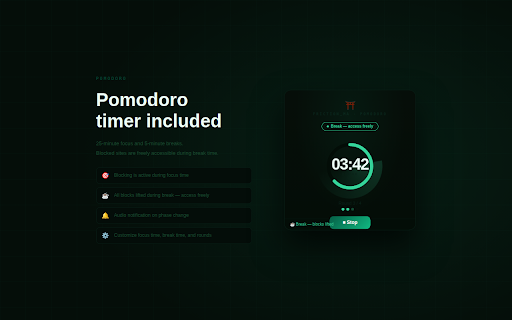
● How to use (Pomodoro Timer)
Open the Pomodoro timer from the extension's management screen. Look for the 🍅 icon in the upper right corner.
Set your focus time, break time, and number of rounds. 25 minutes of focus and 5 minutes of break is recommended.
During focus time, access to blocked sites is restricted. During break time, all sites are freely accessible. This allows you to switch between focus and rest autonomously.
● OverviewFriction_MA is a browser extension that inserts a waiting page before you access specified domains — such as social media or video platforms — giving you a moment to reconsider whether the visit is truly necessary.To unlock access, simply stay on the waiting page for the configured number of seconds. Switching to another tab resets the timer. This small friction discourages impulsive browsing and helps you access sites only when you genuinely need to.The extension also combines site blocking with a built-in Pomodoro timer, letting you manage focus and rest autonomously.All data is stored locally in your browser.

● How to use (Standard)
Specify the domains of sites that distract you. X and YouTube are registered by default. You can add or remove sites as needed.
When you try to access a registered site, you will be redirected to a waiting page. If you realize the visit was impulsive or purposeless, simply close the tab and reclaim that time.
If the visit is genuinely necessary, you can unlock access. Press the unlock button and wait for the configured number of seconds (default: 30 seconds) to unlock.
After unlocking, you can access blocked sites freely for the configured duration (default: 15 minutes). Once the time expires, the lock is automatically re-applied.
You can also control when blocking is active by specifying days of the week and time ranges — for example, enabling it only during work hours.

● How to use (Pomodoro Timer)
Open the Pomodoro timer from the extension's management screen. Look for the 🍅 icon in the upper right corner.
Set your focus time, break time, and number of rounds. 25 minutes of focus and 5 minutes of break is recommended.
During focus time, access to blocked sites is restricted. During break time, all sites are freely accessible. This allows you to switch between focus and rest autonomously.
- May 5, 2026description
A browser extension that inserts a waiting page before you access specified domains — social media, video platforms, or any site you choose — giving you a moment to reconsider whether the visit is truly necessary.
To unlock access, simply stay on the waiting page for the number of seconds you have configured. Switching to another tab resets the timer. This small friction discourages impulsive browsing and helps you access sites only when you genuinely need to.
A built-in Pomodoro timer lets you control your own focus and break periods. During focus time, all domain blocks are active. During breaks, blocks are lifted. This creates a self-directed rhythm of concentration and rest.
All data is stored locally in your browser.
● OverviewFriction_MA is a browser extension that inserts a waiting page before you access specified domains — such as social media or video platforms — giving you a moment to reconsider whether the visit is truly necessary.To unlock access, simply stay on the waiting page for the configured number of seconds. Switching to another tab resets the timer. This small friction discourages impulsive browsing and helps you access sites only when you genuinely need to.The extension also combines site blocking with a built-in Pomodoro timer, letting you manage focus and rest autonomously.All data is stored locally in your browser.

● How to use (Standard)
Specify the domains of sites that distract you. X and YouTube are registered by default. You can add or remove sites as needed.
When you try to access a registered site, you will be redirected to a waiting page. If you realize the visit was impulsive or purposeless, simply close the tab and reclaim that time.
If the visit is genuinely necessary, you can unlock access. Press the unlock button and wait for the configured number of seconds (default: 30 seconds) to unlock.
After unlocking, you can access blocked sites freely for the configured duration (default: 15 minutes). Once the time expires, the lock is automatically re-applied.
To prevent repeated unlocking, a cooldown feature is included. After unlocking once, you can set a cooldown period (default: 10 minutes) before unlocking is available again.
You can also control when blocking is active by specifying days of the week and time ranges — for example, enabling it only during work hours.

● How to use (Pomodoro Timer)
Open the Pomodoro timer from the extension's management screen. Look for the 🍅 icon in the upper right corner.
Set your focus time, break time, and number of rounds. 25 minutes of focus and 5 minutes of break is recommended.
During focus time, access to blocked sites is restricted. During break time, all sites are freely accessible. This allows you to switch between focus and rest autonomously.
Permissions & access
- Permissions
- storagetabswebNavigationalarms
- Host access
- None declared
Screenshots


About
● OverviewFriction_MA is a browser extension that inserts a waiting page before you access specified domains — such as social media or video platforms — giving you a moment to reconsider whether the visit is truly necessary.To unlock access, simply stay on the waiting page for the configured number of seconds. Switching to another tab resets the timer. This small friction discourages impulsive browsing and helps you access sites only when you genuinely need to.The extension also combines site blocking with a built-in Pomodoro timer, letting you manage focus and rest autonomously.All data is stored locally in your browser.

● How to use (Standard)
Specify the domains of sites that distract you. X and YouTube are registered by default. You can add or remove sites as needed.
When you try to access a registered site, you will be redirected to a waiting page. If you realize the visit was impulsive or purposeless, simply close the tab and reclaim that time.
If the visit is genuinely necessary, you can unlock access. Press the unlock button and wait for the configured number of seconds (default: 30 seconds) to unlock.
After unlocking, you can access blocked sites freely for the configured duration (default: 15 minutes). Once the time expires, the lock is automatically re-applied.
You can also control when blocking is active by specifying days of the week and time ranges — for example, enabling it only during work hours.

● How to use (Pomodoro Timer)
Open the Pomodoro timer from the extension's management screen. Look for the 🍅 icon in the upper right corner.
Set your focus time, break time, and number of rounds. 25 minutes of focus and 5 minutes of break is recommended.
During focus time, access to blocked sites is restricted. During break time, all sites are freely accessible. This allows you to switch between focus and rest autonomously.
Technical
- Version
- 1.2.4
- Manifest
- V3
- Size
- 86.9KiB
- Min Chrome
- 88
- Languages
- 7
- Featured
- No
Metadata
- ID
- dibmboampkeadonkgjogneaghdieekpa
- Developer ID
- u181bf64ff15314a86667bb95c4ab3430
- Developer Email
- [email protected]
- Created
- Apr 27, 2026
- Last Updated (Store)
- May 14, 2026
- Last Scraped
- Jun 11, 2026
- Website
- —
- Support URL
- https://x.com/nenokatas
- Privacy Policy
- —
Data sourced from the Chrome Web Store · last verified Jun 11, 2026.