
Screen Recorder
Record your computer's screen with just one click!
As of May 2026, Screen Recorder has 300,000 users and a 3.07/5 rating from 310 reviews in the Productivity category.
Usersno change0%
300.0K
300,000
Ratingup 0.3 percent+0.3%
3.07
310 reviews
Reviewsup 0.3 percent+0.3%
310
Version
0.2.2
Manifest V3
History
1 snapshotsTracking since Apr 21, 2026.
View as table
| Date | Users | Rating | Reviews | Version |
|---|---|---|---|---|
| Apr 21, 2026 | 300.0K | 3.06 | 309 | 0.2.2 |
| Now | 300.0K | 3.07 | 310 | 0.2.2 |
Permissions & access
- Permissions
- storagedesktopCaptureunlimitedStorage
- Host access
- None declared
Screenshots

About
Screen Recorder extension helps you record video from the computer's screen.

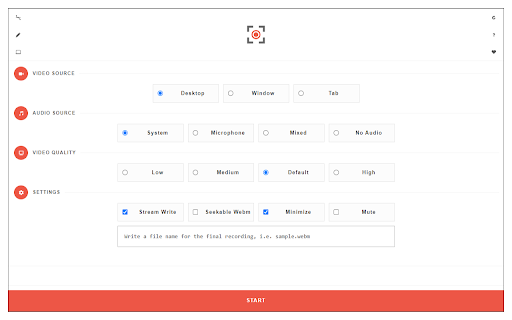
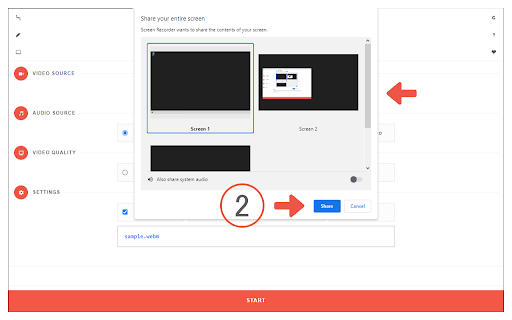
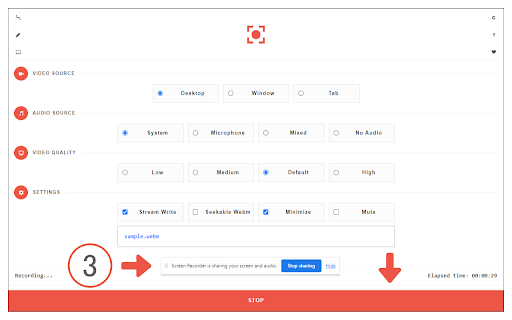
To work with this addon, please click on the toolbar button. Once the recorder interface appears, please adjust desired options, and then click the - Start - button. The video source could be your screen, window, or tab. The audio source can be the system's audio, microphone, mixed, or no audio at all. When you click the start button, a popup will appear within the interface. This popup window allows you to select the desired screen, tab, or window. To start recording please click on the - Share - button. When you are done recording the screen, please press the toolbar button (or the stop button on the app interface) to stop the recording process. The recorded video will be download to your computer automatically (on the default download location).

By default, recorded media is in - webm - format. To get more information about webm video format, please visit this Wikipedia page (https://en.wikipedia.org/wiki/WebM). If you want to change this format to a different one, please use a different software. Moreover, to switch the interface theme to dark, please press the moon icon in the right toolbar.

To report bugs, please fill out the bug report form on the addon's homepage (https://mybrowseraddon.com/screen-recorder.html).
Technical
- Version
- 0.2.2
- Manifest
- V3
- Size
- 62.9KiB
- Min Chrome
- 88
- Languages
- 1
- Featured
- Yes
Metadata
- ID
- dhopldobnfjeckokfjimfcdagmlhjdce
- Developer ID
- u04a1722491dced799186d7c552449816
- Developer Email
- [email protected]
- Created
- Nov 1, 2017
- Last Updated (Store)
- Aug 14, 2025
- Last Scraped
- May 31, 2026
- Website
- —
- Privacy Policy
- —
Similar extensions
Alternatives to Screen Recorder, ranked by description similarity.

Video Recorder
Easily record video & audio from your computer's camera!
20.0K
★ 2.1

Audio Recorder
Easily record audio from your computer's microphone!
20.0K
★ 1.9

Easy Screen Recorder
The easiest screen recorder extension to use.
Easy Screen Recorder extension helps you record video from the computer's screen,…
79
★ 5.0

Custom Screen Recorder
Record a customizable portion of the screen.
49

One-Click Screen Recorder
Click the icon to start recording; click again to stop and save to Downloads.
37
★ 5.0

Simple Screen Recorder
Local screen/window/tab recorder with optional microphone and local download only
6

W_REC Quick
A simple screen recorder that captures your current tab with a single click. Includes a visual recording indicator and timer.
5

Legend101 Screen Recorder
The Screen Recorder Chrome Extension is a versatile and user-friendly tool designed to capture your screen activities with ease and…
30
★ 5.0
Data sourced from the Chrome Web Store · last verified May 31, 2026.